This time we’re going bigger than ever. Fabric, Power BI, SQL, AI and more. We're covering it all. You won't want to miss it.
Learn moreDid you hear? There's a new SQL AI Developer certification (DP-800). Start preparing now and be one of the first to get certified. Register now
Hi everybody!
I currently have some dates with the day with "00", let-s say, the sources does not have idea about the day so it is reported as 00. So some of the dates are 00-08-2019. As the column is recognized as a date, those values are reported as a cero.
I find the same situation in other columns, but, it they are not recognized as dates, i have the time to replace -00 for -01 and then change it to date format, and i still keep those values!
What can I do for the power query editor to leave the original values for me to able to change them before finding errors? (I have already tried to unclick the option to recognize the data type, but i has not worked so far).
I do not know if i explain mayself in a good way... I hope you guys understand. Thank you in advance!
Solved! Go to Solution.
Hi @lgo ,
you have 2 choices:
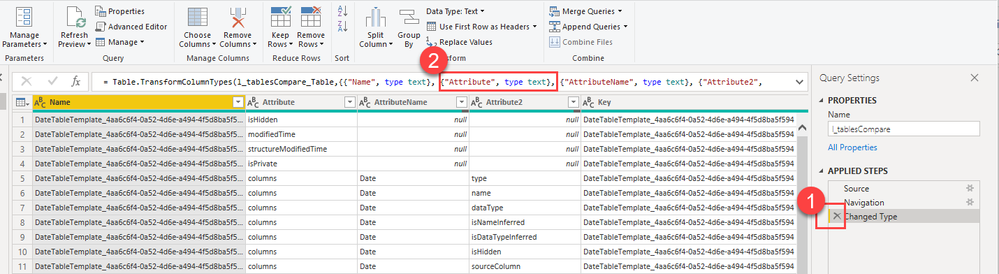
1) remove the automatically created changed step manually by clicking the cross
2) manually edit the automatically created M code and delete only the column whose formatting you want to skip:
Imke Feldmann (The BIccountant)
If you liked my solution, please give it a thumbs up. And if I did answer your question, please mark this post as a solution. Thanks!
How to integrate M-code into your solution -- How to get your questions answered quickly -- How to provide sample data -- Check out more PBI- learning resources here -- Performance Tipps for M-queries
Hi @lgo ,
you have 2 choices:
1) remove the automatically created changed step manually by clicking the cross
2) manually edit the automatically created M code and delete only the column whose formatting you want to skip:
Imke Feldmann (The BIccountant)
If you liked my solution, please give it a thumbs up. And if I did answer your question, please mark this post as a solution. Thanks!
How to integrate M-code into your solution -- How to get your questions answered quickly -- How to provide sample data -- Check out more PBI- learning resources here -- Performance Tipps for M-queries
Thank you so much for your reply! but i can't see the same in my screen!
So I have discovered something further....
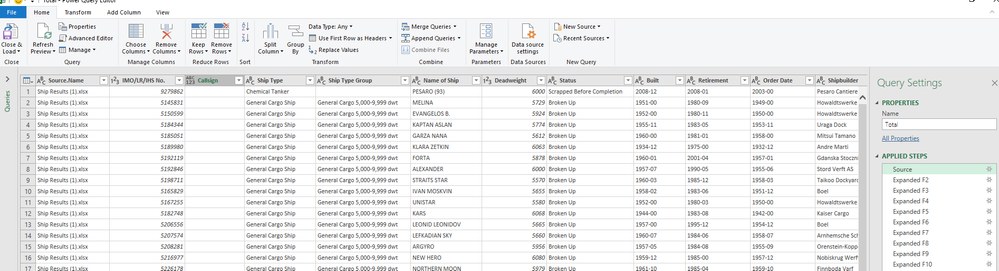
I have all the tables without Data types in the columns...when I do merge + then expand = some columns got the Data type! Do you know why this is happening?
Thank in advance,
Laura.
Hi Laura,
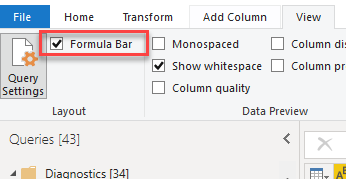
you have to enable the Formula Bar in the View-Tab like so:
You should check the Source-queries (the current one and the ones you're merging). Fix the corrections you want to make there before merging.
Usually you loose your types during merge/expand-operations. This is a known limitation.
Imke Feldmann (The BIccountant)
If you liked my solution, please give it a thumbs up. And if I did answer your question, please mark this post as a solution. Thanks!
How to integrate M-code into your solution -- How to get your questions answered quickly -- How to provide sample data -- Check out more PBI- learning resources here -- Performance Tipps for M-queries
Check out the April 2026 Power BI update to learn about new features.
Sign up to receive a private message when registration opens and key events begin.
If you have recently started exploring Fabric, we'd love to hear how it's going. Your feedback can help with product improvements.