This time we’re going bigger than ever. Fabric, Power BI, SQL, AI and more. We're covering it all. You won't want to miss it.
Learn moreLevel up your Power BI skills this month - build one visual each week and tell better stories with data! Get started
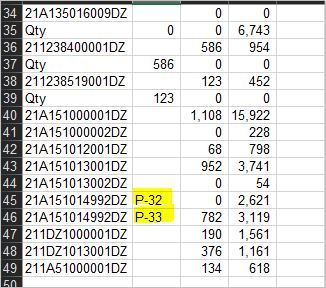
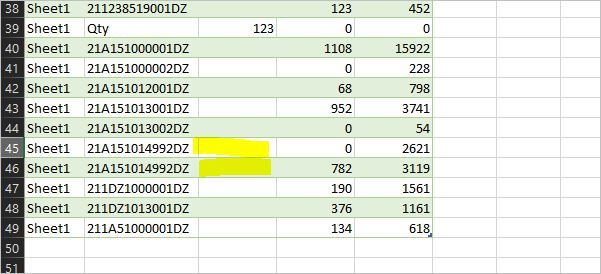
I have data A.xls and I used power query to load file A.xls but the data at cell B45, B46 in Power query is null. I think it have a problem with auto detected data from Excel file
How to not lose data in cell B45, B46 in power query?
Attach file
Thanks for your support
Solved! Go to Solution.
Problems with legacy Excel files (xls instead of xlxs) are well known and documented here:
https://docs.microsoft.com/en-us/power-bi/desktop-access-database-errors
or here for example: https://social.technet.microsoft.com/Forums/en-US/cb4da941-6e36-4447-8c10-1582ae6a59b8/power-query-n...
So your best bet is to transform to csv or xlsx.
Imke Feldmann (The BIccountant)
If you liked my solution, please give it a thumbs up. And if I did answer your question, please mark this post as a solution. Thanks!
How to integrate M-code into your solution -- How to get your questions answered quickly -- How to provide sample data -- Check out more PBI- learning resources here -- Performance Tipps for M-queries
Have you continued through close and load? Power Query does not necessarily load all of the data into the preview window but only samples the data. Once you close and load, go to the table view and sort into the data to see if the data is making it to the table.
If that doesn't work, please share some sample data here and I will be happy to take a look at it indepth.
Proud to be a Super User!
Problems with legacy Excel files (xls instead of xlxs) are well known and documented here:
https://docs.microsoft.com/en-us/power-bi/desktop-access-database-errors
or here for example: https://social.technet.microsoft.com/Forums/en-US/cb4da941-6e36-4447-8c10-1582ae6a59b8/power-query-n...
So your best bet is to transform to csv or xlsx.
Imke Feldmann (The BIccountant)
If you liked my solution, please give it a thumbs up. And if I did answer your question, please mark this post as a solution. Thanks!
How to integrate M-code into your solution -- How to get your questions answered quickly -- How to provide sample data -- Check out more PBI- learning resources here -- Performance Tipps for M-queries
Check out the April 2026 Power BI update to learn about new features.
Sign up to receive a private message when registration opens and key events begin.
If you have recently started exploring Fabric, we'd love to hear how it's going. Your feedback can help with product improvements.
| User | Count |
|---|---|
| 3 | |
| 2 | |
| 2 | |
| 2 | |
| 2 |