cancel
Showing results for 
Search instead for 
Did you mean: 

Did you hear? There's a new SQL AI Developer certification (DP-800). Start preparing now and be one of the first to get certified. Register now

Reply
aquilano76
Frequent Visitor

Problem after SAP BW connection

Dear All,

we have installed SAP RFC libraries and, after SAP BW connection, it appears a tree with the name of the server (root) and the node with the string $INFOCUBE.  Expanding this node appears the message "No items selected for preview". But, what kind of SAP BW authorizations we need to assign to login user in order to see the infocubes?


Thank you, kind regards

Andrea 

2 ACCEPTED SOLUTIONS
Anonymous
Not applicable

@aquilano76,

What is the version of your Power BI Desktop and do you define any queries in  the cube? If you need to connect to the queries, you would need to enable the option that you mentioned.

Regards,
Lydia

View solution in original post

Dear Lydia, we solved the problem allowing the flag "allow external access to this query".

Thank you, kind regards

Andrea


View solution in original post

6 REPLIES 6
Anonymous
Not applicable

@aquilano76,

Are you able to view these cubes when using other client tool such as BEx Query Designer to connect to SAP?Power BI exposes queries and cubes exposed by the BW Open Analysis Interface OLAP BAPIs

And if you need to perform BEx queries in Power BI Desktop , you would need to turn on "Allow external access  to this query" in SAP.

Reference:
https://docs.microsoft.com/en-us/power-bi/desktop-sap-bw-connector

Regards,
Lydia

Dear Lydia,

i tryed with BEx Analyzer and we are able to see the infoareas and cubes.

So the problem is on PowerBI side, isn't it?


What could be the problem? Thanks, Andrea

img.png

Anonymous
Not applicable

@aquilano76,


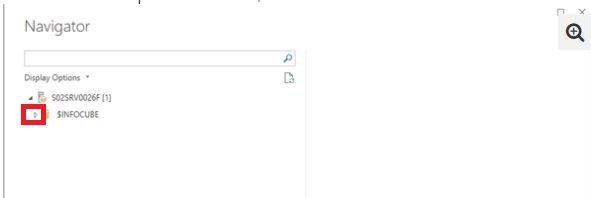
Have you clicked the triangle to expand the cube?
1.JPG

Regards,
Lydia

Yes Lydia, and nothings happen.


May the problem be related to “allow external access to this query” option?


Thank you,

Andrea

Anonymous
Not applicable

@aquilano76,

What is the version of your Power BI Desktop and do you define any queries in  the cube? If you need to connect to the queries, you would need to enable the option that you mentioned.

Regards,
Lydia

Dear Lydia, we solved the problem allowing the flag "allow external access to this query".

Thank you, kind regards

Andrea


Helpful resources

Announcements
April Power BI Update Carousel

Power BI Monthly Update - April 2026

Check out the April 2026 Power BI update to learn about new features.

Fabric SQL PBI Data Days

Data Days 2026 coming soon!

Sign up to receive a private message when registration opens and key events begin.

New to Fabric survey Carousel

New to Fabric Survey

If you have recently started exploring Fabric, we'd love to hear how it's going. Your feedback can help with product improvements.

Power BI DataViz World Championships carousel

Power BI DataViz World Championships - June 2026

A new Power BI DataViz World Championship is coming this June! Don't miss out on submitting your entry.