Join us in Barcelona for FabCon and SQLCon, September 28 - October 1, 2026.
This is best Fabric, Power BI, SQL and AI community event. How do we know? The last event sold out! Save €200 with code FABCMTY200.
Register now- Power BI forums
- Get Help with Power BI
- Desktop
- Service
- Report Server
- Power Query
- Mobile Apps
- Developer
- DAX Commands and Tips
- Custom Visuals Development Discussion
- Health and Life Sciences
- Power BI Spanish forums
- Translated Spanish Desktop
- Training and Consulting
- Instructor Led Training
- Dashboard in a Day for Women, by Women
- Galleries
- Data Stories Gallery
- Themes Gallery
- Contests Gallery
- QuickViz Gallery
- Quick Measures Gallery
- Visual Calculations Gallery
- Fabric Apps Gallery
- Notebook Gallery
- Translytical Task Flow Gallery
- TMDL Gallery
- R Script Showcase
- Webinars and Video Gallery
- Ideas
- Custom Visuals Ideas (read-only)
- Issues
- Issues
- Events
- Upcoming Events
The Fabric community is now in read-only for platform upgrade. Learn more
- Power BI forums
- Forums
- Get Help with Power BI
- Power Query
- Problem after SAP BW connection
- Subscribe to RSS Feed
- Mark Topic as New
- Mark Topic as Read
- Float this Topic for Current User
- Bookmark
- Subscribe
- Printer Friendly Page

- Mark as New
- Bookmark
- Subscribe
- Mute
- Subscribe to RSS Feed
- Permalink
- Report Inappropriate Content
Problem after SAP BW connection
Dear All,
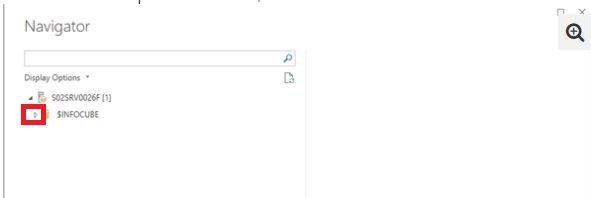
we have installed SAP RFC libraries and, after SAP BW connection, it appears a tree with the name of the server (root) and the node with the string $INFOCUBE. Expanding this node appears the message "No items selected for preview". But, what kind of SAP BW authorizations we need to assign to login user in order to see the infocubes?
Thank you, kind regards
Andrea
Solved! Go to Solution.
- Mark as New
- Bookmark
- Subscribe
- Mute
- Subscribe to RSS Feed
- Permalink
- Report Inappropriate Content
@aquilano76,
What is the version of your Power BI Desktop and do you define any queries in the cube? If you need to connect to the queries, you would need to enable the option that you mentioned.
Regards,
Lydia
- Mark as New
- Bookmark
- Subscribe
- Mute
- Subscribe to RSS Feed
- Permalink
- Report Inappropriate Content
Dear Lydia, we solved the problem allowing the flag "allow external access to this query".
Thank you, kind regards
Andrea

- Mark as New
- Bookmark
- Subscribe
- Mute
- Subscribe to RSS Feed
- Permalink
- Report Inappropriate Content
@aquilano76,
Are you able to view these cubes when using other client tool such as BEx Query Designer to connect to SAP?Power BI exposes queries and cubes exposed by the BW Open Analysis Interface OLAP BAPIs.
And if you need to perform BEx queries in Power BI Desktop , you would need to turn on "Allow external access to this query" in SAP.
Reference:
https://docs.microsoft.com/en-us/power-bi/desktop-sap-bw-connector
Regards,
Lydia
- Mark as New
- Bookmark
- Subscribe
- Mute
- Subscribe to RSS Feed
- Permalink
- Report Inappropriate Content
Dear Lydia,
i tryed with BEx Analyzer and we are able to see the infoareas and cubes.
So the problem is on PowerBI side, isn't it?
What could be the problem? Thanks, Andrea

- Mark as New
- Bookmark
- Subscribe
- Mute
- Subscribe to RSS Feed
- Permalink
- Report Inappropriate Content
- Mark as New
- Bookmark
- Subscribe
- Mute
- Subscribe to RSS Feed
- Permalink
- Report Inappropriate Content
Yes Lydia, and nothings happen.
May the problem be related to “allow external access to this query” option?
Thank you,
Andrea
- Mark as New
- Bookmark
- Subscribe
- Mute
- Subscribe to RSS Feed
- Permalink
- Report Inappropriate Content
@aquilano76,
What is the version of your Power BI Desktop and do you define any queries in the cube? If you need to connect to the queries, you would need to enable the option that you mentioned.
Regards,
Lydia
- Mark as New
- Bookmark
- Subscribe
- Mute
- Subscribe to RSS Feed
- Permalink
- Report Inappropriate Content
Dear Lydia, we solved the problem allowing the flag "allow external access to this query".
Thank you, kind regards
Andrea
Helpful resources

FabCon & SQLCon – Barcelona 2026
Join us in Barcelona for FabCon and SQLCon, the Fabric, Power BI, SQL, and AI community event. Save €200 with code FABCMTY200.

Power BI DataViz World Championships - June 2026
A new Power BI DataViz World Championship is coming this June! Don't miss out on submitting your entry.


