Join us at FabCon Atlanta from March 16 - 20, 2026, for the ultimate Fabric, Power BI, AI and SQL community-led event. Save $200 with code FABCOMM.
Register now!Vote for your favorite vizzies from the Power BI Dataviz World Championship submissions. Vote now!
Hi,
I'm trying to return a single record per asset/date according to its source, with one source favoured over another (discarded record bolded below)...
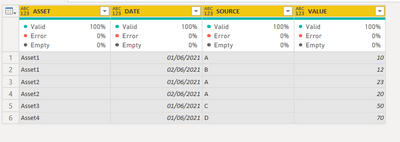
Raw table:
| ASSET | DATE | SOURCE | VALUE |
| Asset1 | 01/06/2021 | A | 10 |
| Asset1 | 01/06/2021 | B | 15 |
| Asset1 | 02/06/2021 | B | 12 |
| Asset2 | 01/06/2021 | A | 23 |
| Asset2 | 02/06/2021 | A | 20 |
| Asset3 | 01/06/2021 | C | 50 |
| Asset4 | 01/06/2021 | D | 70 |
Desired outcome:
| ASSET | DATE | SOURCE | VALUE |
| Asset1 | 01/06/2021 | A | 10 |
| Asset1 | 02/06/2021 | B | 12 |
| Asset2 | 01/06/2021 | A | 23 |
| Asset2 | 02/06/2021 | A | 20 |
| Asset3 | 01/06/2021 | C | 50 |
| Asset4 | 01/06/2021 | D | 70 |
I don't need to know the final [SOURCE] in the visualisation, however if source A doesnt have a value for the Asset/Date combination, it should then fallback to source B. There's also a [SOURCE] C & D, however I'm happy to ignore them as only sources A & B overlap in my example.
Solved! Go to Solution.
Hi @PELNZ_kjm
Here is one way
let
Source = Table.FromRows(Json.Document(Binary.Decompress(Binary.FromText("i45WciwuTi0xVNJRMjDUNzDTNzIwAnEcgdjQQClWB5cCJ5ACUzQFRugKjBAKjLBZYWSMpsAIXQGSG4zRTXAGYlMkBSboClyA2ByoIBYA", BinaryEncoding.Base64), Compression.Deflate)), let _t = ((type nullable text) meta [Serialized.Text = true]) in type table [ASSET = _t, DATE = _t, SOURCE = _t, VALUE = _t]),
#"Changed Type" = Table.TransformColumnTypes(Source,{{"ASSET", type text}, {"DATE", type date}, {"SOURCE", type text}, {"VALUE", Int64.Type}}),
#"Grouped Rows" = Table.Group(#"Changed Type", {"ASSET", "DATE"}, {{"allrows", each _, type table }}),
#"Added Custom" = Table.AddColumn(#"Grouped Rows", "Custom", each if List.ContainsAll( [allrows][SOURCE],{"A","B"}) then Table.SelectRows([allrows], each [SOURCE] <>"B") else [allrows]),
#"Removed Other Columns" = Table.SelectColumns(#"Added Custom",{"Custom"}),
#"Expanded Custom" = Table.ExpandTableColumn(#"Removed Other Columns", "Custom", {"ASSET", "DATE", "SOURCE", "VALUE"}, {"ASSET", "DATE", "SOURCE", "VALUE"})
in
#"Expanded Custom"
Hi @PELNZ_kjm
Here is one way
let
Source = Table.FromRows(Json.Document(Binary.Decompress(Binary.FromText("i45WciwuTi0xVNJRMjDUNzDTNzIwAnEcgdjQQClWB5cCJ5ACUzQFRugKjBAKjLBZYWSMpsAIXQGSG4zRTXAGYlMkBSboClyA2ByoIBYA", BinaryEncoding.Base64), Compression.Deflate)), let _t = ((type nullable text) meta [Serialized.Text = true]) in type table [ASSET = _t, DATE = _t, SOURCE = _t, VALUE = _t]),
#"Changed Type" = Table.TransformColumnTypes(Source,{{"ASSET", type text}, {"DATE", type date}, {"SOURCE", type text}, {"VALUE", Int64.Type}}),
#"Grouped Rows" = Table.Group(#"Changed Type", {"ASSET", "DATE"}, {{"allrows", each _, type table }}),
#"Added Custom" = Table.AddColumn(#"Grouped Rows", "Custom", each if List.ContainsAll( [allrows][SOURCE],{"A","B"}) then Table.SelectRows([allrows], each [SOURCE] <>"B") else [allrows]),
#"Removed Other Columns" = Table.SelectColumns(#"Added Custom",{"Custom"}),
#"Expanded Custom" = Table.ExpandTableColumn(#"Removed Other Columns", "Custom", {"ASSET", "DATE", "SOURCE", "VALUE"}, {"ASSET", "DATE", "SOURCE", "VALUE"})
in
#"Expanded Custom"
Thanks Vera, I've discovered further issues with visualising due to the data structure, however this achieves exactly what I outlined 🙂
Vote for your favorite vizzies from the Power BI World Championship submissions!
If you love stickers, then you will definitely want to check out our Community Sticker Challenge!
Check out the January 2026 Power BI update to learn about new features.
| User | Count |
|---|---|
| 11 | |
| 11 | |
| 6 | |
| 6 | |
| 6 |