Join us at FabCon Atlanta from March 16 - 20, 2026, for the ultimate Fabric, Power BI, AI and SQL community-led event. Save $200 with code FABCOMM.
Register now!The Power BI Data Visualization World Championships is back! Get ahead of the game and start preparing now! Learn more
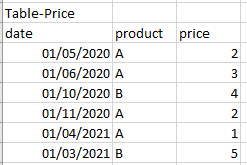
I have a price list like this
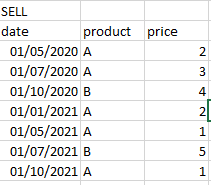
and I have a sell table
The final table should be like this
I have created a key-word "product_date" --> for example a_05/2020 or a_07/2020 but I don't know how connect key-words without connection.
Have you some ideas?
Thank you all
Solved! Go to Solution.
@giuliapiazza94 This is essentially Lookup Min/Max: https://community.powerbi.com/t5/Quick-Measures-Gallery/Lookup-Min-Max/m-p/985814#M434
So, in your case:
Column =
VAR __Date = 'SELL'[date]
VAR __Product = 'SELL'[product]
VAR __PriceDate = MAXX(FILTER('Table-Price',[product]=__Product && [date]<=__Date),[date])
RETURN
MAXX(FILTER('Table-Price',[product]=__Product && [date]=__PriceDate),[price])
@giuliapiazza94 This is essentially Lookup Min/Max: https://community.powerbi.com/t5/Quick-Measures-Gallery/Lookup-Min-Max/m-p/985814#M434
So, in your case:
Column =
VAR __Date = 'SELL'[date]
VAR __Product = 'SELL'[product]
VAR __PriceDate = MAXX(FILTER('Table-Price',[product]=__Product && [date]<=__Date),[date])
RETURN
MAXX(FILTER('Table-Price',[product]=__Product && [date]=__PriceDate),[price])
Check out the November 2025 Power BI update to learn about new features.
Advance your Data & AI career with 50 days of live learning, contests, hands-on challenges, study groups & certifications and more!
| User | Count |
|---|---|
| 11 | |
| 7 | |
| 5 | |
| 5 | |
| 3 |