cancel
Showing results for 
Search instead for 
Did you mean: 

Level up your Power BI skills this month - build one visual each week and tell better stories with data! Get started

Reply
Anonymous
Not applicable

PowerQuery connect to API

hi all


I'm having difficulties setting up powerquery to get info from an API. 

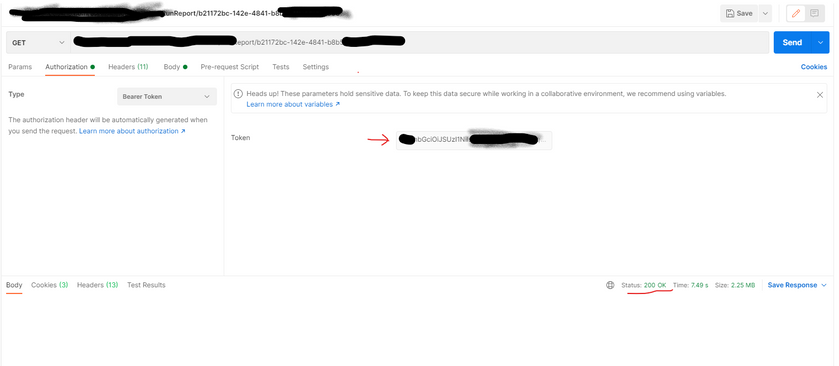
I use Postman and everything is working just fine. 


cristian_PBI_1-1620400606233.png

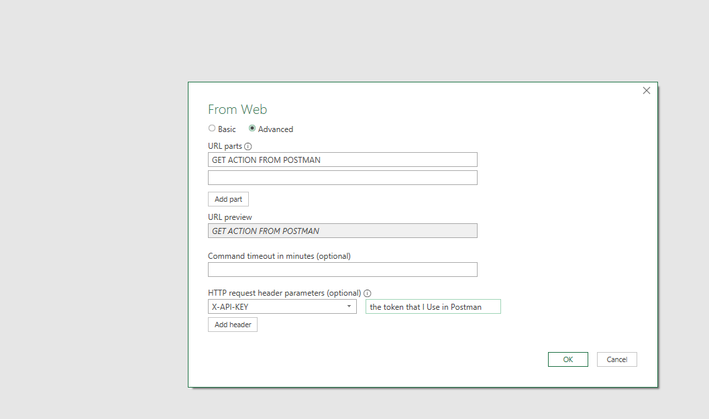
So from above I'm using the URL from the GET and add it in the URL below and I use the token and add it to the Headers as per below. 


cristian_PBI_0-1620400346957.png


I use Anonymous auth. 

This gives me the following error

cristian_PBI_2-1620400833995.png


I dont get it. Could you help ? 


I specify that in order to receive the token I do use another GET action (GetToken). but having this token this should work fine...


thank you !


1 ACCEPTED SOLUTION
v-jingzhang
Community Support
Community Support

Hi @Anonymous 


It seems you are using the incorrect header paramter for token. Use Authorization rather than X-API-KEY and add "Bearer " before the token. You could refer to this link: powerbi - Where do I save token in Power BI web connection?


Other reference:

powerbi - How do I retrieve a bearer token from a service in Power BI?


Regards,
Community Support Team _ Jing
If this post helps, please Accept it as the solution to help other members find it.

View solution in original post

2 REPLIES 2
Anonymous
Not applicable

Hello @v-jingzhang 


Thank you SO much. Worked like a charm! 


Regards 

crisitan 

v-jingzhang
Community Support
Community Support

Hi @Anonymous 


It seems you are using the incorrect header paramter for token. Use Authorization rather than X-API-KEY and add "Bearer " before the token. You could refer to this link: powerbi - Where do I save token in Power BI web connection?


Other reference:

powerbi - How do I retrieve a bearer token from a service in Power BI?


Regards,
Community Support Team _ Jing
If this post helps, please Accept it as the solution to help other members find it.

Helpful resources

Announcements
April Power BI Update Carousel

Power BI Monthly Update - April 2026

Check out the April 2026 Power BI update to learn about new features.

Fabric SQL PBI Data Days

Data Days 2026 coming soon!

Sign up to receive a private message when registration opens and key events begin.

New to Fabric survey Carousel

New to Fabric Survey

If you have recently started exploring Fabric, we'd love to hear how it's going. Your feedback can help with product improvements.

Power BI DataViz World Championships carousel

Power BI DataViz World Championships - June 2026

A new Power BI DataViz World Championship is coming this June! Don't miss out on submitting your entry.

Top Kudoed Authors