Don't miss your chance to take the Fabric Data Engineer (DP-600) exam for FREE! Find out how by watching the DP-600 session on-demand now through April 28th.
Learn moreJoin the FabCon + SQLCon recap series. Up next: Power BI, Real-Time Intelligence, IQ and AI, and Data Factory take center stage. All sessions are available on-demand after the live show. Register now
Hello all,
I would like to restructure the following table: (in reality more than 1k rows with different sold to partys)
| Sold to party | Period | Material | MBR Category | Value | Quantity |
| 17012097 | 4 | 1 | Sales | 100 | 2 |
| 17012097 | 4 | 1 | SRD | 20 | 0 |
| 17012097 | 4 | 1 | Cost | 30 | 0 |
| 17012097 | 5 | 2 | Sales | 200 | 3 |
| 17012097 | 6 | 2 | Sales | 300 | 4 |
The result should look like this:
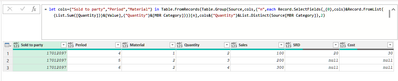
| Sold to party | Period | Material | Quantity | Sales | SRD | Cost |
| 17012097 | 4 | 1 | 2 | 100 | 20 | 30 |
| 17012097 | 5 | 2 | 3 | 200 | ||
| 17012097 | 6 | 2 | 4 | 300 |
As you can see I would like to pivot the column MBR Category and summarize its values. However, when I try to do that, the resulting table still has five rows and not three rows and the SRD/Cost/Sales are not summarized in one row but still show up in different rows.
Do you have any idea, how I could solve this?
Thank you very much in advance.
Best regards
Solved! Go to Solution.
See the working here - Open a blank query - Home - Advanced Editor - Remove everything from there and paste the below code to test
let
Source = Table.FromRows(Json.Document(Binary.Decompress(Binary.FromText("i45WMjQ3MDQysDRX0lEyAWJDIA5OzEktBrENDICkkVKsDnZlQS4gaZAaA1xqnPOLS4CUMVZFpmDTEfYZge0zRldmhqbMGKzMRCk2FgA=", BinaryEncoding.Base64), Compression.Deflate)), let _t = ((type nullable text) meta [Serialized.Text = true]) in type table [#"Sold to party" = _t, Period = _t, Material = _t, #"MBR Category" = _t, Value = _t, Quantity = _t]),
#"Changed Type" = Table.TransformColumnTypes(Source,{{"Sold to party", Int64.Type}, {"Period", Int64.Type}, {"Material", Int64.Type}, {"MBR Category", type text}, {"Value", Int64.Type}, {"Quantity", Int64.Type}}),
#"Grouped Rows" = Table.Group(#"Changed Type", {"Sold to party", "Period", "Material"}, {{"Quantity", each List.Sum([Quantity]), type nullable number}, {"Temp", each _, type table [Sold to party=nullable number, Period=nullable number, Material=nullable number, MBR Category=nullable text, Value=nullable number, Quantity=nullable number]}}),
//Function Start
fxProcess=(Tbl)=>
let
#"Removed Columns" = Table.RemoveColumns(Tbl,{"Sold to party", "Period", "Material", "Quantity"}),
#"Transposed Table" = Table.Transpose(#"Removed Columns"),
#"Promoted Headers" = Table.PromoteHeaders(#"Transposed Table", [PromoteAllScalars=true])
in
#"Promoted Headers",
//Function End
#"Added Custom" = Table.AddColumn(#"Grouped Rows", "Custom", each fxProcess([Temp])),
#"Removed Columns" = Table.RemoveColumns(#"Added Custom",{"Temp"}),
#"Expanded Custom" = Table.ExpandTableColumn(#"Removed Columns", "Custom", {"Sales", "SRD", "Cost"}, {"Sales", "SRD", "Cost"}),
#"Changed Type1" = Table.TransformColumnTypes(#"Expanded Custom",{{"Sold to party", Int64.Type}, {"Period", Int64.Type}, {"Material", Int64.Type}, {"Quantity", Int64.Type}, {"Sales", Int64.Type}, {"SRD", Int64.Type}, {"Cost", Int64.Type}})
in
#"Changed Type1"
= let cols={"Sold to party","Period","Material"} in Table.FromRecords(Table.Group(Source,cols,{"n",each Record.SelectFields(_{0},cols)&Record.FromList({List.Sum([Quantity])}&[Value],{"Quantity"}&[MBR Category])})[n],cols&{"Quantity"}&List.Distinct(Source[MBR Category]),2)
Hello both,
both solutions work perfectly fine, I am currently testing everything, but topic should be solved.
Thank you very much!
= let cols={"Sold to party","Period","Material"} in Table.FromRecords(Table.Group(Source,cols,{"n",each Record.SelectFields(_{0},cols)&Record.FromList({List.Sum([Quantity])}&[Value],{"Quantity"}&[MBR Category])})[n],cols&{"Quantity"}&List.Distinct(Source[MBR Category]),2)
See the working here - Open a blank query - Home - Advanced Editor - Remove everything from there and paste the below code to test
let
Source = Table.FromRows(Json.Document(Binary.Decompress(Binary.FromText("i45WMjQ3MDQysDRX0lEyAWJDIA5OzEktBrENDICkkVKsDnZlQS4gaZAaA1xqnPOLS4CUMVZFpmDTEfYZge0zRldmhqbMGKzMRCk2FgA=", BinaryEncoding.Base64), Compression.Deflate)), let _t = ((type nullable text) meta [Serialized.Text = true]) in type table [#"Sold to party" = _t, Period = _t, Material = _t, #"MBR Category" = _t, Value = _t, Quantity = _t]),
#"Changed Type" = Table.TransformColumnTypes(Source,{{"Sold to party", Int64.Type}, {"Period", Int64.Type}, {"Material", Int64.Type}, {"MBR Category", type text}, {"Value", Int64.Type}, {"Quantity", Int64.Type}}),
#"Grouped Rows" = Table.Group(#"Changed Type", {"Sold to party", "Period", "Material"}, {{"Quantity", each List.Sum([Quantity]), type nullable number}, {"Temp", each _, type table [Sold to party=nullable number, Period=nullable number, Material=nullable number, MBR Category=nullable text, Value=nullable number, Quantity=nullable number]}}),
//Function Start
fxProcess=(Tbl)=>
let
#"Removed Columns" = Table.RemoveColumns(Tbl,{"Sold to party", "Period", "Material", "Quantity"}),
#"Transposed Table" = Table.Transpose(#"Removed Columns"),
#"Promoted Headers" = Table.PromoteHeaders(#"Transposed Table", [PromoteAllScalars=true])
in
#"Promoted Headers",
//Function End
#"Added Custom" = Table.AddColumn(#"Grouped Rows", "Custom", each fxProcess([Temp])),
#"Removed Columns" = Table.RemoveColumns(#"Added Custom",{"Temp"}),
#"Expanded Custom" = Table.ExpandTableColumn(#"Removed Columns", "Custom", {"Sales", "SRD", "Cost"}, {"Sales", "SRD", "Cost"}),
#"Changed Type1" = Table.TransformColumnTypes(#"Expanded Custom",{{"Sold to party", Int64.Type}, {"Period", Int64.Type}, {"Material", Int64.Type}, {"Quantity", Int64.Type}, {"Sales", Int64.Type}, {"SRD", Int64.Type}, {"Cost", Int64.Type}})
in
#"Changed Type1"
Check out the April 2026 Power BI update to learn about new features.
If you have recently started exploring Fabric, we'd love to hear how it's going. Your feedback can help with product improvements.
A new Power BI DataViz World Championship is coming this June! Don't miss out on submitting your entry.
| User | Count |
|---|---|
| 3 | |
| 3 | |
| 3 | |
| 2 | |
| 2 |
| User | Count |
|---|---|
| 8 | |
| 6 | |
| 5 | |
| 5 | |
| 4 |