cancel
Showing results for 
Search instead for 
Did you mean: 

The Power BI Data Visualization World Championships is back! It's time to submit your entry. Live now!

Reply
mrbajana
Helper III
Helper III

PowerQuery Delete last digits in Text column

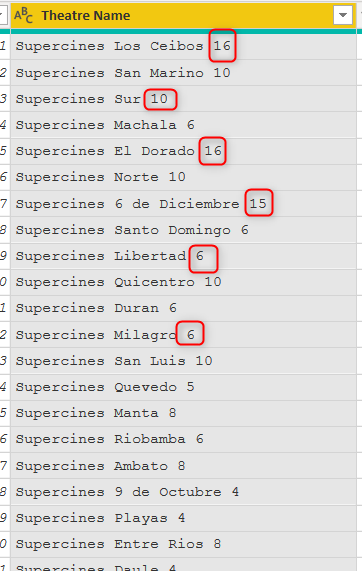
I need to delete the last one or two digits by every row in the column using powerquery

2021-04-29_10h57_29.png

1 ACCEPTED SOLUTION
Jakinta
Solution Sage
Solution Sage

You can try this. Replace:

Source - your previous step

Column1 - your column name


#"Trimmed Text" = Table.TransformColumns(Source,{{"Column1", each Text.TrimEnd(_,{"0".."9"}), type text}})

OR

#"Added Custom" = Table.AddColumn(Source, "Custom", each Text.TrimEnd([Column1],{"0".."9"}))


You should Trim it one more time afterwards to remove trailing whitespaces.

View solution in original post

1 REPLY 1
Jakinta
Solution Sage
Solution Sage

You can try this. Replace:

Source - your previous step

Column1 - your column name


#"Trimmed Text" = Table.TransformColumns(Source,{{"Column1", each Text.TrimEnd(_,{"0".."9"}), type text}})

OR

#"Added Custom" = Table.AddColumn(Source, "Custom", each Text.TrimEnd([Column1],{"0".."9"}))


You should Trim it one more time afterwards to remove trailing whitespaces.

Helpful resources

Announcements
FabCon Atlanta 2026 carousel

FabCon Atlanta 2026

Join us at FabCon Atlanta, March 16-20, for the ultimate Fabric, Power BI, AI and SQL community-led event. Save $200 with code FABCOMM.