A new Data Days event is coming soon!
This time we’re going bigger than ever. Fabric, Power BI, SQL, AI and more. We're covering it all. You won't want to miss it.
Learn more- Power BI forums
- Get Help with Power BI
- Desktop
- Service
- Report Server
- Power Query
- Mobile Apps
- Developer
- DAX Commands and Tips
- Custom Visuals Development Discussion
- Health and Life Sciences
- Power BI Spanish forums
- Translated Spanish Desktop
- Training and Consulting
- Instructor Led Training
- Dashboard in a Day for Women, by Women
- Galleries
- Data Stories Gallery
- Themes Gallery
- Contests Gallery
- QuickViz Gallery
- Quick Measures Gallery
- Visual Calculations Gallery
- Notebook Gallery
- Translytical Task Flow Gallery
- TMDL Gallery
- R Script Showcase
- Webinars and Video Gallery
- Ideas
- Custom Visuals Ideas (read-only)
- Issues
- Issues
- Events
- Upcoming Events
Get Fabric Certified for FREE during AI Skills Fest. This week only. Secure your voucher now.
- Power BI forums
- Forums
- Get Help with Power BI
- Power Query
- PowerQuery Copy paste a value between rows
- Subscribe to RSS Feed
- Mark Topic as New
- Mark Topic as Read
- Float this Topic for Current User
- Bookmark
- Subscribe
- Printer Friendly Page

- Mark as New
- Bookmark
- Subscribe
- Mute
- Subscribe to RSS Feed
- Permalink
- Report Inappropriate Content
PowerQuery Copy paste a value between rows
Hello community,
I'm looking for the way to copy a value from a row to another with some criteria.
I want to do this on PowerQuery :
See below an example of my tab
Mytable source :
| EndDate | Service | type | Charge Label | IdResource | Amount HT | ProjectName | Qty | State-Cost |
| 20210228 | VM | xlarge.4 | 0065a356-c566-4d0a-a9aa-ca8b7860a023 | HISTO | test1 | 1 | HS | |
| 20210228 | VM | xlarge.4 | 0065a356-c566-4d0a-a9aa-ca8b7860a023 | HISTO | test1 | 2 | HS | |
| 20210228 | VM | xlarge.4 | 0065a356-c566-4d0a-a9aa-ca8b7860a023 | HISTO | test1 | 3 | HS | |
| 20210228 | VM | xlarge.4 | 0065a356-c566-4d0a-a9aa-ca8b7860a023 | HISTO | test1 | 4 | HS | |
| 20210228 | VM | xlarge.4 | 0065a356-c566-4d0a-a9aa-ca8b7860a023 | HISTO | test1 | 5 | HS | |
| 20210228 | VM | xlarge.4 | 0065a356-c566-4d0a-a9aa-ca8b7860a023 | HISTO | test1 | 6 | HS | |
| 20210228 | VM | xlarge.4 | 0065a356-c566-4d0a-a9aa-ca8b7860a023 | HISTO | test1 | 7 | HS | |
| 20210228 | VM | xlarge.4 | 0065a356-c566-4d0a-a9aa-ca8b7860a023 | HISTO | test1 | 8 | HS | |
| 20210228 | VM | xlarge.4 | 0065a356-c566-4d0a-a9aa-ca8b7860a023 | HISTO | test1 | 9 | HS | |
| 20210228 | VM | xlarge.4 | 0065a356-c566-4d0a-a9aa-ca8b7860a023 | HISTO | test1 | 10 | HS | |
| 20210228 | VM | xlarge.4 | 0065a356-c566-4d0a-a9aa-ca8b7860a023 | HISTO | test1 | 11 | HS | |
| 20210228 | VM | xlarge.4 | xlarge.4 | 0065a356-c566-4d0a-a9aa-ca8b7860a023 | RESERVED | 66 | RSD | |
| 20210226 | VM | large.2 | 12567816-2148-4139-8126-443fd3550cd4 | HISTO | test2 | 1 | HS | |
| 20210227 | VM | large.2 | 12567816-2148-4139-8126-443fd3550cd4 | HISTO | test2 | 1 | HS | |
| 20210228 | VM | large.2 | 12567816-2148-4139-8126-443fd3550cd4 | HISTO | test3 | 1 | HS | |
| 20210228 | VM | large.2 | Large.2 | 12567816-2148-4139-8126-443fd3550cd4 | RESERVED | 1 | RSD |
Wanted Results :
| EndDate | Service | type | Charge Label | IdResource | Amount HT | ProjectName | Qty | State-Cost |
| 20210228 | VM | xlarge.4 | 0065a356-c566-4d0a-a9aa-ca8b7860a023 | HISTO | test1 | 1 | HS | |
| 20210228 | VM | xlarge.4 | 0065a356-c566-4d0a-a9aa-ca8b7860a023 | HISTO | test1 | 2 | HS | |
| 20210228 | VM | xlarge.4 | 0065a356-c566-4d0a-a9aa-ca8b7860a023 | HISTO | test1 | 3 | HS | |
| 20210228 | VM | xlarge.4 | 0065a356-c566-4d0a-a9aa-ca8b7860a023 | HISTO | test1 | 4 | HS | |
| 20210228 | VM | xlarge.4 | 0065a356-c566-4d0a-a9aa-ca8b7860a023 | HISTO | test1 | 5 | HS | |
| 20210228 | VM | xlarge.4 | 0065a356-c566-4d0a-a9aa-ca8b7860a023 | HISTO | test1 | 6 | HS | |
| 20210228 | VM | xlarge.4 | 0065a356-c566-4d0a-a9aa-ca8b7860a023 | HISTO | test1 | 7 | HS | |
| 20210228 | VM | xlarge.4 | 0065a356-c566-4d0a-a9aa-ca8b7860a023 | HISTO | test1 | 8 | HS | |
| 20210228 | VM | xlarge.4 | 0065a356-c566-4d0a-a9aa-ca8b7860a023 | HISTO | test1 | 9 | HS | |
| 20210228 | VM | xlarge.4 | 0065a356-c566-4d0a-a9aa-ca8b7860a023 | HISTO | test1 | 10 | HS | |
| 20210228 | VM | xlarge.4 | 0065a356-c566-4d0a-a9aa-ca8b7860a023 | HISTO | test1 | 11 | HS | |
| 20210228 | VM | xlarge.4 | xlarge.4 | 0065a356-c566-4d0a-a9aa-ca8b7860a023 | RESERVED | test1 | 66 | RSD |
| 20210226 | VM | large.2 | 12567816-2148-4139-8126-443fd3550cd4 | HISTO | test2 | 1 | HS | |
| 20210227 | VM | large.2 | 12567816-2148-4139-8126-443fd3550cd4 | HISTO | test2 | 1 | HS | |
| 20210228 | VM | large.2 | 12567816-2148-4139-8126-443fd3550cd4 | HISTO | test3 | 1 | HS | |
| 20210228 | VM | large.2 | Large.2 | 12567816-2148-4139-8126-443fd3550cd4 | RESERVED | test3 | 1 | RSD |
Thx by advance for your help.
Regards
Cairn
Solved! Go to Solution.
- Mark as New
- Bookmark
- Subscribe
- Mute
- Subscribe to RSS Feed
- Permalink
- Report Inappropriate Content
this should correspond to your last example, although I still have some doubts about the general validity of your situations. but in case you will provide some more exhaustive examples
- Mark as New
- Bookmark
- Subscribe
- Mute
- Subscribe to RSS Feed
- Permalink
- Report Inappropriate Content
an alternative way
- Mark as New
- Bookmark
- Subscribe
- Mute
- Subscribe to RSS Feed
- Permalink
- Report Inappropriate Content
- Mark as New
- Bookmark
- Subscribe
- Mute
- Subscribe to RSS Feed
- Permalink
- Report Inappropriate Content
mode Idresource project tags type
usage ressource 1 P1 T1 H
usage ressource 1 P1 T1 H
usage ressource 2 P2 T2 H
usage ressource 2 P2 T2 H
usage ressource 1
R
usage ressource 2
R
sub ressource 3 P3 T3 R
sub ressource 4 P4 T4 R
usage ressource 5 P5 T5 H
- Mark as New
- Bookmark
- Subscribe
- Mute
- Subscribe to RSS Feed
- Permalink
- Report Inappropriate Content
hello,
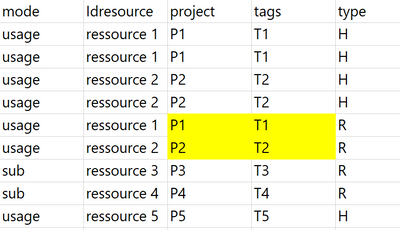
Sorry if i was not clear, I just want to complete empty field base on the previews rows
So i want to complete all line with Type is "R" with empty projet & tags columns.
And i want to use information providing previous row with the same Idresource.
I want to post a pbix file but it failed 😞 so i put you a screenshot of an example
Initial State :

Results :
Regards
- Mark as New
- Bookmark
- Subscribe
- Mute
- Subscribe to RSS Feed
- Permalink
- Report Inappropriate Content
- Mark as New
- Bookmark
- Subscribe
- Mute
- Subscribe to RSS Feed
- Permalink
- Report Inappropriate Content
- Mark as New
- Bookmark
- Subscribe
- Mute
- Subscribe to RSS Feed
- Permalink
- Report Inappropriate Content
I'm sorry, but I can't figure out which tables you are referring to. If you can, upload tables to an excel sheet on a file sharing website. One is the starting point (with all the cases of interest: I cannot invent situations that I do not know); a second with the desired result. A clear and complete explanation of the transformation logic would be helpful.
- Mark as New
- Bookmark
- Subscribe
- Mute
- Subscribe to RSS Feed
- Permalink
- Report Inappropriate Content
Hi @Anonymous
If you sorted your table, then retrieve the one above? Performace may be not good if you have lots of data
let
    Source = Table.FromRows(Json.Document(Binary.Decompress(Binary.FromText("tZTBCsIwDIbfZedVkrTNuruDCYqwyS5jh7pNL550Bx/flqEM8bCDgab5D+X7CUnatgkBIRC5JE2aQ7ieN3+/jhsTZDgAbL22rHrLrMwAXvnce9V7d84cgwfS4Vm5q0/HkKfxMWHIMco66VIhPgnztTDfCPOtMJ+F+Zkw3wnzc2E+grTBug1eyJVGVVEXVVNs4xDFKarqKJc+/PaZ2TTXgWQ5c8iK0DhlUOfKIQUjoy+Dthb6wXzVQT8/okwW7/6F12vx+49a6bJoAS460L0A", BinaryEncoding.Base64), Compression.Deflate)), let _t = ((type nullable text) meta [Serialized.Text = true]) in type table [EndDate = _t, Service = _t, #"type" = _t, #"Charge Label" = _t, IdResource = _t, #"Amount HT" = _t, ProjectName = _t, Qty = _t, #"State-Cost" = _t]),
    #"Changed Type" = Table.TransformColumnTypes(Source,{{"EndDate", Int64.Type}, {"Service", type text}, {"type", type text}, {"Charge Label", type text}, {"IdResource", type text}, {"Amount HT", type text}, {"ProjectName", type text}, {"Qty", type text}, {"State-Cost", type text}}),
    #"Added Index" = Table.AddIndexColumn(#"Changed Type", "Index", 0, 1, Int64.Type),
    #"Reordered Columns" = Table.ReorderColumns(#"Added Index",{"Index", "EndDate", "Service", "type", "Charge Label", "IdResource", "Amount HT", "ProjectName", "Qty", "State-Cost"}),
    #"Added Custom" = Table.AddColumn(#"Reordered Columns", "Custom", each [a =Record.ToList(_),
b= if [Qty] = "RSD" then List.RemoveLastN( List.InsertRange(a, 6,{#"Reordered Columns"{[Index]-1}[ProjectName]}),1) else a,
c=List.RemoveFirstN(b,1)][c]),
    #"Added Custom1" = Table.AddColumn(#"Added Custom", "Custom1", each Record.FromList([Custom],Table.ColumnNames( Source))),
    #"Removed Other Columns" = Table.SelectColumns(#"Added Custom1",{"Custom1"}),
    #"Expanded Custom1" = Table.ExpandRecordColumn(#"Removed Other Columns", "Custom1", {"EndDate", "Service", "type", "Charge Label", "IdResource", "Amount HT", "ProjectName", "Qty", "State-Cost"}, {"EndDate", "Service", "type", "Charge Label", "IdResource", "Amount HT", "ProjectName", "Qty", "State-Cost"})
in
    #"Expanded Custom1"
Helpful resources

Power BI Monthly Update - May 2026
Check out the May 2026 Power BI update to learn about new features.

Data Days 2026 coming soon!
Sign up to receive a private message when registration opens and key events begin.

New to Fabric Survey
If you have recently started exploring Fabric, we'd love to hear how it's going. Your feedback can help with product improvements.

Power BI DataViz World Championships - June 2026
A new Power BI DataViz World Championship is coming this June! Don't miss out on submitting your entry.

| User | Count |
|---|---|
| 4 | |
| 3 | |
| 3 | |
| 1 | |
| 1 |


