Join us at FabCon Atlanta from March 16 - 20, 2026, for the ultimate Fabric, Power BI, AI and SQL community-led event. Save $200 with code FABCOMM.
Register now!Learn from the best! Meet the four finalists headed to the FINALS of the Power BI Dataviz World Championships! Register now
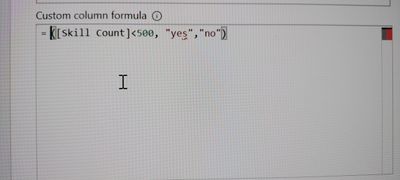
even if I type IF it is not showing in drop down?.
I have tried with conditional column but I couldn't see skill count column name? Why it is? @Vijay_A_Verma
Solved! Go to Solution.
Hi @AtchayaP ,
The syntax for if clauses in Power Querys M looks like this :
if [Skill Count] < 500 then "Yes" else "no"
Note, M is case sensitive.
Let me know if this one helped 🙂
/Tom
https://www.tackytech.blog/
https://www.instagram.com/tackytechtom/
| Did I answer your question❓➡️ Please, mark my post as a solution ✔️ |
| Also happily accepting Kudos 🙂 |
| Feel free to connect with me on LinkedIn! | |
| #proudtobeasuperuser | |
Hi @AtchayaP ,
The syntax for if clauses in Power Querys M looks like this :
if [Skill Count] < 500 then "Yes" else "no"
Note, M is case sensitive.
Let me know if this one helped 🙂
/Tom
https://www.tackytech.blog/
https://www.instagram.com/tackytechtom/
| Did I answer your question❓➡️ Please, mark my post as a solution ✔️ |
| Also happily accepting Kudos 🙂 |
| Feel free to connect with me on LinkedIn! | |
| #proudtobeasuperuser | |
Thank you so much .I am new to powerbi.
Share feedback directly with Fabric product managers, participate in targeted research studies and influence the Fabric roadmap.
Check out the February 2026 Power BI update to learn about new features.
| User | Count |
|---|---|
| 16 | |
| 12 | |
| 9 | |
| 7 | |
| 6 |