


Don't miss your chance to take the Fabric Data Engineer (DP-600) exam for FREE! Find out how by watching the DP-600 session on-demand now through April 28th.
Learn moreJoin the FabCon + SQLCon recap series. Up next: Power BI, Real-Time Intelligence, IQ and AI, and Data Factory take center stage. All sessions are available on-demand after the live show. Register now
Hello, is it possible to make power query refresh the data and change the date to local? Because every day comes a new date and needs to pull out the current one
hi @Dominikx1 ,
using the below statement provides the date from your locale :
Date.From(DateTime.LocalNow())
You could use this in a filter step, where the filter is equal to the above to filter today's data.
Alternatively, you could create a query with this value and reference the filter to the query's name if you want.
When you hit refresh now it should bring in only from that date.
Appreciate a thumbs up if this is helpful.
DateTime.LocalNow - PowerQuery M | Microsoft Learn
Let me know if this resovles your question.
I found a problem, the date cannot be e.g. 30/01/2023 only instead of . must be - just how to replace . on -
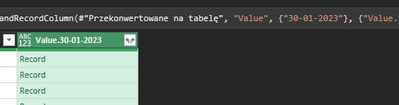
Hello, I used the solutions you posted with "" and without "", the result is the same as in the picture and when I add {""} it pops up null
Check out the April 2026 Power BI update to learn about new features.
If you have recently started exploring Fabric, we'd love to hear how it's going. Your feedback can help with product improvements.
A new Power BI DataViz World Championship is coming this June! Don't miss out on submitting your entry.
| User | Count |
|---|---|
| 8 | |
| 6 | |
| 5 | |
| 5 | |
| 4 |