cancel
Showing results for 
Search instead for 
Did you mean: 

Learn from the best! Meet the four finalists headed to the FINALS of the Power BI Dataviz World Championships! Register now

Reply
k2s2
Frequent Visitor

Power query is loading dates as date time in spreadsheet

Hello


I've got columns of data in a power query that are fornatted as dates, as in

"Date Type: Date"

I tried also using the Date button > Date Only 


...but When the Table loads to the worksheet in Excel, It shows as date and time.


How can I make sure it loads the date only?

1 ACCEPTED SOLUTION
timg
Solution Sage
Solution Sage

Hi K2S2,

You could change this in two ways:

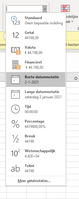
  1. You can format the values as a "short date" in excel
  2. You could explicitly format the date in a format that you would prefer in a calculated column in Power BI. to do this, create a new column with the formatted date. Below you will find an example. When exporting this column it will retain the formatting that you give it

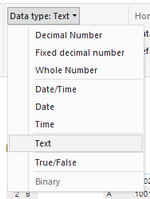
EDIT: @Watsky Pointed out a third great option, which is to format the date as a text value in Power BI

Method 1:

1.PNG

Method 2:

DateFormatted= FORMAT(Table[DateColumn],"dd-mm/yyyy")

Method 3:

3.PNG


Regards,


Tim


Did I answer your question? Mark my post as a solution!

Proud to be a Super User!


View solution in original post

3 REPLIES 3
v-jingzhang
Community Support
Community Support

Hi @k2s2 


Have you solved this problem? Kindly accept a proper reply as solution or share your own solution if you have got better ones. This would help more people who may have similar questions. Thanks. 


Best Regards,
Community Support Team _ Jing

timg
Solution Sage
Solution Sage

Hi K2S2,

You could change this in two ways:

  1. You can format the values as a "short date" in excel
  2. You could explicitly format the date in a format that you would prefer in a calculated column in Power BI. to do this, create a new column with the formatted date. Below you will find an example. When exporting this column it will retain the formatting that you give it

EDIT: @Watsky Pointed out a third great option, which is to format the date as a text value in Power BI

Method 1:

1.PNG

Method 2:

DateFormatted= FORMAT(Table[DateColumn],"dd-mm/yyyy")

Method 3:

3.PNG


Regards,


Tim


Did I answer your question? Mark my post as a solution!

Proud to be a Super User!


k2s2
Frequent Visitor

Hi Thanks,  I need for teh dates in Excel to work with averageifs criteria, so text or simply changing the format in excel doesn't work (it just hides the extra data).  


I'll try method 2.  Thanks again

Helpful resources

Announcements
New to Fabric survey Carousel

New to Fabric Survey

If you have recently started exploring Fabric, we'd love to hear how it's going. Your feedback can help with product improvements.

Power BI DataViz World Championships carousel

Power BI DataViz World Championships - June 2026

A new Power BI DataViz World Championship is coming this June! Don't miss out on submitting your entry.

Join our Fabric User Panel

Join our Fabric User Panel

Share feedback directly with Fabric product managers, participate in targeted research studies and influence the Fabric roadmap.

March Power BI Update Carousel

Power BI Community Update - March 2026

Check out the March 2026 Power BI update to learn about new features.