cancel
Showing results for 
Search instead for 
Did you mean: 

The Power BI Data Visualization World Championships is back! Get ahead of the game and start preparing now! Learn more

Reply
Anonymous
Not applicable

Power query if statement help

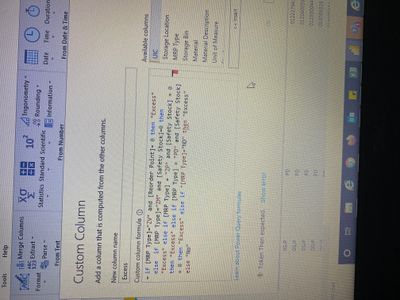
Can someone please help me with the error on the attached picture? It seems as though I'm missing something simple, but can seem to be able to get the syntax right. 

817599E9-EFA7-4EAD-98B6-C149FEB2AE0C.jpeg

1 ACCEPTED SOLUTION
nandic
Resident Rockstar
Resident Rockstar

@Anonymous , you have " sign on wrong place (in front of field name).
"[MRP Type]="ND" then ...
it should be
[MRP Type]="ND" then ...


Regards,

Nemanja Andic

View solution in original post

3 REPLIES 3
nandic
Resident Rockstar
Resident Rockstar

@Anonymous , you have " sign on wrong place (in front of field name).
"[MRP Type]="ND" then ...
it should be
[MRP Type]="ND" then ...


Regards,

Nemanja Andic

Anonymous
Not applicable

That was it! Can't believe I didn't catch that. Thank you!!

smpa01
Community Champion
Community Champion

@Anonymouscan you try it like this

if ([Index]=1 and [val]<>null) then 1 else if ([Index]>1 and [val]<>null) then 2 else 0
Did I answer your question? Mark my post as a solution!
Proud to be a Super User!
My custom visualization projects
Plotting Live Sound: Viz1
Beautiful News:Viz1, Viz2, Viz3
Visual Capitalist: Working Hrs

Helpful resources

Announcements
Power BI DataViz World Championships

Power BI Dataviz World Championships

The Power BI Data Visualization World Championships is back! Get ahead of the game and start preparing now!

December 2025 Power BI Update Carousel

Power BI Monthly Update - December 2025

Check out the December 2025 Power BI Holiday Recap!

FabCon Atlanta 2026 carousel

FabCon Atlanta 2026

Join us at FabCon Atlanta, March 16-20, for the ultimate Fabric, Power BI, AI and SQL community-led event. Save $200 with code FABCOMM.

Top Solution Authors