cancel
Showing results for 
Search instead for 
Did you mean: 

July 7 - July 17 | Round 2 of the Power BI Dataviz World Championships. Don't miss your chance! Learn more

Reply
amanuit
Regular Visitor

Power query editor-Add column

Hello,

I am very new to power BI.

I am trying to add a conditional column and in condition, I want to compare a column with "."  or any text but i am getting error and it is asking to provide number number.

Does it compare only numbers?

or the column which i have selected is number then i how can i convert it into text, another question if i convert it into text then will it impact on dashboard?

3 REPLIES 3
KNP
Super User
Super User

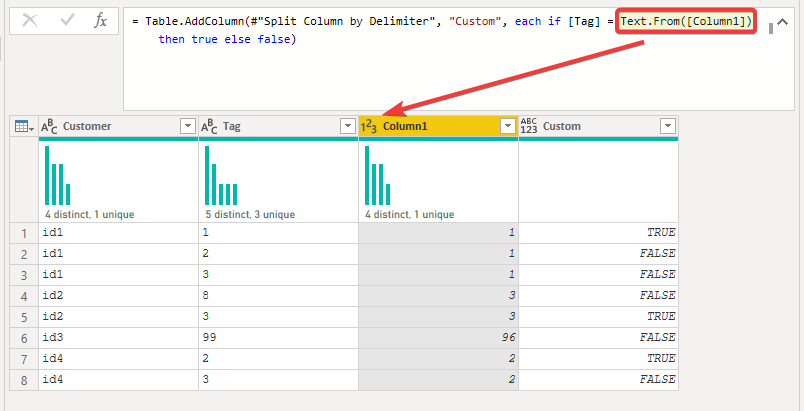
An alternative approach for comparing number and text types would be to add Text.From() to the number column.

e.g.

KNP_0-1659379659825.png


Have I solved your problem?
Please click Accept as Solution so I don't keep coming back to this post, oh yeah, others may find it useful also ;).
xOIEmaj

If you found this post helpful, please give Kudos.
It gives me a sense of instant gratification and, if you give me Kudos enough times, magical unicorns will appear on your screen.
If you find my signature vaguely amusing, please give Kudos.
image
fabric-SUbadge
Proud to be a Super User!
amanuit
Regular Visitor

Thank you for reply

jennratten
Super User
Super User

Hello - the columns you are comparing need to be of the same data type.  If you change the actual type of the column it could have subsequent negative consequences.  For example, if you convert a number to text and you are later summing that number, the sum function will fail because it is text.  If you need to compare a number to text, you can add a column that compares the text value of another column to the comparison text.  That way your original value is not impacted.

Helpful resources

Announcements
FabCon and SQLCon Barcelona 2026

FabCon & SQLCon – Barcelona 2026

Join us in Barcelona for FabCon and SQLCon, the Fabric, Power BI, SQL, and AI community event. Save €200 with code FABCMTY200.

60 days of Data Days Carousel

Data Days 2026

Join Data Days 2026: 60 days of free live/on-demand sessions, challenges, study groups, and certification opportunities.

Power BI DataViz World Championships carousel

Power BI DataViz World Championships - June 2026

A new Power BI DataViz World Championship is coming this June! Don't miss out on submitting your entry.

Top Solution Authors