cancel
Showing results for 
Search instead for 
Did you mean: 

The Power BI Data Visualization World Championships is back! Get ahead of the game and start preparing now! Learn more

Reply
mrfazio
New Member

Power query - Counting rows from all table in query editor but not shows data in the model tab

I want to consolidate counting rows from all my tables that I import from excel in power bi.

I did that using a script in power query:


let
Source = #shared,
#"Converted to Table" = Record.ToTable(Source),
#"Filtered Rows" = Table.SelectRows(#"Converted to Table", each Type.Is(Value.Type([Value]),Table.Type) and [Name] <> "Query1"),
#"Consolidate Table" = Table.AddColumn(#"Filtered Rows", "Column", each Table.RowCount([Value]) )
in
#"Consolidate Table"


The data can be showed in query editor but when I changed to the model tab or building the report the power bi dont show any data.


Can anyone help me?

5 REPLIES 5
v-alq-msft
Community Support
Community Support

Hi, @mrfazio 


Based on your description, I'd like to suggest you replace the parameter for 'Table.rowcount' with #'Filtered Rows'. The function needs a table as a parameter.

Table.RowCount(table as table) as number 


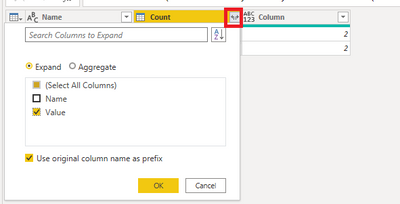
When you load the model in Power BI Desktop, the column with data which is table data type won't be loaded into the model. I'd like to suggest you extend the column to display the corresponding data before you click 'Close and Apply'. The pbix file is attached in the end.


d1.png


d2.png


Result:

d3.png


Best Regards

Allan


If this post helps, then please consider Accept it as the solution to help the other members find it more quickly.


Hi, thanks for trying to help me.


Im going to explain every step that I did:


I create two excel files and Import the files in power bi:
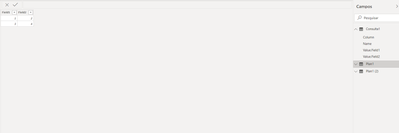
mrfazio_0-1593792078191.png


So, I create a empty query and edit the query :


let
Source = #shared,
#"Converted to Table" = Record.ToTable(Source),
#"Filtered Rows" = Table.SelectRows(#"Converted to Table", each Type.Is(Value.Type([Value]),Table.Type) and [Name] <> "Consulta1"),
#"Consolidate Table" = Table.AddColumn(#"Filtered Rows", "Column", each Table.RowCount([Value]) ),
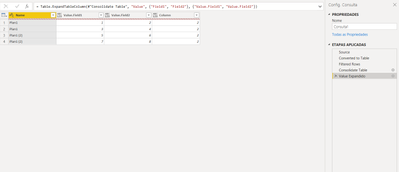
#"Value Expandido" = Table.ExpandTableColumn(#"Consolidate Table", "Value", {"Field1", "Field2"}, {"Value.Field1", "Value.Field2"})
in
#"Value Expandido"


The first line:

Source = #shared,


Take all variables used by power bi, tables imported, function, etc.


The next step I convert to a table


#"Converted to Table" = Record.ToTable(Source),


Then, I filter only the variables wich is the type of table. I need to remove the table related to the query I made, in my case the query has the name "Consulta1".

#"Filtered Rows" = Table.SelectRows(#"Converted to Table", each Type.Is(Value.Type([Value]),Table.Type) and [Name] <> "Consulta1"),


I  get the tables and calculate the row count

#"Consolidate Table" = Table.AddColumn(#"Filtered Rows", "Column", each Table.RowCount([Value]) ),


Then I tried your suggest, expanding the column, but not worked for me.

#"Value Expandido" = Table.ExpandTableColumn(#"Consolidate Table", "Value", {"Field1", "Field2"}, {"Value.Field1", "Value.Field2"})

mrfazio_0-1593793197080.png


But when I switched to model, any data appear:
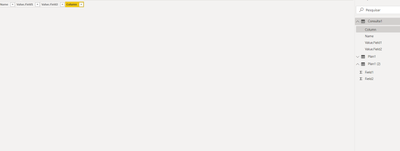
 

mrfazio_1-1593793249546.png


Hi, @mrfazio 


Is there any error message with these steps? What is the result for the query? 


Best Regards

Allan

Hi,

It shows the results when I transform the data, but when I apply the changes I cannot manipulate the data in report because it not shows the data that was tranformed.

You're not missing anything, it's just reference and context.

When in PQ Editor, you are referencing all your queries via #shared. This works, because at this time all your queries are computed, and ready to be referenced on a new query. However, when applying changes, Consulta1 query gets only the direct references of Consulta1 (and all functions) from #shared, and since all other queries are never directly referenced, and probably not even calculated at the time of Consulta1's calculation, they are simply not there. Thus, an empty table.


Edit: You can see that on Query Dependencies


Spyros Mavroforos

Data Consultant


Find me on LinkedIn or drop me an email

eSpyros

Helpful resources

Announcements
Power BI DataViz World Championships

Power BI Dataviz World Championships

The Power BI Data Visualization World Championships is back! Get ahead of the game and start preparing now!

November Power BI Update Carousel

Power BI Monthly Update - November 2025

Check out the November 2025 Power BI update to learn about new features.

FabCon Atlanta 2026 carousel

FabCon Atlanta 2026

Join us at FabCon Atlanta, March 16-20, for the ultimate Fabric, Power BI, AI and SQL community-led event. Save $200 with code FABCOMM.