Hi @Anonymous
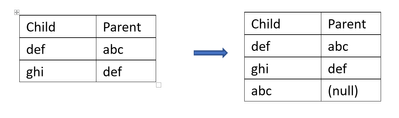
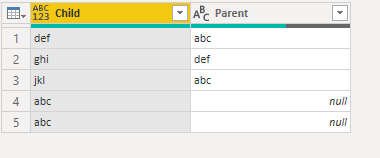
Find the difference between Child and Parent then Table.Combine
let
    Source = Table.FromRows(Json.Document(Binary.Decompress(Binary.FromText("i45WSklNU9JRSkxKVorViVZKz8gE8kBisbEA", BinaryEncoding.Base64), Compression.Deflate)), let _t = ((type nullable text) meta [Serialized.Text = true]) in type table [Child = _t, Parent = _t]),
    Custom1 = List.Difference(Source[Parent],Source[Child]),
    #"Converted to Table" = Table.FromList(Custom1, Splitter.SplitByNothing(), null, null, ExtraValues.Error),
    #"Renamed Columns" = Table.RenameColumns(#"Converted to Table",{{"Column1", "Child"}}),
    Custom2 = Table.Combine({Source, #"Renamed Columns"})
in
    Custom2
Or combine Child and Parent, then Merge
let
    Source = Table.FromRows(Json.Document(Binary.Decompress(Binary.FromText("i45WSklNU9JRSkxKVorViVZKz8gE8kBisbEA", BinaryEncoding.Base64), Compression.Deflate)), let _t = ((type nullable text) meta [Serialized.Text = true]) in type table [Child = _t, Parent = _t]),
    Custom1 = List.Union({ Source[Child],Source[Parent]}),
    #"Converted to Table" = Table.FromList(Custom1, Splitter.SplitByNothing(), null, null, ExtraValues.Error),
    #"Renamed Columns" = Table.RenameColumns(#"Converted to Table",{{"Column1", "Child"}}),
    #"Merged Queries" = Table.NestedJoin(#"Renamed Columns", {"Child"}, Source, {"Child"}, "Renamed Columns", JoinKind.LeftOuter),
    #"Expanded Renamed Columns" = Table.ExpandTableColumn(#"Merged Queries", "Renamed Columns", {"Parent"}, {"Parent"})
in
    #"Expanded Renamed Columns"