cancel
Showing results for 
Search instead for 
Did you mean: 

The Power BI Data Visualization World Championships is back! Get ahead of the game and start preparing now! Learn more

Reply
KAURM
Helper I
Helper I

Power Query to replace specific value in column based on value in another column

Hi,


I hope you are well.


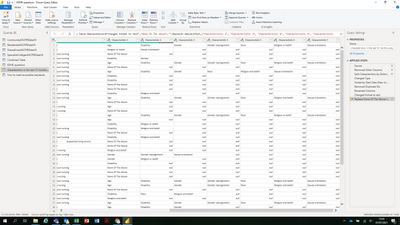
From the below I am trying to replace the 'none of the above' values in characteristic 1 column to a blank or null if the characteristic 2 column does not equal 'none of the above' i.e. it has a characteristic in there such as age, etc. 


I need to avoid adding a custom column so I need a Power Query statement that will allow me to do this rather than DAX. 


KAURM_0-1625669113855.png

Any assistance you can provide in this matter would be much appreciated!


Thank you in advance! 


@amitchandak @parry2k @Fowmy @selimovd @amitchandak @Jihwan_Kim 

1 ACCEPTED SOLUTION

Hi @mahoneypat 


Thanks for your reply 

I managed to figure it out in the Power Query Editor, thank you though! 

= Table.ReplaceValue(#"Changed format to text","None Of The Above", each if [Characteristic 2] <> null then null else "None Of The Above",Replacer.ReplaceValue,{"Characteristic 1"})

View solution in original post

2 REPLIES 2
mahoneypat
Microsoft Employee
Microsoft Employee

Here's one way to do it in the query editor.  To see how it works, just create a blank query, open the Advanced Editor and replace the text there with the M code below.  Basically, you just need to do a basic Replace Values step with "none of the above" and "null" in the pop-up box (no quotes), and then replace the second term ("null") with 


each if [Characteristic 2] = "none of the above" then null else [Characteristic 1]


let
    Source = Table.FromRows(Json.Document(Binary.Decompress(Binary.FromText("i45WclTSUcrLz0tVyE9TKMlIVUhMyi9LBYoVpaYoxepEKzkB2ZWpOTn55UBGUk5pKljUGYcuTLHYWAA=", BinaryEncoding.Base64), Compression.Deflate)), let _t = ((type nullable text) meta [Serialized.Text = true]) in type table [Column1 = _t, #"Characteristic 1" = _t, #"Characteristic 2" = _t]),
    #"Replaced Value" = Table.ReplaceValue(Source,"none of the above",each if [Characteristic 2] = "none of the above" then null else [Characteristic 1],Replacer.ReplaceValue,{"Characteristic 1"})
in
    #"Replaced Value"


Pat


Did I answer your question? Mark my post as a solution! Kudos are also appreciated!

To learn more about Power BI, follow me on Twitter or subscribe on YouTube.


@mahoneypa HoosierBI on YouTube


Hi @mahoneypat 


Thanks for your reply 

I managed to figure it out in the Power Query Editor, thank you though! 

= Table.ReplaceValue(#"Changed format to text","None Of The Above", each if [Characteristic 2] <> null then null else "None Of The Above",Replacer.ReplaceValue,{"Characteristic 1"})

Helpful resources

Announcements
Power BI DataViz World Championships

Power BI Dataviz World Championships

The Power BI Data Visualization World Championships is back! Get ahead of the game and start preparing now!

December 2025 Power BI Update Carousel

Power BI Monthly Update - December 2025

Check out the December 2025 Power BI Holiday Recap!

FabCon Atlanta 2026 carousel

FabCon Atlanta 2026

Join us at FabCon Atlanta, March 16-20, for the ultimate Fabric, Power BI, AI and SQL community-led event. Save $200 with code FABCOMM.

Top Solution Authors