Don't miss your chance to take exam DP-600 or DP-700 on us!
Request nowLearn from the best! Meet the four finalists headed to the FINALS of the Power BI Dataviz World Championships! Register now
Hello BI community, I need some help from you.
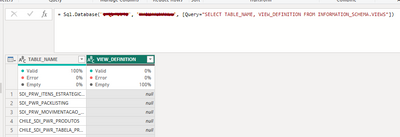
I use a SQL query to get data from SQL database to Power Query. However, there is a column that comes as null instead of its actual content.
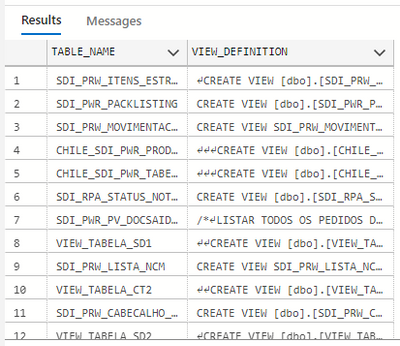
In SQL Management or Azure Data Studio:
SELECT TABLE_NAME, VIEW_DEFINITION FROM INFORMATION_SCHEMA.VIEWS
In Power BI (Power Query):
= Sql.Database("********", "********", [Query="SELECT TABLE_NAME, VIEW_DEFINITION FROM INFORMATION_SCHEMA.VIEWS"])
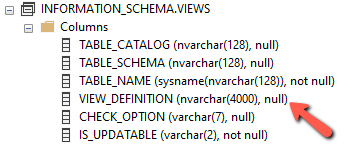
I noticed that this column has nvarchar(4000) format.
I did some tests with other tables that have columns with the same format (nvarchar (4000)), the error persists.
I found THIS thread where the person has a very similar problem, but the proposed solution didn't work. I couldn't find any other related to this.
Any idea what's happening?
Hi @edhans, thanks for your message!
I will do as per you suggestion and create a post in the Issues section.
Well, it is either a bug or a limitation. I would post this in the Issues forum here Issues - Microsoft Power BI Community - that is the one forum that MS engineers look at to see what bugs crop up.
DAX is for Analysis. Power Query is for Data Modeling
Proud to be a Super User!
MCSA: BI ReportingShare feedback directly with Fabric product managers, participate in targeted research studies and influence the Fabric roadmap.
Check out the February 2026 Power BI update to learn about new features.
| User | Count |
|---|---|
| 10 | |
| 9 | |
| 8 | |
| 7 | |
| 7 |