Join us at FabCon Atlanta from March 16 - 20, 2026, for the ultimate Fabric, Power BI, AI and SQL community-led event. Save $200 with code FABCOMM.
Register now!Vote for your favorite vizzies from the Power BI Dataviz World Championship submissions. Vote now!
Hello BI community, I need some help from you.
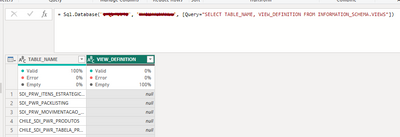
I use a SQL query to get data from SQL database to Power Query. However, there is a column that comes as null instead of its actual content.
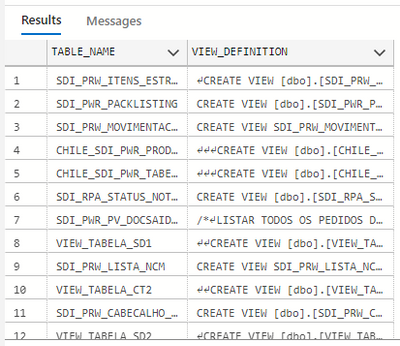
In SQL Management or Azure Data Studio:
SELECT TABLE_NAME, VIEW_DEFINITION FROM INFORMATION_SCHEMA.VIEWS
In Power BI (Power Query):
= Sql.Database("********", "********", [Query="SELECT TABLE_NAME, VIEW_DEFINITION FROM INFORMATION_SCHEMA.VIEWS"])
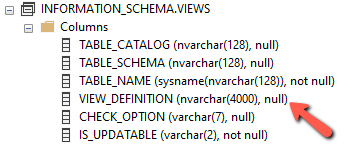
I noticed that this column has nvarchar(4000) format.
I did some tests with other tables that have columns with the same format (nvarchar (4000)), the error persists.
I found THIS thread where the person has a very similar problem, but the proposed solution didn't work. I couldn't find any other related to this.
Any idea what's happening?
Hi @edhans, thanks for your message!
I will do as per you suggestion and create a post in the Issues section.
Well, it is either a bug or a limitation. I would post this in the Issues forum here Issues - Microsoft Power BI Community - that is the one forum that MS engineers look at to see what bugs crop up.
DAX is for Analysis. Power Query is for Data Modeling
Proud to be a Super User!
MCSA: BI ReportingVote for your favorite vizzies from the Power BI World Championship submissions!
If you love stickers, then you will definitely want to check out our Community Sticker Challenge!
Check out the January 2026 Power BI update to learn about new features.
| User | Count |
|---|---|
| 12 | |
| 11 | |
| 7 | |
| 7 | |
| 6 |