Get Fabric or SQL Certified for Free.
Get certified for free when you join Fabric Data Days 2026 and dive into Fabric, Power BI, SQL, AI, and other essential data skills.
Join now- Power BI forums
- Get Help with Power BI
- Desktop
- Service
- Report Server
- Power Query
- Mobile Apps
- Developer
- DAX Commands and Tips
- Custom Visuals Development Discussion
- Health and Life Sciences
- Power BI Spanish forums
- Translated Spanish Desktop
- Training and Consulting
- Instructor Led Training
- Dashboard in a Day for Women, by Women
- Galleries
- Data Stories Gallery
- Themes Gallery
- Contests Gallery
- QuickViz Gallery
- Quick Measures Gallery
- Visual Calculations Gallery
- Fabric Apps Gallery
- Notebook Gallery
- Translytical Task Flow Gallery
- TMDL Gallery
- R Script Showcase
- Webinars and Video Gallery
- Ideas
- Custom Visuals Ideas (read-only)
- Issues
- Issues
- Events
- Upcoming Events
July 28 - August 9 | Final Round of the Power BI Dataviz World Championships. This is your chance. Learn more
- Power BI forums
- Forums
- Get Help with Power BI
- Power Query
- Re: Power Query needed formula
- Subscribe to RSS Feed
- Mark Topic as New
- Mark Topic as Read
- Float this Topic for Current User
- Bookmark
- Subscribe
- Printer Friendly Page

- Mark as New
- Bookmark
- Subscribe
- Mute
- Subscribe to RSS Feed
- Permalink
- Report Inappropriate Content
Power Query needed formula
I have the following situation.
| Column A | Column B |
| AAA | |
| AAA | |
| CCC | |
| BBB | |
| DDD | |
| CCC | |
| CCC | deactive |
| DDD | deactive |
In Column A are different values. In column B one value "deactive" is set. I am searching for a formula that now putting the value in Column C "deactive" in every row were Column A is null (see table below as a solution).
| Column A | Column B | Column C |
| AAA | ||
| AAA | ||
| CCC | deactive | |
| BBB | ||
| DDD | deactive | |
| CCC | deactive | |
| CCC | deactive | deactive |
| DDD | deactive | deactive |
I hope someone can help me out 🙂
Cheers,
Kai
Solved! Go to Solution.


- Mark as New
- Bookmark
- Subscribe
- Mute
- Subscribe to RSS Feed
- Permalink
- Report Inappropriate Content
@Kaitra ,
Ah yes, I see.
In Power Query, go to New Source>Blank Query then in Advanced Editor paste my code over the default code. You can then follow the steps I took to complete this:
let
    Source = Table.FromRows(Json.Document(Binary.Decompress(Binary.FromText("i45WcnR0VNJRUlCK1UFlOzs7w9lOTk5wtouLC1Y1EHZKamJySWZZKpJShFAsAA==", BinaryEncoding.Base64), Compression.Deflate)), let _t = ((type nullable text) meta [Serialized.Text = true]) in type table [#"Column A" = _t, #"Column B" = _t]),
    chgTypes = Table.TransformColumnTypes(Source,{{"Column A", type text}, {"Column B", type text}}),
    groupColumnA = Table.Group(chgTypes, {"Column A"}, {{"data", each _, type table [Column A=nullable text, Column B=nullable text]}}),
    addMaxColumnB = Table.AddColumn(groupColumnA, "maxColumnB", each Table.Max([data], "Column B")),
    expandMaxColumnB = Table.ExpandRecordColumn(addMaxColumnB, "maxColumnB", {"Column B"}, {"Column B"}),
    expandData = Table.ExpandTableColumn(expandMaxColumnB, "data", {"Column B"}, {"Column B.1"})
in
    expandData
SUMMARY:
1) Group table on [Column A] and keep All Rows as [data]
2) Get max value of column B from nested table and expand record
3) Expand [data] again to reinstate original data
This gives me the following output:
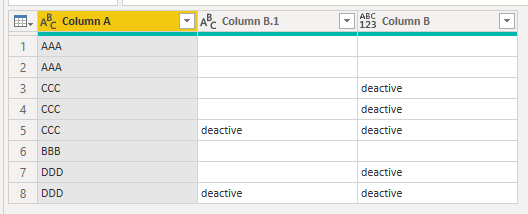
Pete
Now accepting Kudos! If my post helped you, why not give it a thumbs-up?
Proud to be a Datanaut!

- Mark as New
- Bookmark
- Subscribe
- Mute
- Subscribe to RSS Feed
- Permalink
- Report Inappropriate Content
I had something written before I saw @BA_Pete's answer. Please accept that one if it works for you but I thought I might as well post a slightly different alternative since it's already written.
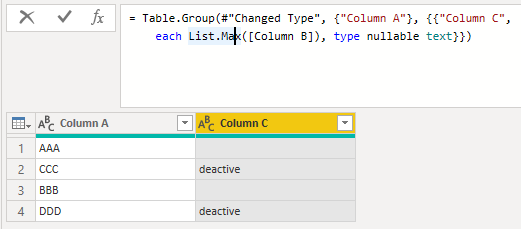
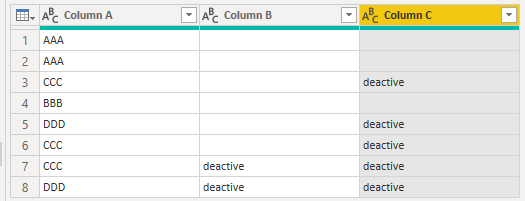
You could group by Column A and define the max over Column B as Column C and then merge this back to the original table.
Group:
Merge and Expand:
Full sample M code you can paste into your Advanced Editor:
let
    Source = Table.FromRows(Json.Document(Binary.Decompress(Binary.FromText("i45WcnR0VNJRUlCK1UFlOzs7w9lOTk5wtouLC1Y1EHZKamJySWZZKpJShFAsAA==", BinaryEncoding.Base64), Compression.Deflate)), let _t = ((type nullable text) meta [Serialized.Text = true]) in type table [#"Column A" = _t, #"Column B" = _t]),
    #"Changed Type" = Table.TransformColumnTypes(Source,{{"Column A", type text}, {"Column B", type text}}),
    #"Grouped Rows" = Table.Group(#"Changed Type", {"Column A"}, {{"Column C", each List.Max([Column B]), type nullable text}}),
    #"Merged Queries" = Table.NestedJoin(#"Changed Type", {"Column A"}, #"Grouped Rows", {"Column A"}, "Grouped Rows", JoinKind.LeftOuter),
    #"Expanded Grouped Rows" = Table.ExpandTableColumn(#"Merged Queries", "Grouped Rows", {"Column C"}, {"Column C"})
in
    #"Expanded Grouped Rows"
- Mark as New
- Bookmark
- Subscribe
- Mute
- Subscribe to RSS Feed
- Permalink
- Report Inappropriate Content
Hi @ anyone who might be interested.
Just for fun, I combined my solution and @AlexisOlson 's solution into a single step.
The following should be added as a custom step:
Table.Group(
    previousStep,
    {"Column A"},
    {
        {"Column C", each try
        Text.Split(
            Text.Trim(
                Text.Repeat(
                    List.Max([Column B]) & " ",
                    Table.RowCount(_)
                )
            ), " "
        ) otherwise null}
    }
)
Expand the resulting list and, Voila!
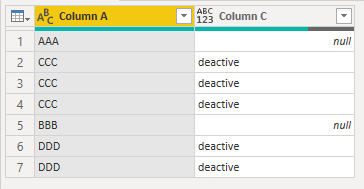
Full M code:
let
    Source = Table.FromRows(Json.Document(Binary.Decompress(Binary.FromText("i45WcnR0VNJRUlCK1YGxwUxnZ2e4sJOTE5zt4uICZyOrgbBTUhOTSzLLUpGUIoRiAQ==", BinaryEncoding.Base64), Compression.Deflate)), let _t = ((type nullable text) meta [Serialized.Text = true]) in type table [#"Column A" = _t, #"Column B" = _t]),
    repBlankNull = Table.ReplaceValue(Source," ",null,Replacer.ReplaceValue,{"Column B"}),
    groupColumnA =
    Table.Group(
        repBlankNull,
        {"Column A"},
        {
            {"Column C", each try
            Text.Split(
                Text.Trim(
                    Text.Repeat(
                        List.Max([Column B]) & " ",
                        Table.RowCount(_)
                    )
                ), " "
            ) otherwise null}
        }
    ),
    expandColumnC = Table.ExpandListColumn(groupColumnA, "Column C")
in
    expandColumnC
Pete
Now accepting Kudos! If my post helped you, why not give it a thumbs-up?
Proud to be a Datanaut!
- Mark as New
- Bookmark
- Subscribe
- Mute
- Subscribe to RSS Feed
- Permalink
- Report Inappropriate Content
This is a fun combo. 🙂
Not ideal if there are additional columns in the query though.
- Mark as New
- Bookmark
- Subscribe
- Mute
- Subscribe to RSS Feed
- Permalink
- Report Inappropriate Content
Thanks a lot both of you. I really appreciate the quick and helpful support here in the forum!!!
Like @AlexisOlson mentioned, I had additional columns which I needed (forget to mention in the topic). So the solution from both of you is working pretty well 🙂
- Mark as New
- Bookmark
- Subscribe
- Mute
- Subscribe to RSS Feed
- Permalink
- Report Inappropriate Content
I had something written before I saw @BA_Pete's answer. Please accept that one if it works for you but I thought I might as well post a slightly different alternative since it's already written.
You could group by Column A and define the max over Column B as Column C and then merge this back to the original table.
Group:
Merge and Expand:
Full sample M code you can paste into your Advanced Editor:
let
    Source = Table.FromRows(Json.Document(Binary.Decompress(Binary.FromText("i45WcnR0VNJRUlCK1UFlOzs7w9lOTk5wtouLC1Y1EHZKamJySWZZKpJShFAsAA==", BinaryEncoding.Base64), Compression.Deflate)), let _t = ((type nullable text) meta [Serialized.Text = true]) in type table [#"Column A" = _t, #"Column B" = _t]),
    #"Changed Type" = Table.TransformColumnTypes(Source,{{"Column A", type text}, {"Column B", type text}}),
    #"Grouped Rows" = Table.Group(#"Changed Type", {"Column A"}, {{"Column C", each List.Max([Column B]), type nullable text}}),
    #"Merged Queries" = Table.NestedJoin(#"Changed Type", {"Column A"}, #"Grouped Rows", {"Column A"}, "Grouped Rows", JoinKind.LeftOuter),
    #"Expanded Grouped Rows" = Table.ExpandTableColumn(#"Merged Queries", "Grouped Rows", {"Column C"}, {"Column C"})
in
    #"Expanded Grouped Rows"
- Mark as New
- Bookmark
- Subscribe
- Mute
- Subscribe to RSS Feed
- Permalink
- Report Inappropriate Content
Hi @Kaitra ,
I'm not sure I understand: you have values in column C where column A isn't null.
Have I misunderstood your requirement?
Pete
Now accepting Kudos! If my post helped you, why not give it a thumbs-up?
Proud to be a Datanaut!
- Mark as New
- Bookmark
- Subscribe
- Mute
- Subscribe to RSS Feed
- Permalink
- Report Inappropriate Content
Hi @BA_Pete
the source table is the first one. I'd like to have column C as a result. Column C doesn't exist in the current table. I needs to be created. So the situation is, that in Column B a value is set only for one entry, I'd like to have it for every matching entry. In my example it would be "CCC" and "DDD".
- Mark as New
- Bookmark
- Subscribe
- Mute
- Subscribe to RSS Feed
- Permalink
- Report Inappropriate Content
@Kaitra ,
Ah yes, I see.
In Power Query, go to New Source>Blank Query then in Advanced Editor paste my code over the default code. You can then follow the steps I took to complete this:
let
    Source = Table.FromRows(Json.Document(Binary.Decompress(Binary.FromText("i45WcnR0VNJRUlCK1UFlOzs7w9lOTk5wtouLC1Y1EHZKamJySWZZKpJShFAsAA==", BinaryEncoding.Base64), Compression.Deflate)), let _t = ((type nullable text) meta [Serialized.Text = true]) in type table [#"Column A" = _t, #"Column B" = _t]),
    chgTypes = Table.TransformColumnTypes(Source,{{"Column A", type text}, {"Column B", type text}}),
    groupColumnA = Table.Group(chgTypes, {"Column A"}, {{"data", each _, type table [Column A=nullable text, Column B=nullable text]}}),
    addMaxColumnB = Table.AddColumn(groupColumnA, "maxColumnB", each Table.Max([data], "Column B")),
    expandMaxColumnB = Table.ExpandRecordColumn(addMaxColumnB, "maxColumnB", {"Column B"}, {"Column B"}),
    expandData = Table.ExpandTableColumn(expandMaxColumnB, "data", {"Column B"}, {"Column B.1"})
in
    expandData
SUMMARY:
1) Group table on [Column A] and keep All Rows as [data]
2) Get max value of column B from nested table and expand record
3) Expand [data] again to reinstate original data
This gives me the following output:
Pete
Now accepting Kudos! If my post helped you, why not give it a thumbs-up?
Proud to be a Datanaut!
- Mark as New
- Bookmark
- Subscribe
- Mute
- Subscribe to RSS Feed
- Permalink
- Report Inappropriate Content
Thanks a lot, that helped me a lot!!!

Helpful resources

Fabric Community Sticker Challenge - Barcelona 2026
If you love stickers, then you will definitely want to check out our community sticker challenge, Barcelona edition!

Power BI Monthly Update - July 2026
Check out the July 2026 Power BI update to learn about new features.

Power BI DataViz World Championships - June 2026
A new Power BI DataViz World Championship is coming this June! Don't miss out on submitting your entry.


