Join us at FabCon Atlanta from March 16 - 20, 2026, for the ultimate Fabric, Power BI, AI and SQL community-led event. Save $200 with code FABCOMM.
Register now!The Power BI Data Visualization World Championships is back! Get ahead of the game and start preparing now! Learn more
Hello,
When I load a text ID from PQ directly into Power Pivot (Excel), the case of the string is being changed.
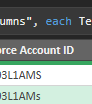
In PQ the IDs show as "3L1AMs" and "3L1AMS", but in PP they both become "3L1AMS." What is weird, is when I filter to just "3L1AMs" (lowercase s), the row loads correctly. It is only when both are included that one is wrong after loading.
FYI, PQ also loads it incorrectly to a table. This is a PQ issue, not PP issue.
I think this is a bug and might need review from the PQ team. Thoughts?
PQ is below
PP is below
Excel table
Hi @KPMTGG - Power Query has different case-sensitivty rules to Tabular Data Model. In Power Query, "a" does not equal "A". In DAX, "a" and "A" are same. The fact that capital "S" is using instead of "s" is just that indexing was based on the first instance. Please read the following to understand why Tabular Data Model works this way: Letter case-sensitivity in DAX, Power BI and Analysis Services - SQLBI
@Daryl-Lynch-Bzy I understand that. This is a Power Query issue, not a PBI issue. When loading data from PQ into a table in Excel, not in Power Pivot, it should use the correct case, i.e. it should have a lower case S.
The Power BI Data Visualization World Championships is back! Get ahead of the game and start preparing now!
| User | Count |
|---|---|
| 19 | |
| 10 | |
| 9 | |
| 7 | |
| 6 |