Learn from the best! Meet the four finalists headed to the FINALS of the Power BI Dataviz World Championships! Register now
Hello everyone,
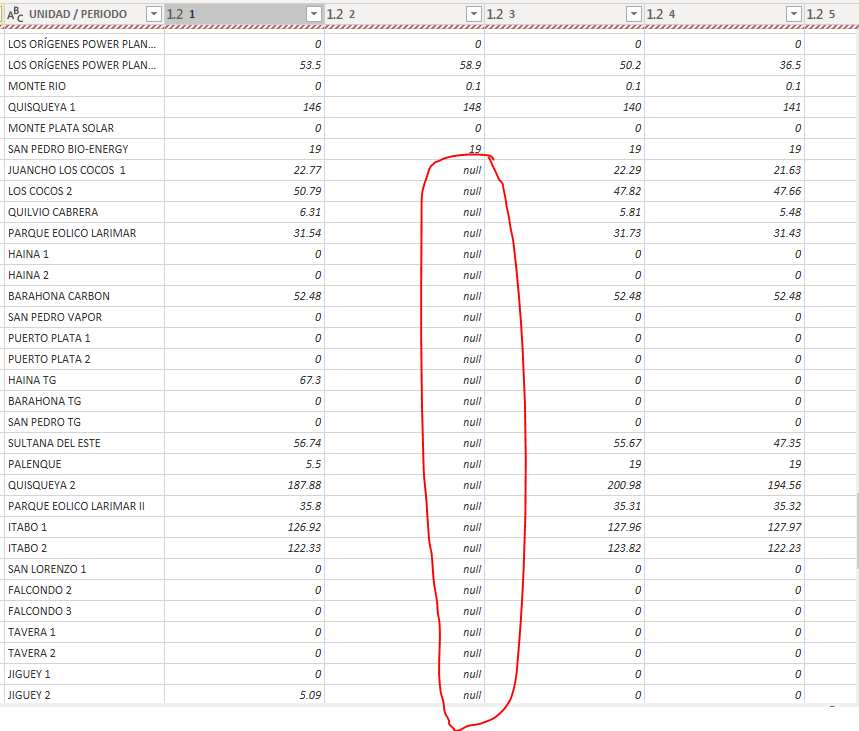
I've uploaded a database to PowerQuery, but it's not recognizing some numbers. The problem appears in only one column of some files. I've checked every file and the column the program doesn't recognize is formated as number just like the other columns. I don't know what's happening here.
Does anybody knows how to solve this? Thanks
Hi @danyac1591
It is appreciated of you to paste some filtered data from data source here so i can use your data to reproduce this problem.
Please let me know what steps you have made in "applied setps" pane, do you change any data type for any column?
Best Regards
Maggie
Hi @v-juanli-msft ,
Thanks for replying.
Here's the data and the PBI file: https://dencmi-my.sharepoint.com/:f:/p/dacuna/EmDwOBxc7U1Mr0zc9lXW_UoB_prKgikI8bIBka2x0iGSpg?e=jrhRt...
So no one can help me with this? 😭
If you have recently started exploring Fabric, we'd love to hear how it's going. Your feedback can help with product improvements.
A new Power BI DataViz World Championship is coming this June! Don't miss out on submitting your entry.
Share feedback directly with Fabric product managers, participate in targeted research studies and influence the Fabric roadmap.
| User | Count |
|---|---|
| 6 | |
| 4 | |
| 3 | |
| 2 | |
| 2 |
| User | Count |
|---|---|
| 11 | |
| 10 | |
| 8 | |
| 7 | |
| 7 |