
Join us at FabCon Atlanta from March 16 - 20, 2026, for the ultimate Fabric, Power BI, AI and SQL community-led event. Save $200 with code FABCOMM.
Register now!The Power BI Data Visualization World Championships is back! Get ahead of the game and start preparing now! Learn more
Hey all,
I am trying to create a Power Query from a folder which contains a CSV file.
Unfortunatly i am getting an error.
After clicking on the " Binary" sign, i get the error below.
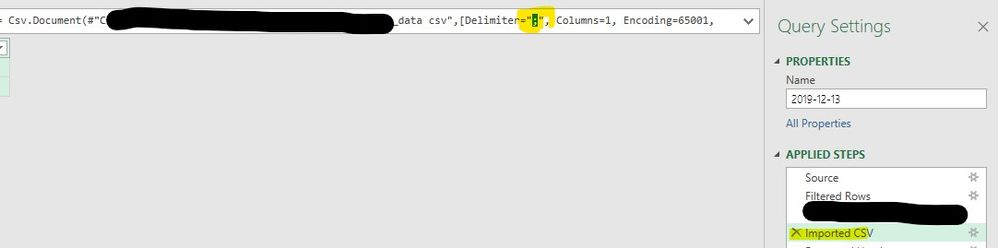
I think it's due to the Delimiter.
But i don't know how to solve it.
Does anybody now how to solve this?
Thanks in advance!!!!
Solved! Go to Solution.
Hi @Anonymous
Try this:
let
Source = Folder.Files("O:\EXPIRATIES"),
#"Sorted Rows" = Table.Sort(Source,{{"Date created", Order.Descending}}),
#"Kept First Rows" = Table.FirstN(#"Sorted Rows",1),
ImportCSV = Csv.Document(#"Kept First Rows"{0}[Content],[Delimiter=";", Columns=1, Encoding=65001, QuoteStyle=QuoteStyle.None])
in
ImportCSV
Kind regards,
JB
Hi @Anonymous ,
We can change the "Imported CSV" step, from
= Csv.Document(#"Previous Step Name",[Delimiter=",", Columns=1, Encoding=65001, QuoteStyle=QuoteStyle.None])
To
= Csv.Document(#"Previous Step Name",[Delimiter=";", Columns=1, Encoding=65001, QuoteStyle=QuoteStyle.None])
Then we can add a "Use First Row as Headers" step after imported CSV
Best regards,
Hey v-lid-msft,
Thanks for your response 🙂
Unfortunately i seem to be unable to adjust your steps 😞
Do you perhaps know what i should add in the advanced editor?
Thanks in advance,
Vianney123
let
Source = Folder.Files("O:\EXPIRATIES"),
#"Sorted Rows" = Table.Sort(Source,{{"Date created", Order.Descending}}),
#"Kept First Rows" = Table.FirstN(#"Sorted Rows",1)
in
#"Kept First Rows"
Hi @Anonymous
Try this:
let
Source = Folder.Files("O:\EXPIRATIES"),
#"Sorted Rows" = Table.Sort(Source,{{"Date created", Order.Descending}}),
#"Kept First Rows" = Table.FirstN(#"Sorted Rows",1),
ImportCSV = Csv.Document(#"Kept First Rows"{0}[Content],[Delimiter=";", Columns=1, Encoding=65001, QuoteStyle=QuoteStyle.None])
in
ImportCSV
Kind regards,
JB
@Anonymous Works like a charm! Thanks!!!
Hello @Anonymous
what is the idea to read from the folder and then from csv-file?
If you only need this file only, query your file directly with the TXT/CSV function. This help importing your data with a special wizard. If you need do read the binary data from your flder consider using this csv-converting function like this (your file seems european standard and devided with semicolon)
= Csv.Document(YourBinaryDataUsindForExampleFileContents,[Delimiter=";", Columns=4, Encoding=1252, QuoteStyle=QuoteStyle.None])
If this post helps or solves your problem, please mark it as solution (to help other users find useful content and to acknowledge the work of users that helped you)
Kudoes are nice too
Have fun
Jimmy
Check out the November 2025 Power BI update to learn about new features.
Advance your Data & AI career with 50 days of live learning, contests, hands-on challenges, study groups & certifications and more!
| User | Count |
|---|---|
| 10 | |
| 6 | |
| 5 | |
| 4 | |
| 3 |