Join us at FabCon Atlanta from March 16 - 20, 2026, for the ultimate Fabric, Power BI, AI and SQL community-led event. Save $200 with code FABCOMM.
Register now!The Power BI Data Visualization World Championships is back! Get ahead of the game and start preparing now! Learn more
Hello,
I need to calculate the average value of the column "value" for the former sprint. I have added a column "date of end" which the date of end of each sprint.
I have added a custom column that shows 1 when "asofdate" = "date of end" so that I know the average we had at the end of a sprint. But that way I can have a match also for past or future sprints. I need only to have a match for my former sprint that is over.
How can I calculate this average please?
https://www.dropbox.com/s/x5lg95zfhxtbmgo/sample%20data.xlsx?dl=0
Solved! Go to Solution.
@Anonymous
The simplest way is fill up and group by the end date to get the average value.
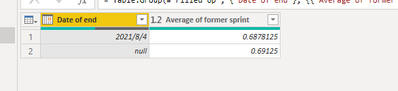
Steps:
1. Fill up
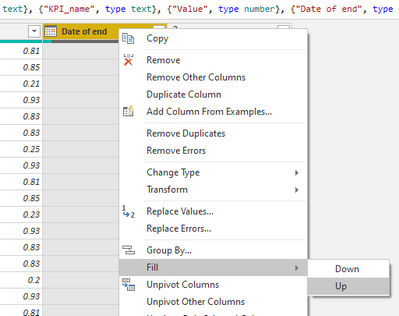
2. Group by
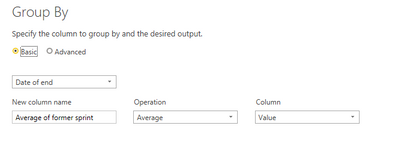
Or just copy and paste the following code into advanced editor and then check the applied steps.
let
Source = Table.FromRows(Json.Document(Binary.Decompress(Binary.FromText("rdnLToNQGATgV2lYG1OoWli6cWHiShMXTRcUUUlqa7gsfHtLm2gqZ+a/HFdekg87DCpTVqvkuX7Z1d1L+TXL8tn9sD18nGdpcpEM7Xb8UFZV3XXNptk2/dfh6/llPn57/CxZX8i+q/cndW1Rn3X7um8/yl1VH3Vm+pmbuus/27Lqm8NrP/piofVZOLPJ/2Q2qUlm9RnLFJmf3of2xAtPzQIPtyygSWDLC47Iq6lY4OGGBTTJa7BS3Lu2GfFi7imX4nC1lNCgVLpjajqlONwoJX9jpjdqKuV8LPuhPfLUU6jAw5UKaJI2N+CIvJpmBR7uVkDuvOF+8+UZH3YjTme3w9vQ9dZ6qQbtUiOEpVbsFmpVtVSDZqnxZtX0+rA/6szXK9fhXrnhWbmVesVa0yvX4V658WbV9Po0nO69Fr5iBQ7unjjicQUckVd198Q5uHviiN89cSvF/b25vjIVjF2qO+5Z89FHm1wS2X8cFZy8qOOSiyj6uGdXV/TRJuf0X7I7z+nPSLh2/h0SvDDjgJqcosKi1UMu4E1LDnhhygHF36CQtHLm3Pha5pruOWA0gw5Qf1TDpAOabjpg+L9VbtUrZ+m87xe8sOuA4r++ko7JbJp2wAvbDih/ZsO6y6PWHdB03QEjpKVWue4C2rDugKbrDhhvVsO6K6LWHdB03QHDs3KrXHcBbVh3QNN1B4w3q2XdpfO4eYc833dIqQYPwuJdFfGWhYc8n3hI6TYt0vrHPqnzjTf5CNLjLuQmyY2vPC677aEXOoL02As5eqHLnEZffwM=", BinaryEncoding.Base64), Compression.Deflate)), let _t = ((type nullable text) meta [Serialized.Text = true]) in type table [asofdate = _t, url = _t, KPI_name = _t, Value = _t, #"Date of end" = _t, Custom = _t]),
#"Changed Type" = Table.TransformColumnTypes(Source,{{"asofdate", type date}, {"url", type text}, {"KPI_name", type text}, {"Value", type number}, {"Date of end", type date}, {"Custom", Int64.Type}}),
#"Filled Up" = Table.FillUp(#"Changed Type",{"Date of end"}),
#"Grouped Rows" = Table.Group(#"Filled Up", {"Date of end"}, {{"Average of former sprint", each List.Average([Value]), type nullable number}})
in
#"Grouped Rows"
Paul Zheng _ Community Support Team
If this post helps, please Accept it as the solution to help the other members find it more quickly.
@Anonymous
The simplest way is fill up and group by the end date to get the average value.
Steps:
1. Fill up
2. Group by
Or just copy and paste the following code into advanced editor and then check the applied steps.
let
Source = Table.FromRows(Json.Document(Binary.Decompress(Binary.FromText("rdnLToNQGATgV2lYG1OoWli6cWHiShMXTRcUUUlqa7gsfHtLm2gqZ+a/HFdekg87DCpTVqvkuX7Z1d1L+TXL8tn9sD18nGdpcpEM7Xb8UFZV3XXNptk2/dfh6/llPn57/CxZX8i+q/cndW1Rn3X7um8/yl1VH3Vm+pmbuus/27Lqm8NrP/piofVZOLPJ/2Q2qUlm9RnLFJmf3of2xAtPzQIPtyygSWDLC47Iq6lY4OGGBTTJa7BS3Lu2GfFi7imX4nC1lNCgVLpjajqlONwoJX9jpjdqKuV8LPuhPfLUU6jAw5UKaJI2N+CIvJpmBR7uVkDuvOF+8+UZH3YjTme3w9vQ9dZ6qQbtUiOEpVbsFmpVtVSDZqnxZtX0+rA/6szXK9fhXrnhWbmVesVa0yvX4V658WbV9Po0nO69Fr5iBQ7unjjicQUckVd198Q5uHviiN89cSvF/b25vjIVjF2qO+5Z89FHm1wS2X8cFZy8qOOSiyj6uGdXV/TRJuf0X7I7z+nPSLh2/h0SvDDjgJqcosKi1UMu4E1LDnhhygHF36CQtHLm3Pha5pruOWA0gw5Qf1TDpAOabjpg+L9VbtUrZ+m87xe8sOuA4r++ko7JbJp2wAvbDih/ZsO6y6PWHdB03QEjpKVWue4C2rDugKbrDhhvVsO6K6LWHdB03QHDs3KrXHcBbVh3QNN1B4w3q2XdpfO4eYc833dIqQYPwuJdFfGWhYc8n3hI6TYt0vrHPqnzjTf5CNLjLuQmyY2vPC677aEXOoL02As5eqHLnEZffwM=", BinaryEncoding.Base64), Compression.Deflate)), let _t = ((type nullable text) meta [Serialized.Text = true]) in type table [asofdate = _t, url = _t, KPI_name = _t, Value = _t, #"Date of end" = _t, Custom = _t]),
#"Changed Type" = Table.TransformColumnTypes(Source,{{"asofdate", type date}, {"url", type text}, {"KPI_name", type text}, {"Value", type number}, {"Date of end", type date}, {"Custom", Int64.Type}}),
#"Filled Up" = Table.FillUp(#"Changed Type",{"Date of end"}),
#"Grouped Rows" = Table.Group(#"Filled Up", {"Date of end"}, {{"Average of former sprint", each List.Average([Value]), type nullable number}})
in
#"Grouped Rows"
Paul Zheng _ Community Support Team
If this post helps, please Accept it as the solution to help the other members find it more quickly.
The Power BI Data Visualization World Championships is back! Get ahead of the game and start preparing now!
Check out the November 2025 Power BI update to learn about new features.