This is best Fabric, Power BI, SQL and AI community event. How do we know? The last event sold out! Save €200 with code FABCMTY200.
Register nowA new Data Days event is coming soon! This time we’re going bigger than ever. Fabric, Power BI, SQL, AI and more. Don't miss out.
I have three columns Last Name, First Name and Preferred Name.
Some of the records in these are NULL.
I have to create a custom column called Person Name which will have data like below, based on last name,first name and preferred name.
For example :
Expected Output :
Last name First Name Preferred Name Person Name
Hans Samuel NULL Hans, Samuel
Alfred NULL NULL Alfred
Kennedy John Joe Kennedy, John (Joe)
-----------------------------------------------------------------------------------------------------------------------------
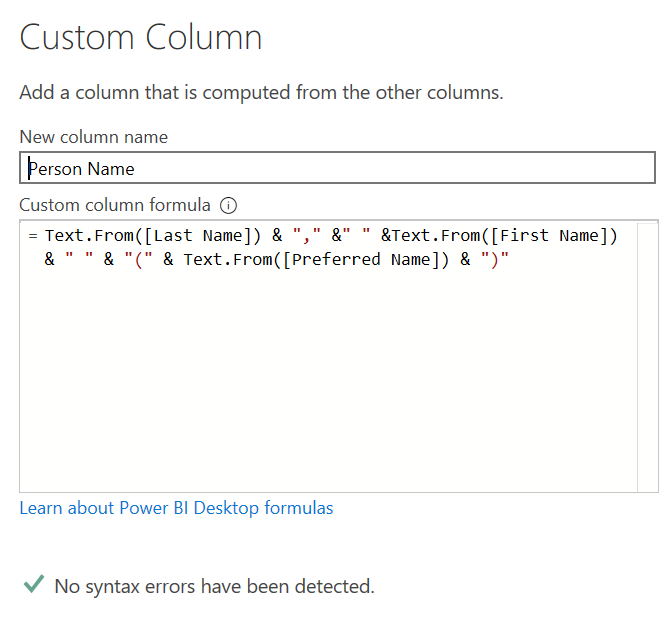
My Query :
My query
This generates values like :
Person Name
NULL
NULL
Kennedy, John (Joe)
Solved! Go to Solution.
Try this formula
Text.Combine({[Last Name],[First Name]},", ") &
(if [Preferred Name] = null then "" else " ("&[Preferred Name]&")")
Try this formula
Text.Combine({[Last Name],[First Name]},", ") &
(if [Preferred Name] = null then "" else " ("&[Preferred Name]&")")
Check out the May 2026 Power BI update to learn about new features.
Sign up to receive a private message when registration opens and key events begin.
If you have recently started exploring Fabric, we'd love to hear how it's going. Your feedback can help with product improvements.
| User | Count |
|---|---|
| 4 | |
| 3 | |
| 2 | |
| 2 | |
| 1 |