Share feedback directly with Fabric product managers, participate in targeted research studies and influence the Fabric roadmap.
Sign up nowGet Fabric certified for FREE! Don't miss your chance! Learn more
I have three columns Last Name, First Name and Preferred Name.
Some of the records in these are NULL.
I have to create a custom column called Person Name which will have data like below, based on last name,first name and preferred name.
For example :
Expected Output :
Last name First Name Preferred Name Person Name
Hans Samuel NULL Hans, Samuel
Alfred NULL NULL Alfred
Kennedy John Joe Kennedy, John (Joe)
-----------------------------------------------------------------------------------------------------------------------------
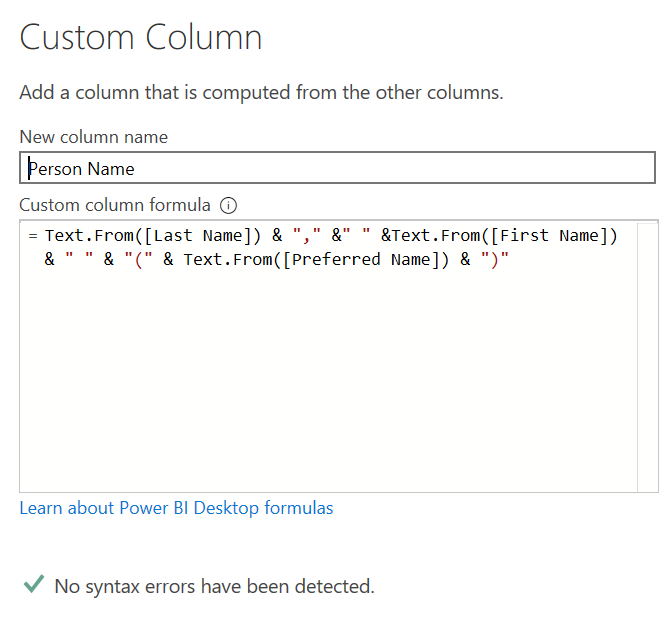
My Query :
My query
This generates values like :
Person Name
NULL
NULL
Kennedy, John (Joe)
Solved! Go to Solution.
Try this formula
Text.Combine({[Last Name],[First Name]},", ") &
(if [Preferred Name] = null then "" else " ("&[Preferred Name]&")")
Try this formula
Text.Combine({[Last Name],[First Name]},", ") &
(if [Preferred Name] = null then "" else " ("&[Preferred Name]&")")
Share feedback directly with Fabric product managers, participate in targeted research studies and influence the Fabric roadmap.
| User | Count |
|---|---|
| 7 | |
| 4 | |
| 4 | |
| 4 | |
| 3 |
| User | Count |
|---|---|
| 12 | |
| 11 | |
| 11 | |
| 7 | |
| 6 |