Join us at FabCon Atlanta from March 16 - 20, 2026, for the ultimate Fabric, Power BI, AI and SQL community-led event. Save $200 with code FABCOMM.
Register now!The Power BI Data Visualization World Championships is back! Get ahead of the game and start preparing now! Learn more
Hello all,
I know to to create a reduced table in Table View using this code:
CGJOBS Reduced = CALCULATETABLE(CGJOBS, CGJOBS[JOB] IN VALUES (realocJOBS [JOB]))
But I need to create the same reduced table from a copy of the original CGJOBS in query mode using M code. Any suggestion?
Thanks in advance.
Solved! Go to Solution.
Hi @Fcoatis
Copy CGJOBS and paste in Edit queries, then we get a table CGJOBS(2),
Merge queries in CGJOBS(2),
Expand "JOB" , then remove blank values
let
Source = Excel.Workbook(File.Contents("C:\Users\maggiel\Desktop\case\8\8.2\8.2.xlsx"), null, true),
CGJOBS_Sheet = Source{[Item="CGJOBS",Kind="Sheet"]}[Data],
#"Promoted Headers" = Table.PromoteHeaders(CGJOBS_Sheet, [PromoteAllScalars=true]),
#"Changed Type" = Table.TransformColumnTypes(#"Promoted Headers",{{"JOB", Int64.Type}, {"value", type text}}),
#"Merged Queries" = Table.NestedJoin(#"Changed Type", {"JOB"}, realocJOBS, {"JOB"}, "realocJOBS", JoinKind.LeftOuter),
#"Expanded realocJOBS" = Table.ExpandTableColumn(#"Merged Queries", "realocJOBS", {"JOB"}, {"realocJOBS.JOB"}),
#"Filtered Rows" = Table.SelectRows(#"Expanded realocJOBS", each [realocJOBS.JOB] <> null and [realocJOBS.JOB] <> ""),
#"Removed Columns" = Table.RemoveColumns(#"Filtered Rows",{"realocJOBS.JOB"})
in
#"Removed Columns"
Best Regards
Maggie
Community Support Team _ Maggie Li
If this post helps, then please consider Accept it as the solution to help the other members find it more quickly.
Hi @Fcoatis
Copy CGJOBS and paste in Edit queries, then we get a table CGJOBS(2),
Merge queries in CGJOBS(2),
Expand "JOB" , then remove blank values
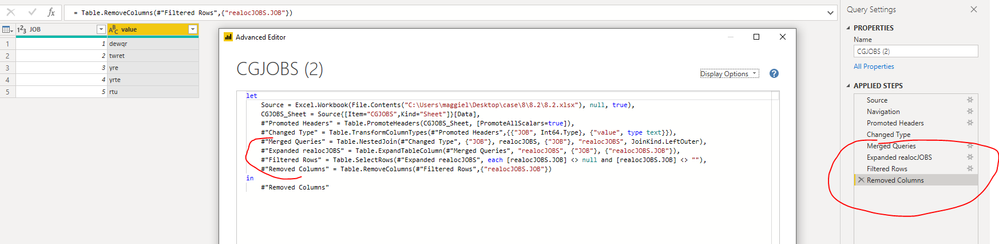
let
Source = Excel.Workbook(File.Contents("C:\Users\maggiel\Desktop\case\8\8.2\8.2.xlsx"), null, true),
CGJOBS_Sheet = Source{[Item="CGJOBS",Kind="Sheet"]}[Data],
#"Promoted Headers" = Table.PromoteHeaders(CGJOBS_Sheet, [PromoteAllScalars=true]),
#"Changed Type" = Table.TransformColumnTypes(#"Promoted Headers",{{"JOB", Int64.Type}, {"value", type text}}),
#"Merged Queries" = Table.NestedJoin(#"Changed Type", {"JOB"}, realocJOBS, {"JOB"}, "realocJOBS", JoinKind.LeftOuter),
#"Expanded realocJOBS" = Table.ExpandTableColumn(#"Merged Queries", "realocJOBS", {"JOB"}, {"realocJOBS.JOB"}),
#"Filtered Rows" = Table.SelectRows(#"Expanded realocJOBS", each [realocJOBS.JOB] <> null and [realocJOBS.JOB] <> ""),
#"Removed Columns" = Table.RemoveColumns(#"Filtered Rows",{"realocJOBS.JOB"})
in
#"Removed Columns"
Best Regards
Maggie
Community Support Team _ Maggie Li
If this post helps, then please consider Accept it as the solution to help the other members find it more quickly.
The Power BI Data Visualization World Championships is back! Get ahead of the game and start preparing now!
Check out the November 2025 Power BI update to learn about new features.