cancel
Showing results for 
Search instead for 
Did you mean: 

The Power BI Data Visualization World Championships is back! Get ahead of the game and start preparing now! Learn more

Reply
Anonymous
Not applicable

Power Query Text editor

Hello everybody, 


I have a data in which i merge about 40 different queries to get one evalutaion sheet of the data. For the documentation of the queries I would like to copy the M-Code of the queries and would like to save it in word file. 

Is there a possibilty to read out the code for all queries in one, or do I have to open the extended editor for each query and copy it to the word file. This would be very "labor intensity"


Thanks in advance for your help. 


1 ACCEPTED SOLUTION

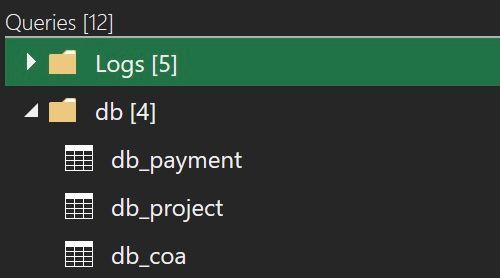
@Anonymous , I was under impression that your queries are located in single file like in the picture below and you wanted to get all of their content in some text editor. 

q.jpg

 You may select many queries like files in Explorer - just select first in the list, press Shift key and select the last one or press Ctrl select some of them. I am a bit lost. You don't need to open Advanced Editor to copy a text of your query/queries. Select and copy it's name (or several names) on the left pane of PQ editor. Then paste it in word processor and see what happens.  

View solution in original post

4 REPLIES 4
AlienSx
Super User
Super User

Hello, @Anonymous select all query names/titles in editor, Ctrl-C and Ctrl-V in your word processing app. 

Anonymous
Not applicable

Hey AlienSx, thanks for your fast reply. But to be honest....How I can select more than one query in editor?


Carl1985_0-1680437825854.png


@Anonymous , I was under impression that your queries are located in single file like in the picture below and you wanted to get all of their content in some text editor. 

q.jpg

 You may select many queries like files in Explorer - just select first in the list, press Shift key and select the last one or press Ctrl select some of them. I am a bit lost. You don't need to open Advanced Editor to copy a text of your query/queries. Select and copy it's name (or several names) on the left pane of PQ editor. Then paste it in word processor and see what happens.  

Anonymous
Not applicable

Hey Alien Sx, thanks again for your help. That's what I already tried before your solution. To be honest I was a litte bit confused when I did it before, because I got a code like this. 


<?xml version="1.0" encoding="utf-8"?><Mashup xmlns:xsd="http://www.w3.org/2001/XMLSchema" xmlns:xsi="http://www.w3.org/2001/XMLSchema-instance" xmlns="http://schemas.microsoft.com/DataMashup"><Client>EXCEL</Client><Version>2.115.243.0</Version><MinVersion>2.21.0.0</MinVersion><Culture>de-DE</Culture><SafeCombine>false</SafeCombine><Items><Query Name="Schichtbericht - Rohdaten"><Formula><![CDATA[let Quelle =


After your reply I checked the code a little bit more in detail and it works fine. Sorry for my "stupidness". I just have to format the layout a little bit. 


Helpful resources

Announcements
Power BI DataViz World Championships

Power BI Dataviz World Championships

The Power BI Data Visualization World Championships is back! Get ahead of the game and start preparing now!

December 2025 Power BI Update Carousel

Power BI Monthly Update - December 2025

Check out the December 2025 Power BI Holiday Recap!

FabCon Atlanta 2026 carousel

FabCon Atlanta 2026

Join us at FabCon Atlanta, March 16-20, for the ultimate Fabric, Power BI, AI and SQL community-led event. Save $200 with code FABCOMM.

Top Solution Authors