This time we’re going bigger than ever. Fabric, Power BI, SQL, AI and more. We're covering it all. You won't want to miss it.
Learn moreJoin the FabCon + SQLCon recap series. Up next: Power BI, Real-Time Intelligence, IQ and AI, and Data Factory take center stage. All sessions are available on-demand after the live show. Register now
Hello everybody,
I have a data in which i merge about 40 different queries to get one evalutaion sheet of the data. For the documentation of the queries I would like to copy the M-Code of the queries and would like to save it in word file.
Is there a possibilty to read out the code for all queries in one, or do I have to open the extended editor for each query and copy it to the word file. This would be very "labor intensity"
Thanks in advance for your help.
Solved! Go to Solution.
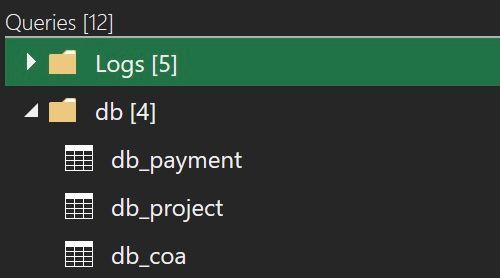
@Anonymous , I was under impression that your queries are located in single file like in the picture below and you wanted to get all of their content in some text editor.
You may select many queries like files in Explorer - just select first in the list, press Shift key and select the last one or press Ctrl select some of them. I am a bit lost. You don't need to open Advanced Editor to copy a text of your query/queries. Select and copy it's name (or several names) on the left pane of PQ editor. Then paste it in word processor and see what happens.
Hello, @Anonymous select all query names/titles in editor, Ctrl-C and Ctrl-V in your word processing app.
Hey AlienSx, thanks for your fast reply. But to be honest....How I can select more than one query in editor?
@Anonymous , I was under impression that your queries are located in single file like in the picture below and you wanted to get all of their content in some text editor.
You may select many queries like files in Explorer - just select first in the list, press Shift key and select the last one or press Ctrl select some of them. I am a bit lost. You don't need to open Advanced Editor to copy a text of your query/queries. Select and copy it's name (or several names) on the left pane of PQ editor. Then paste it in word processor and see what happens.
Hey Alien Sx, thanks again for your help. That's what I already tried before your solution. To be honest I was a litte bit confused when I did it before, because I got a code like this.
<?xml version="1.0" encoding="utf-8"?><Mashup xmlns:xsd="http://www.w3.org/2001/XMLSchema" xmlns:xsi="http://www.w3.org/2001/XMLSchema-instance" xmlns="http://schemas.microsoft.com/DataMashup"><Client>EXCEL</Client><Version>2.115.243.0</Version><MinVersion>2.21.0.0</MinVersion><Culture>de-DE</Culture><SafeCombine>false</SafeCombine><Items><Query Name="Schichtbericht - Rohdaten"><Formula><![CDATA[let Quelle =
After your reply I checked the code a little bit more in detail and it works fine. Sorry for my "stupidness". I just have to format the layout a little bit.
Check out the April 2026 Power BI update to learn about new features.
If you have recently started exploring Fabric, we'd love to hear how it's going. Your feedback can help with product improvements.
A new Power BI DataViz World Championship is coming this June! Don't miss out on submitting your entry.
| User | Count |
|---|---|
| 3 | |
| 3 | |
| 3 | |
| 2 | |
| 2 |
| User | Count |
|---|---|
| 5 | |
| 4 | |
| 4 | |
| 4 | |
| 4 |