Join us at FabCon Atlanta from March 16 - 20, 2026, for the ultimate Fabric, Power BI, AI and SQL community-led event. Save $200 with code FABCOMM.
Register now!The Power BI Data Visualization World Championships is back! It's time to submit your entry. Live now!
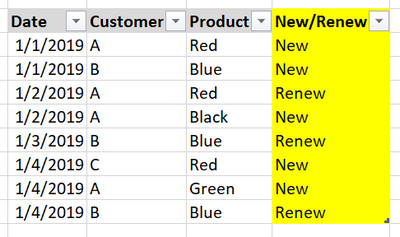
I have a Sales table consists of Date, Customer and Product columns. I want to segregate the data into two parts, New and Renew order. Each customer can order many types of products and each new product ordered by the customer will be state as New and if the same customer order the same product days or months later, it will be state as Renew.
Here is my sample data and column that I want to create:
So far I created a column by merging Customer and Product into one column to make it unique and got stuck to sort it by date. Or is there any other way that will make this easier? Thank you.
Solved! Go to Solution.
I've found a way. Here's what I did. I combined Customer and Product so it became unique and created a calculated column like this:
New/Renew = VAR counta = CALCULATE ( COUNTROWS ( 'Sales' ), FILTER ( ALLEXCEPT ( 'Sales', 'Sales'[CustomerXProduct] ), 'Sales'[Date] < EARLIER ( 'Sales'[Date] ) ) ) RETURN IF ( counta = 0, "New", "Renew" )
I've found a way. Here's what I did. I combined Customer and Product so it became unique and created a calculated column like this:
New/Renew = VAR counta = CALCULATE ( COUNTROWS ( 'Sales' ), FILTER ( ALLEXCEPT ( 'Sales', 'Sales'[CustomerXProduct] ), 'Sales'[Date] < EARLIER ( 'Sales'[Date] ) ) ) RETURN IF ( counta = 0, "New", "Renew" )
The Power BI Data Visualization World Championships is back! It's time to submit your entry.
Check out the January 2026 Power BI update to learn about new features.
| User | Count |
|---|---|
| 16 | |
| 14 | |
| 9 | |
| 8 | |
| 7 |