cancel
Showing results for 
Search instead for 
Did you mean: 

Data Days is here! Join us now for 60+ days of learning, challenges, and connection. Learn more

Reply
bangerasid
Helper I
Helper I

Power Query - Scenario

bangerasid_0-1652695648831.png

Hi Team,


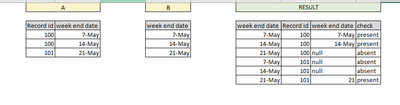
I have above scenario, I am trying to achieve the result in power query but unable to do so.
After doing Table B left join Table A, I am not getting the desired result. 
The join is not taking into consideration the Record ID. Is there any way to achieve the desired result as shown in the snippet?


Happy Monday.

1 ACCEPTED SOLUTION
Vijay_A_Verma
Most Valuable Professional

See the working here - Open a blank query - Home - Advanced Editor - Remove everything from there and paste the below code to test

CODE FOR TABLE A

let
    Source = Table.FromRows(Json.Document(Binary.Decompress(Binary.FromText("i45WMjQwUNJRMtU31zcyMDJSitVBCBmaIIsZgsWMDKFisQA=", BinaryEncoding.Base64), Compression.Deflate)), let _t = ((type nullable text) meta [Serialized.Text = true]) in type table [#"Record id" = _t, #"week end date" = _t]),
    #"Changed Type" = Table.TransformColumnTypes(Source,{{"Record id", Int64.Type}, {"week end date", type date}})
in
    #"Changed Type"

CODE FOR TABLE B

let
    Source = Table.FromRows(Json.Document(Binary.Decompress(Binary.FromText("i45WMtU31zcyMDJSitUBcQxNkHlGhlBeLAA=", BinaryEncoding.Base64), Compression.Deflate)), let _t = ((type nullable text) meta [Serialized.Text = true]) in type table [#"week end date" = _t]),
    #"Changed Type" = Table.TransformColumnTypes(Source,{{"week end date", type date}}),
    #"Added Custom" = Table.AddColumn(#"Changed Type", "Record id", each List.Distinct(#"Table A"[Record id])),
    #"Expanded Custom" = Table.ExpandListColumn(#"Added Custom", "Record id"),
    #"Merged Queries" = Table.NestedJoin(#"Expanded Custom", {"Record id", "week end date"}, #"Table A", {"Record id", "week end date"}, "Table A", JoinKind.LeftOuter),
    #"Expanded Table A" = Table.ExpandTableColumn(#"Merged Queries", "Table A", {"week end date"}, {"week end date.1"}),
    #"Sorted Rows" = Table.Sort(#"Expanded Table A",{{"Record id", Order.Ascending}, {"week end date", Order.Ascending}}),
    #"Added Custom1" = Table.AddColumn(#"Sorted Rows", "check", each if [week end date.1]=null then "absent" else "present")
in
    #"Added Custom1"

View solution in original post

2 REPLIES 2
bangerasid
Helper I
Helper I

That works! I was wondering whether this can be done using dax at the report level (not powerquery)

Vijay_A_Verma
Most Valuable Professional

See the working here - Open a blank query - Home - Advanced Editor - Remove everything from there and paste the below code to test

CODE FOR TABLE A

let
    Source = Table.FromRows(Json.Document(Binary.Decompress(Binary.FromText("i45WMjQwUNJRMtU31zcyMDJSitVBCBmaIIsZgsWMDKFisQA=", BinaryEncoding.Base64), Compression.Deflate)), let _t = ((type nullable text) meta [Serialized.Text = true]) in type table [#"Record id" = _t, #"week end date" = _t]),
    #"Changed Type" = Table.TransformColumnTypes(Source,{{"Record id", Int64.Type}, {"week end date", type date}})
in
    #"Changed Type"

CODE FOR TABLE B

let
    Source = Table.FromRows(Json.Document(Binary.Decompress(Binary.FromText("i45WMtU31zcyMDJSitUBcQxNkHlGhlBeLAA=", BinaryEncoding.Base64), Compression.Deflate)), let _t = ((type nullable text) meta [Serialized.Text = true]) in type table [#"week end date" = _t]),
    #"Changed Type" = Table.TransformColumnTypes(Source,{{"week end date", type date}}),
    #"Added Custom" = Table.AddColumn(#"Changed Type", "Record id", each List.Distinct(#"Table A"[Record id])),
    #"Expanded Custom" = Table.ExpandListColumn(#"Added Custom", "Record id"),
    #"Merged Queries" = Table.NestedJoin(#"Expanded Custom", {"Record id", "week end date"}, #"Table A", {"Record id", "week end date"}, "Table A", JoinKind.LeftOuter),
    #"Expanded Table A" = Table.ExpandTableColumn(#"Merged Queries", "Table A", {"week end date"}, {"week end date.1"}),
    #"Sorted Rows" = Table.Sort(#"Expanded Table A",{{"Record id", Order.Ascending}, {"week end date", Order.Ascending}}),
    #"Added Custom1" = Table.AddColumn(#"Sorted Rows", "check", each if [week end date.1]=null then "absent" else "present")
in
    #"Added Custom1"
Helpful resources

Announcements
Fabric Data Days is here Carousel

Fabric Data Days 2026

Don't miss out on Data Days, June 15 through August 7. Learn Fabric, Power BI, SQL, AI and more.

May Power BI Update Carousel

Power BI Monthly Update - May 2026

Check out the May 2026 Power BI update to learn about new features.

Power BI DataViz World Championships carousel

Power BI DataViz World Championships - June 2026

A new Power BI DataViz World Championship is coming this June! Don't miss out on submitting your entry.