Hello Community, I am facing an issue while runnign totals in Power Query.
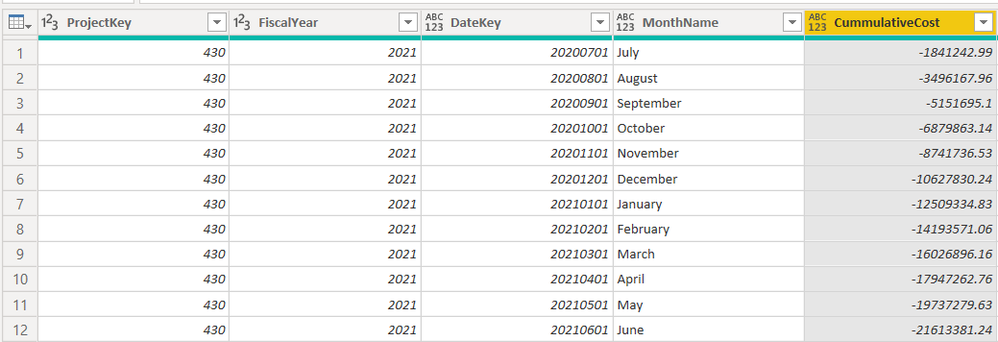
When I run totals for revenue and cost the output is correct:

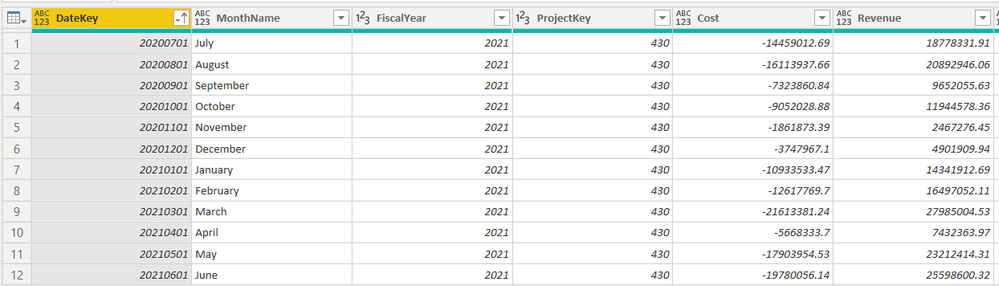
But when I merge those two Queries, I am getting wrong values like this:
Here is my Code:
let
Source = Fact,
#"Filtered Rows" = Table.SelectRows(Source, each ([ProjectKey] = 430) and ([FiscalYear] = 2021)),
#"Sorted Rows" = Table.Sort(#"Filtered Rows",{{"DateKey", Order.Ascending}}),
#"Grouped Rows" = Table.Group(#"Sorted Rows", {"ProjectKey", "FiscalYear"}, {{"Count", each _, type table [DateKey=number, MonthName=text, FiscalYear=nullable number, ProjectKey=nullable number, CostAmount=nullable number, Revenue=nullable number, BudgetMonthlyRevenue=nullable number, BudgetMonthlyCost=nullable number, BudgetYTDRevenue=nullable number, BudgetYTDCost=nullable number]}}),
// Function to calculate running totals
RunFunction = (RunTable as table) as table=>
let
#"Added Index" = Table.AddIndexColumn(RunTable, "Index", 1, 1, Int64.Type),
#"Added Custom" = Table.AddColumn(#"Added Index", "CummulativeRevenue", each List.Sum(List.Range(#"Added Index" [Revenue],0,[Index])))
in
#"Added Custom",
// call the function
RunTotals= Table.TransformColumns(#"Grouped Rows", {"Count", each RunFunction(_)}),
#"Expanded Count" = Table.ExpandTableColumn(RunTotals, "Count", {"DateKey", "MonthName", "BudgetYTDRevenue", "BudgetYTDCost", "CummulativeRevenue"}, {"DateKey", "MonthName", "BudgetYTDRevenue", "BudgetYTDCost", "CummulativeRevenue"}),
// Function to calculate running totals
RunFunction2 = (RunTable as table) as table=>
let
#"Added Index" = Table.AddIndexColumn(RunTable, "Index", 1, 1, Int64.Type),
#"Added Custom" = Table.AddColumn(#"Added Index", "CummulativeCost", each List.Sum(List.Range(#"Added Index" [CostAmount],0,[Index])))
in
#"Added Custom",
// call the function
RunTotals2 = Table.TransformColumns(#"Grouped Rows", {"Count", each RunFunction2(_)}),
#"Expanded Count1" = Table.ExpandTableColumn(RunTotals2, "Count", {"DateKey", "MonthName", "BudgetYTDRevenue", "BudgetYTDCost", "CummulativeCost"}, {"DateKey", "MonthName", "BudgetYTDRevenue", "BudgetYTDCost", "CummulativeCost"}),
#"Merged Queries" = Table.NestedJoin(#"Expanded Count1", {"ProjectKey", "DateKey","FiscalYear"}, #"Expanded Count", {"ProjectKey", "DateKey","FiscalYear"},"Expanded Count", JoinKind.LeftOuter),
#"Expanded Expanded Count" = Table.ExpandTableColumn(#"Merged Queries", "Expanded Count", {"CummulativeRevenue"}, {"CummulativeRevenue"}),
#"Reordered Columns" = Table.ReorderColumns(#"Expanded Expanded Count",{"DateKey", "MonthName", "FiscalYear", "ProjectKey", "CummulativeCost", "CummulativeRevenue", "BudgetYTDCost", "BudgetYTDRevenue"}),
#"Renamed Columns" = Table.RenameColumns(#"Reordered Columns",{{"CummulativeCost", "Cost"}, {"CummulativeRevenue", "Revenue"}, {"BudgetYTDCost", "BudgetCost"}, {"BudgetYTDRevenue", "BudgetRevenue"}}),
#"Sorted Rows1" = Table.Sort(#"Renamed Columns",{{"DateKey", Order.Ascending}})
in
#"Sorted Rows1"
Is the problem with Index or Merge queries?
Hope someone can help me with this..
Thanks


