
cancel
Showing results for 
Search instead for 
Did you mean: 

Learn from the best! Meet the four finalists headed to the FINALS of the Power BI Dataviz World Championships! Register now

Reply
tweidner
Helper I
Helper I

Power Query, M Code, Replace Value based on value in another column

Hello Everybody,


Apologies in case this was answered already in this forum, but I wasn't able to find it...


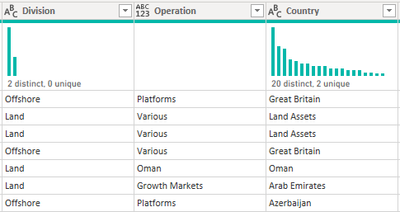
I've one column (Division) in a table where I would like to change the value if a value in another column (Country) fulfills a criteria.


Looks like:


tweidner_0-1619160095198.png

Value in [Division] should change to "Offshore", if value in column [Country] = "Oman"


I thought I was close with the following formula, but nothing happens. 


tweidner_1-1619160236565.png

= Table.ReplaceValue(#"Changed Type", each [Country] = "Oman" , "Offshore" ,Replacer.ReplaceValue,{"Division"})


Any ideas?


Thank you & Rgds
Tobias

1 ACCEPTED SOLUTION
CNENFRNL
Community Champion
Community Champion

@tweidner 

Table.ReplaceValue(#"Changed Type", each if [Country] = "Oman" then "Offshore" else [Division], null, (x,y,z) => y, {"Division"})

Thanks to the great efforts by MS engineers to simplify syntax of DAX! Most beginners are SUCCESSFULLY MISLED to think that they could easily master DAX; but it turns out that the intricacy of the most frequently used RANKX() is still way beyond their comprehension!

DAX is simple, but NOT EASY!

View solution in original post

2 REPLIES 2
tweidner
Helper I
Helper I

@CNENFRNL Thanks for the quick response... I would highly appreciate if you could explain the ,null, (x,y,z) => y 

piece...


Is this just filling the formula requirement?


Rgds
T

CNENFRNL
Community Champion
Community Champion

@tweidner 

Table.ReplaceValue(#"Changed Type", each if [Country] = "Oman" then "Offshore" else [Division], null, (x,y,z) => y, {"Division"})

Thanks to the great efforts by MS engineers to simplify syntax of DAX! Most beginners are SUCCESSFULLY MISLED to think that they could easily master DAX; but it turns out that the intricacy of the most frequently used RANKX() is still way beyond their comprehension!

DAX is simple, but NOT EASY!

Helpful resources

Announcements
Join our Fabric User Panel

Join our Fabric User Panel

Share feedback directly with Fabric product managers, participate in targeted research studies and influence the Fabric roadmap.

February Power BI Update Carousel

Power BI Monthly Update - February 2026

Check out the February 2026 Power BI update to learn about new features.

FabCon Atlanta 2026 carousel

FabCon Atlanta 2026

Join us at FabCon Atlanta, March 16-20, for the ultimate Fabric, Power BI, AI and SQL community-led event. Save $200 with code FABCOMM.

Top Solution Authors