cancel
Showing results forย 
Search instead forย 
Did you mean:ย 

Try your skills in the Power BI Dataviz World Championship! Round one ends June 26. Join now

Reply
dataPhix
Frequent Visitor

Power Query: Include all unique columns found in files from folder

I've recently run into an issue which hopefully is solvable.

Currently, I have power query pointing at a folder containing several CSV files. This is normally no issue, however, in this instance not all of the files have the same columns.

Is there a way to have power query return every unique column found in the folder populating empty data observations with null values?

Assume that my folder has csv files similar to the following (note that the rows are indexed using letters for easy reference):


PIC1.png


I would like the final table to look something like:
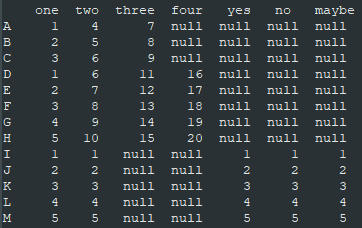
 

PIC2.png


This seems like it should be pretty simple, but I can't figure it out for the life of me! Any help would be greatly appreciated!

1 ACCEPTED SOLUTION

@dataPhix 

Can you paste this code and follow the steps to check if it works for you?
Enter your folder path

let
    Source = Folder.Files("C:\xx\xx"),
    #"Removed Other Columns" = Table.SelectColumns(Source,{"Content", "Name"}),
    #"Added Custom" = Table.AddColumn(#"Removed Other Columns", "Custom", each Table.PromoteHeaders(Csv.Document([Content]))),
    Custom1 = Table.Combine({#"Added Custom"},{"Name", "Custom"}),
    #"Sorted Rows" = Table.Sort(Custom1,{{"Name", Order.Descending}}),
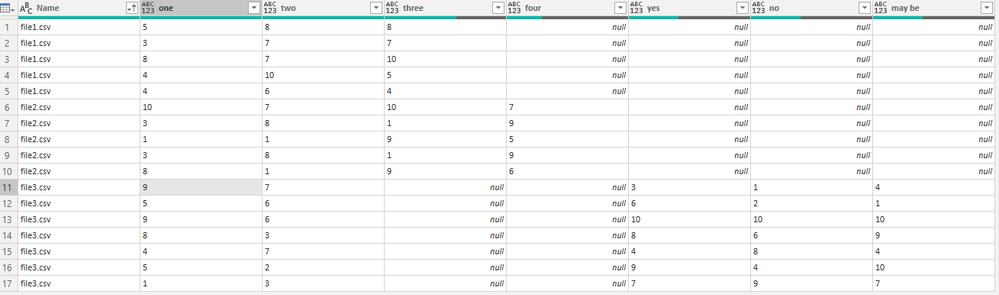
    #"Expanded Custom" = Table.ExpandTableColumn(#"Sorted Rows", "Custom", {"one", "two", "yes", "no", "may be", "three", "four"}, {"one", "two", "yes", "no", "may be", "three", "four"}),
    #"Reordered Columns" = Table.ReorderColumns(#"Expanded Custom",{"Name", "one", "two", "three", "four", "yes", "no", "may be"}),
    #"Sorted Rows1" = Table.Sort(#"Reordered Columns",{{"Name", Order.Ascending}})
in
    #"Sorted Rows1"

Fowmy_0-1600536647698.png

________________________

If my answer was helpful, please consider Accept it as the solution to help the other members find it

Click on the Thumbs-Up icon if you like this reply ๐Ÿ™‚

YouTube  LinkedIn


Did I answer your question? Mark my post as a solution! and hit thumbs up


โญ• Subscribe and learn Power BI from these videos

โšช Website โšช LinkedIn โšช PBI User Group

View solution in original post

4 REPLIES 4
dataPhix
Frequent Visitor

As was suggested, below are the tables in a CSV format for your conveinince:


TABLE1

one,two,three
1,4,7
2,5,8
3,6,9

TABLE2

one,two,three,four
1,6,11,16
2,7,12,17
3,8,13,18
4,9,14,19
5,10,15,20

TABLE3

one,two,yes,no,maybe
1,1,1,1,1
2,2,2,2,2
3,3,3,3,3
4,4,4,4,4
5,5,5,5,5


This is not the actual data I am handling as it is sensitive in nature and cannot be shared here.  I need to point Power Query at a folder which contains 11 csv files with anywhere from 32-56 columns a piece.  It should return one final table with one column for each distinct column header found in any of the 11 files.


Thanks!

@dataPhix 

Can you paste this code and follow the steps to check if it works for you?
Enter your folder path

let
    Source = Folder.Files("C:\xx\xx"),
    #"Removed Other Columns" = Table.SelectColumns(Source,{"Content", "Name"}),
    #"Added Custom" = Table.AddColumn(#"Removed Other Columns", "Custom", each Table.PromoteHeaders(Csv.Document([Content]))),
    Custom1 = Table.Combine({#"Added Custom"},{"Name", "Custom"}),
    #"Sorted Rows" = Table.Sort(Custom1,{{"Name", Order.Descending}}),
    #"Expanded Custom" = Table.ExpandTableColumn(#"Sorted Rows", "Custom", {"one", "two", "yes", "no", "may be", "three", "four"}, {"one", "two", "yes", "no", "may be", "three", "four"}),
    #"Reordered Columns" = Table.ReorderColumns(#"Expanded Custom",{"Name", "one", "two", "three", "four", "yes", "no", "may be"}),
    #"Sorted Rows1" = Table.Sort(#"Reordered Columns",{{"Name", Order.Ascending}})
in
    #"Sorted Rows1"

Fowmy_0-1600536647698.png

________________________

If my answer was helpful, please consider Accept it as the solution to help the other members find it

Click on the Thumbs-Up icon if you like this reply ๐Ÿ™‚

YouTube  LinkedIn


Did I answer your question? Mark my post as a solution! and hit thumbs up


โญ• Subscribe and learn Power BI from these videos

โšช Website โšช LinkedIn โšช PBI User Group

AlB
Community Champion
Community Champion

Hi @dataPhix 

Just do a Table.Combine of all the tables:

Table.Combine({T1, T2, T3})


Please always show your sample data in text-tabular format in addition to (or instead of) the screen captures. A screen cap doesn't allow people to readily copy the data and run a quick test and thus decreases the likelihood of your question being answered. Just use 'Copy table' in Power BI and paste it here. Or, ideally, share the pbix (beware of confidential data).


Please mark the question solved when done and consider giving kudos if posts are helpful.

Contact me privately for support with any larger-scale BI needs, tutoring, etc.

Cheers 


SU18_powerbi_badge


Anonymous
Not applicable

try with


Table.Combine({Table1, Table2,Table3})

Helpful resources

Announcements
Fabric Data Days is here Carousel

Fabric Data Days 2026

Don't miss out on Data Days, June 15 through August 7. Learn Fabric, Power BI, SQL, AI and more.

May Power BI Update Carousel

Power BI Monthly Update - May 2026

Check out the May 2026 Power BI update to learn about new features.

Power BI DataViz World Championships carousel

Power BI DataViz World Championships - June 2026

A new Power BI DataViz World Championship is coming this June! Don't miss out on submitting your entry.