Get certified for free when you join Fabric Data Days 2026 and dive into Fabric, Power BI, SQL, AI, and other essential data skills.
Join nowJuly 7 - July 17 | Round 2 of the Power BI Dataviz World Championships. Don't miss your chance! Learn more
Hello fellow PowerBI people
I would like to add a calculated row in my dataset. I've no idea how to initiate this.
Database contains + 100 000 rows. There's a different row for each quarter. And I would like to add a new line that gives me the best result over the 4 quarters.
I know I can group this column and add a calculated column, but that is no solution for me as I'll have trouble afterwards filtering correctly.
Example (I would like to add the red line):
| Year | Extra info A | Extra info B | Quarter | Amount |
| 2019 | Abc | Zyx | 1 | 80 |
| 2019 | Abc | Zyx | 2 | null |
| 2019 | Abc | Zyx | 3 | 50 |
| 2019 | Abc | Zyx | 4 | 60 |
| 2019 | Abc | Zyx | Best result | 80 |
Thanks in advance for your help!
I think this function can help me: https://docs.microsoft.com/en-us/powerquery-m/table-insertrows
Best regards
Koen
Solved! Go to Solution.
Hi @kdecolve ,
We can use the following steps to meet your requirement:
1. group by the table based on the year column, save other as all rows
2. Create a custom column:
Table.InsertRows(
[QuarterData],
Table.RowCount([QuarterData]),
{
Record.AddField(Record.RemoveFields(Table.Max([QuarterData],"Amount"),"Quarter"),"Quarter","BestResult")
}
)
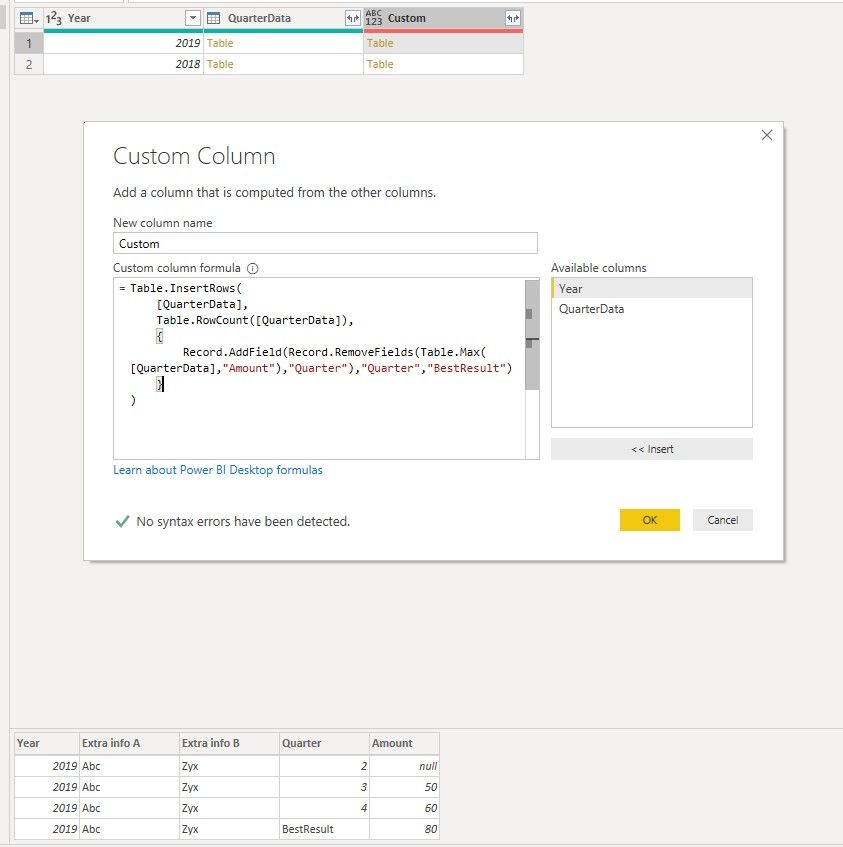
3. expand the custom column exclude the year column
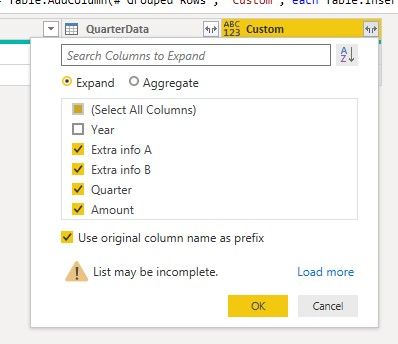
2. delete the useless column and rename other column:
All the queries are here:
let
Source = Table.FromRows(Json.Document(Binary.Decompress(Binary.FromText("i45WMjIwtFTSUXJMSgaSUZUVQNIQiC0MlGJ1sMoaATEuOWMgNsWp0wSIzeCyFlhsNcYpC7LV2BSXrDGSm9DlTKBuigUA", BinaryEncoding.Base64), Compression.Deflate)), let _t = ((type text) meta [Serialized.Text = true]) in type table [Year = _t, #"Extra info A" = _t, #"Extra info B" = _t, Quarter = _t, Amount = _t]),
#"Changed Type" = Table.TransformColumnTypes(Source,{{"Year", Int64.Type}, {"Extra info A", type text}, {"Extra info B", type text}, {"Quarter", Int64.Type}, {"Amount", Int64.Type}}),
#"Grouped Rows" = Table.Group(#"Changed Type", {"Year"}, {{"QuarterData", each _, type table [Year=number, Extra info A=text, Extra info B=text, Quarter=number, Amount=number]}}),
#"Added Custom" = Table.AddColumn(#"Grouped Rows", "Custom", each Table.InsertRows(
[QuarterData],
Table.RowCount([QuarterData]),
{
Record.AddField(Record.RemoveFields(Table.Max([QuarterData],"Amount"),"Quarter"),"Quarter","BestResult")
}
)),
#"Expanded Custom" = Table.ExpandTableColumn(#"Added Custom", "Custom", {"Extra info A", "Extra info B", "Quarter", "Amount"}, {"Custom.Extra info A", "Custom.Extra info B", "Custom.Quarter", "Custom.Amount"}),
#"Removed Columns" = Table.RemoveColumns(#"Expanded Custom",{"QuarterData"}),
#"Renamed Columns" = Table.RenameColumns(#"Removed Columns",{{"Custom.Extra info A", "Extra info A"}, {"Custom.Extra info B", "Extra info B"}, {"Custom.Quarter", "Quarter"}, {"Custom.Amount", "Amount"}})
in
#"Renamed Columns"
Best regards,
Hi @kdecolve ,
We can use the following steps to meet your requirement:
1. group by the table based on the year column, save other as all rows
2. Create a custom column:
Table.InsertRows(
[QuarterData],
Table.RowCount([QuarterData]),
{
Record.AddField(Record.RemoveFields(Table.Max([QuarterData],"Amount"),"Quarter"),"Quarter","BestResult")
}
)
3. expand the custom column exclude the year column
2. delete the useless column and rename other column:
All the queries are here:
let
Source = Table.FromRows(Json.Document(Binary.Decompress(Binary.FromText("i45WMjIwtFTSUXJMSgaSUZUVQNIQiC0MlGJ1sMoaATEuOWMgNsWp0wSIzeCyFlhsNcYpC7LV2BSXrDGSm9DlTKBuigUA", BinaryEncoding.Base64), Compression.Deflate)), let _t = ((type text) meta [Serialized.Text = true]) in type table [Year = _t, #"Extra info A" = _t, #"Extra info B" = _t, Quarter = _t, Amount = _t]),
#"Changed Type" = Table.TransformColumnTypes(Source,{{"Year", Int64.Type}, {"Extra info A", type text}, {"Extra info B", type text}, {"Quarter", Int64.Type}, {"Amount", Int64.Type}}),
#"Grouped Rows" = Table.Group(#"Changed Type", {"Year"}, {{"QuarterData", each _, type table [Year=number, Extra info A=text, Extra info B=text, Quarter=number, Amount=number]}}),
#"Added Custom" = Table.AddColumn(#"Grouped Rows", "Custom", each Table.InsertRows(
[QuarterData],
Table.RowCount([QuarterData]),
{
Record.AddField(Record.RemoveFields(Table.Max([QuarterData],"Amount"),"Quarter"),"Quarter","BestResult")
}
)),
#"Expanded Custom" = Table.ExpandTableColumn(#"Added Custom", "Custom", {"Extra info A", "Extra info B", "Quarter", "Amount"}, {"Custom.Extra info A", "Custom.Extra info B", "Custom.Quarter", "Custom.Amount"}),
#"Removed Columns" = Table.RemoveColumns(#"Expanded Custom",{"QuarterData"}),
#"Renamed Columns" = Table.RenameColumns(#"Removed Columns",{{"Custom.Extra info A", "Extra info A"}, {"Custom.Extra info B", "Extra info B"}, {"Custom.Quarter", "Quarter"}, {"Custom.Amount", "Amount"}})
in
#"Renamed Columns"
Best regards,
PowerQuery is a wrong place to do that. You should use measures for that.
Join us in Barcelona for FabCon and SQLCon, the Fabric, Power BI, SQL, and AI community event. Save €200 with code FABCMTY200.
Join Fabric Data Days 2026: 60 days of free live/on-demand sessions, challenges, study groups, and certification opportunities.