Don't miss your chance to take the Fabric Data Engineer (DP-600) exam for FREE! Find out how by attending the DP-600 session on April 23rd (pacific time), live or on-demand.
Learn moreJoin the FabCon + SQLCon recap series. Up next: Power BI, Real-Time Intelligence, IQ and AI, and Data Factory take center stage. All sessions are available on-demand after the live show. Register now
Working on a Power Query Function that will return the Latitude and Longitude for a given location. It's working great, but when I get a 404 error from the Bing Maps API the refresh crashes. I'd like to add some error handling to the function so that when Bing Maps API returns a 404 then the function will just return a null for the Lat and Long and move on to the next call.
I have found a great article on Chris Webbs blog that covers handling a 404 error here:
Here's my function that returns an error (I've replaced teh API Key with "XXX"):
let
FindLatLong = (location) =>
let
Source = Xml.Tables(Web.Contents("http://dev.virtualearth.net/REST/v1/Locations/"&location&"?o=xml&key=XXX")),
#"Changed Type" = Table.TransformColumnTypes(Source,{{"Copyright", type text}, {"BrandLogoUri", type text}, {"StatusCode", Int64.Type}, {"StatusDescription", type text}, {"AuthenticationResultCode", type text}, {"TraceId", type text}}),
ResourceSets = #"Changed Type"{0}[ResourceSets],
ResourceSet = ResourceSets{0}[ResourceSet],
#"Changed Type1" = Table.TransformColumnTypes(ResourceSet,{{"EstimatedTotal", Int64.Type}}),
Resources = #"Changed Type1"{0}[Resources],
Location = Resources{0}[Location],
#"Changed Type2" = Table.TransformColumnTypes(Location,{{"Name", type text}, {"EntityType", type text}, {"Confidence", type text}, {"MatchCode", type text}}),
Point = #"Changed Type2"{0}[Point],
#"Changed Type3" = Table.TransformColumnTypes(Point,{{"Latitude", type number}, {"Longitude", type number}})
in
#"Changed Type3"
in
FindLatLongI've tried to work in the solution from the blog, but I'm running into an issue on the if statement. The error is Token Literal expedcted.
let
FindLatLong = (location) =>
let
Source = Xml.Tables(Web.Contents("http://dev.virtualearth.net/REST/v1/Locations/"&location&"?o=xml&key=XXX",
[ManualStatusHandling={404}]),
GetMetadata = Value.Metadata(Source),
GetResponseStatus = GetMetadata[Response.Status],
Output = if GetResponseStatus=404 then "Error!" else Source
#"Changed Type" = Table.TransformColumnTypes(Source,{{"Copyright", type text}, {"BrandLogoUri", type text}, {"StatusCode", Int64.Type}, {"StatusDescription", type text}, {"AuthenticationResultCode", type text}, {"TraceId", type text}}),
ResourceSets = #"Changed Type"{0}[ResourceSets],
ResourceSet = ResourceSets{0}[ResourceSet],
#"Changed Type1" = Table.TransformColumnTypes(ResourceSet,{{"EstimatedTotal", Int64.Type}}),
Resources = #"Changed Type1"{0}[Resources],
Location = Resources{0}[Location],
#"Changed Type2" = Table.TransformColumnTypes(Location,{{"Name", type text}, {"EntityType", type text}, {"Confidence", type text}, {"MatchCode", type text}}),
Point = #"Changed Type2"{0}[Point],
#"Changed Type3" = Table.TransformColumnTypes(Point,{{"Latitude", type number}, {"Longitude", type number}})
in
#"Changed Type3"
in
FindLatLong
Not sure where to go with this now. Any help is appreciated.
Thanks!!!!
Solved! Go to Solution.
Hi @bh98381 ,
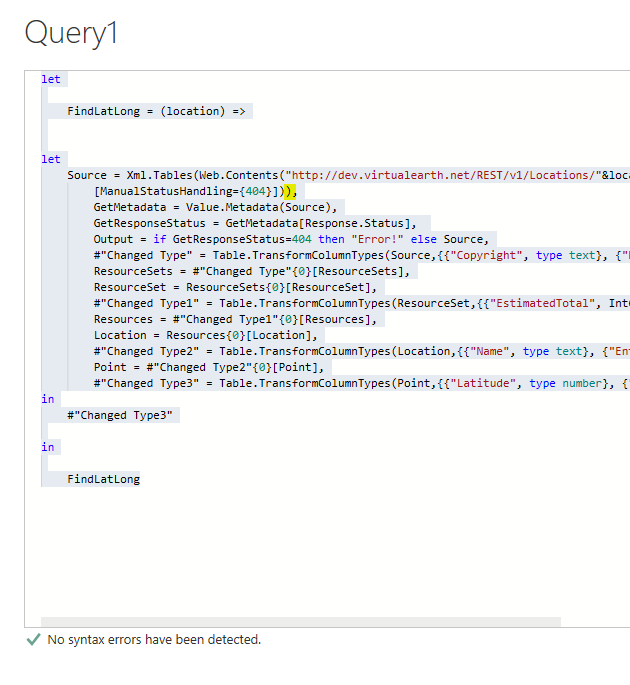
By my tests and research on your query, the issue is caused by lacking of ")".
Please try the query below.
let
FindLatLong = (location) =>
let
Source = Xml.Tables(Web.Contents("http://dev.virtualearth.net/REST/v1/Locations/"&location&"?o=xml&key=XXX",
[ManualStatusHandling={404}])),
GetMetadata = Value.Metadata(Source),
GetResponseStatus = GetMetadata[Response.Status],
Output = if GetResponseStatus=404 then "Error!" else Source,
#"Changed Type" = Table.TransformColumnTypes(Source,{{"Copyright", type text}, {"BrandLogoUri", type text}, {"StatusCode", Int64.Type}, {"StatusDescription", type text}, {"AuthenticationResultCode", type text}, {"TraceId", type text}}),
ResourceSets = #"Changed Type"{0}[ResourceSets],
ResourceSet = ResourceSets{0}[ResourceSet],
#"Changed Type1" = Table.TransformColumnTypes(ResourceSet,{{"EstimatedTotal", Int64.Type}}),
Resources = #"Changed Type1"{0}[Resources],
Location = Resources{0}[Location],
#"Changed Type2" = Table.TransformColumnTypes(Location,{{"Name", type text}, {"EntityType", type text}, {"Confidence", type text}, {"MatchCode", type text}}),
Point = #"Changed Type2"{0}[Point],
#"Changed Type3" = Table.TransformColumnTypes(Point,{{"Latitude", type number}, {"Longitude", type number}})
in
#"Changed Type3"
in
FindLatLong
Here is the test result.
Hope this can help you.
Best Regards,
Cherry
Hi @bh98381 ,
By my tests and research on your query, the issue is caused by lacking of ")".
Please try the query below.
let
FindLatLong = (location) =>
let
Source = Xml.Tables(Web.Contents("http://dev.virtualearth.net/REST/v1/Locations/"&location&"?o=xml&key=XXX",
[ManualStatusHandling={404}])),
GetMetadata = Value.Metadata(Source),
GetResponseStatus = GetMetadata[Response.Status],
Output = if GetResponseStatus=404 then "Error!" else Source,
#"Changed Type" = Table.TransformColumnTypes(Source,{{"Copyright", type text}, {"BrandLogoUri", type text}, {"StatusCode", Int64.Type}, {"StatusDescription", type text}, {"AuthenticationResultCode", type text}, {"TraceId", type text}}),
ResourceSets = #"Changed Type"{0}[ResourceSets],
ResourceSet = ResourceSets{0}[ResourceSet],
#"Changed Type1" = Table.TransformColumnTypes(ResourceSet,{{"EstimatedTotal", Int64.Type}}),
Resources = #"Changed Type1"{0}[Resources],
Location = Resources{0}[Location],
#"Changed Type2" = Table.TransformColumnTypes(Location,{{"Name", type text}, {"EntityType", type text}, {"Confidence", type text}, {"MatchCode", type text}}),
Point = #"Changed Type2"{0}[Point],
#"Changed Type3" = Table.TransformColumnTypes(Point,{{"Latitude", type number}, {"Longitude", type number}})
in
#"Changed Type3"
in
FindLatLong
Here is the test result.
Hope this can help you.
Best Regards,
Cherry
Thanks @v-piga-msft
That ")" fixed the issue.
Great catch!!!
Now I'm running into a new error:
I'll try to work through this one now.
Check out the April 2026 Power BI update to learn about new features.
If you have recently started exploring Fabric, we'd love to hear how it's going. Your feedback can help with product improvements.
A new Power BI DataViz World Championship is coming this June! Don't miss out on submitting your entry.
| User | Count |
|---|---|
| 5 | |
| 3 | |
| 3 | |
| 3 | |
| 3 |
| User | Count |
|---|---|
| 8 | |
| 6 | |
| 5 | |
| 5 | |
| 4 |