Join us in Barcelona for FabCon and SQLCon, September 28 - October 1, 2026.
This is best Fabric, Power BI, SQL and AI community event. How do we know? The last event sold out! Save €200 with code FABCMTY200.
Register now- Power BI forums
- Get Help with Power BI
- Desktop
- Service
- Report Server
- Power Query
- Mobile Apps
- Developer
- DAX Commands and Tips
- Custom Visuals Development Discussion
- Health and Life Sciences
- Power BI Spanish forums
- Translated Spanish Desktop
- Training and Consulting
- Instructor Led Training
- Dashboard in a Day for Women, by Women
- Galleries
- Data Stories Gallery
- Themes Gallery
- Contests Gallery
- QuickViz Gallery
- Quick Measures Gallery
- Visual Calculations Gallery
- Fabric Apps Gallery
- Notebook Gallery
- Translytical Task Flow Gallery
- TMDL Gallery
- R Script Showcase
- Webinars and Video Gallery
- Ideas
- Custom Visuals Ideas (read-only)
- Issues
- Issues
- Events
- Upcoming Events
July 28 - August 9 | Final Round of the Power BI Dataviz World Championships. This is your chance. Learn more
- Power BI forums
- Forums
- Get Help with Power BI
- Power Query
- Power Query, Extract Text before Text
- Subscribe to RSS Feed
- Mark Topic as New
- Mark Topic as Read
- Float this Topic for Current User
- Bookmark
- Subscribe
- Printer Friendly Page

- Mark as New
- Bookmark
- Subscribe
- Mute
- Subscribe to RSS Feed
- Permalink
- Report Inappropriate Content
Power Query, Extract Text before Text
Hi,
Input
| Quantity | ID |
| 400,1,81,A,, 400,82,93,S14,78, 400,94,96,A,, | 12345 |
Output
| Quantity | ID | A | S14 | Total for A | Total for S14 |
| 400,1,81,A,, 400,82,93,S14,78, 400,94,96,A,, | 12345 | 81, 96 | 93 | 84 | 12 |
| calc = ((81-1)+1 ) + ((96-94)+1) | calc = (93-82)+1 |
In the table above i have a requirement where i should get whenever it occurs A give me the previous value which is basically 81, then again if occurs S14 give me 93 in the next col, Similary again for last A give me 96. Then calculate the total intervals between A, S14. So for A 1 to 81 + 94 to 96 = 84
For s14 = 82 to 93 = 12 intervals.
Any help appreciated.
Thank you
Solved! Go to Solution.


- Mark as New
- Bookmark
- Subscribe
- Mute
- Subscribe to RSS Feed
- Permalink
- Report Inappropriate Content
Well, your initial source table was kinda confusing.
This should work.
let
    Source = Table.FromRows(Json.Document(Binary.Decompress(Binary.FromText("VcsxEoAwCETRu1BvERIgUHoGy5greP/S4MTCilnm/TFISgHDGQdw3bm8IhpOFnTfrxCEpSAQ1ya6bhhNfL3aP9D+Boults3nAw==", BinaryEncoding.Base64), Compression.Deflate)), let _t = ((type nullable text) meta [Serialized.Text = true]) in type table [Quantity = _t, ID = _t, Total = _t]),
    SumA = Table.AddColumn(Source, "Total A", each let l=Text.Split([Quantity], ","), i= List.PositionOf(l, "A", Occurrence.All ) in  List.Sum(List.Transform(i, each Number.FromText(l{_-1})-Number.FromText(l{_-2}) +1))),
    SumS14 = Table.AddColumn(SumA, "Total S14", each let l=Text.Split([Quantity], ","), i= List.PositionOf(l, "S14", Occurrence.All ) in  List.Sum(List.Transform(i, each Number.FromText(l{_-1})-Number.FromText(l{_-2}) +1)))
in
    SumS14
- Mark as New
- Bookmark
- Subscribe
- Mute
- Subscribe to RSS Feed
- Permalink
- Report Inappropriate Content
Sorry, too many parentheses at the end of these-- fixed it:
FirstA1 = Table.AddColumn(PreviousStepName, "FirstA1", each let items = List.PositionOf(Text.Split([Quantity], ","), "A") in List.Last(List.FirstN(Text.Split([Quantity], ","), items)),
S12 = Table.AddColumn(FirstA1, "S12", each let items = List.PositionOf(Text.Split([Quantity], ","), "S12") in List.Last(List.FirstN(Text.Split([Quantity], ","), items)),
SecondA = Table.AddColumn(S12, "SecondA", each let items = List.PositionOf(Text.Split([Quantity], ","), "A", Occurrence.Last) in List.Last(List.FirstN(Text.Split([Quantity], ","), items))
- Mark as New
- Bookmark
- Subscribe
- Mute
- Subscribe to RSS Feed
- Permalink
- Report Inappropriate Content
Apologies, but it doesnt work for me and throws errors. can i please request you to create a PBIX file and attach may be?
This is giving me headache from last 3 days.
- Mark as New
- Bookmark
- Subscribe
- Mute
- Subscribe to RSS Feed
- Permalink
- Report Inappropriate Content
Hi
Try this in blank query and adjust accordingly.
let
    Source = Table.FromRows(Json.Document(Binary.Decompress(Binary.FromText("i45WMjEw0DHUsTDUcdTRUdJRUorVgYhZGOlYGusEG5romFugSFia6FiaQVUbGhmbmCrFxgIA", BinaryEncoding.Base64), Compression.Deflate)), let _t = ((type nullable text) meta [Serialized.Text = true]) in type table [Quantity = _t, ID = _t]),
    PosA = Table.AddColumn(Source, "A", each try let i = List.PositionOf(Text.Split([Quantity], ","), "A", Occurrence.Last) in Number.FromText(Text.Split([Quantity], ","){i-1}) - Number.FromText(Text.Split([Quantity], ","){i-2})+1 otherwise 0),
    PosS14 = Table.AddColumn(PosA, "S14", each try let i = List.PositionOf(Text.Split([Quantity], ","), "S14", Occurrence.Last) in Number.FromText(Text.Split([Quantity], ","){i-1}) - Number.FromText(Text.Split([Quantity], ","){i-2})+1 otherwise 0),
    A = List.Sum(PosS14[A]),
    S14 = List.Sum(PosS14[S14])
in
S14- Mark as New
- Bookmark
- Subscribe
- Mute
- Subscribe to RSS Feed
- Permalink
- Report Inappropriate Content
Hi Jakinta,
How will similar information be processed just to retrieve A,F19,F17,S19 from below TEXT field below using power query?
300,1,1,A,,
300,1,63,F19,37,
300,64,67,F17,76,
300,68,96,S19,76,
Thanks in advance!
- Mark as New
- Bookmark
- Subscribe
- Mute
- Subscribe to RSS Feed
- Permalink
- Report Inappropriate Content
I hope this is what you want.
let
    Source = Table.FromRows(Json.Document(Binary.Decompress(Binary.FromText("i45WMjYw0DEEQkcdnZg8CMfMWMfN0FLH2BwqYmaiY2YOFDLXMTeDCVnoWJrpBANVAYWUYmMB", BinaryEncoding.Base64), Compression.Deflate)), let _t = ((type nullable text) meta [Serialized.Text = true]) in type table [Column1 = _t]),
    #"Added Custom" = Table.AddColumn(Source, "Custom", each Text.Combine(List.RemoveNulls(List.Transform(Text.Split( [Column1], ","), each if Value.Is(Value.FromText(_), type text) and  _<>"" then _ else null)),","))
in
    #"Added Custom"
- Mark as New
- Bookmark
- Subscribe
- Mute
- Subscribe to RSS Feed
- Permalink
- Report Inappropriate Content
Works perfectly fine. Thanks a lot. 🙂
- Mark as New
- Bookmark
- Subscribe
- Mute
- Subscribe to RSS Feed
- Permalink
- Report Inappropriate Content
Hi @Jakinta , You have been great help Thanks a lot.
Apologies but i have come up with another hurdle in my report and need your help : )
Something like below - first col is input col (everything is dynamic - basically if a value in col 1 has appeared say "A" unless it is interrputed by any other value say "S14" i should get its distinct (only once) and if it occurs again after "S14" then i should get that and in seq. Example is below) and second col is the output format i need. Again any help much appreciated.
Quality (Input col)
["A", "A", "A", "S14", "S14", "S14", "S14", "S14", "S14", "S14", "S14", "S14", "S14", "S14"]
["A", "K05, "A", "S14", "S14", "S14", "S14", "S14", "K05", "S14", "S14", "S14", "S14", "S14"]
["A", "A", "A", "S14", "A", "S14", "S14", "S45", "S14", "S14", "S14", "A", "K05", "A"]
["A", "A", "A", "S14", "S14", "S14", "S14", "S14", "S14", "S14", "S14", "S14", "S14", "A"]
Distinct Sequential Quality (Output col) - corrsponding to the above rows. (sorry it wont let me paste in the table format)
A, S14
A, K05 , A, S14, K05, S14
A,S14, A, S14, S45, S14,A,K05,A
A,S14,A
- Mark as New
- Bookmark
- Subscribe
- Mute
- Subscribe to RSS Feed
- Permalink
- Report Inappropriate Content
This works completly fine. Thank you very much. Although, i dont understand what's going on cuz i tried to split the steps into different columns but get error in the third step. However together everything works fine. Thank you 🙂
- Mark as New
- Bookmark
- Subscribe
- Mute
- Subscribe to RSS Feed
- Permalink
- Report Inappropriate Content
Jakinta, This is very close to what i want. Thank you. But i need a little more help. In the input below i have only 2 rows. first with 3 400 lines and 2nd with 2 400 lines. So in my output as well i need only 2 output lines otherwise it messes up mt "Total" column as i need to aggregate it in my measure calculation. Again, i appreciate the help.
Input
Quantity ID Total
"400,1,81,A,,
400,82,93,S14,78,
400,94,96,A,," 12345 96
"400,1,56,S14,78,
400,57,96,A" 23456 96
Output
Quantity ID Total Total A Total S14
"400,1,81,A,,
400,82,93,S14,78,
400,94,96,A,," 12345 96 84 12
"400,1,56,S14,78,
400,57,96,A" 23456 96 40 56
P.S: My quantity values are dynamic. There can be any number of 400 lines. So the occurences of A,S14 are dynamic in number too
- Mark as New
- Bookmark
- Subscribe
- Mute
- Subscribe to RSS Feed
- Permalink
- Report Inappropriate Content
Well, your initial source table was kinda confusing.
This should work.
let
    Source = Table.FromRows(Json.Document(Binary.Decompress(Binary.FromText("VcsxEoAwCETRu1BvERIgUHoGy5greP/S4MTCilnm/TFISgHDGQdw3bm8IhpOFnTfrxCEpSAQ1ya6bhhNfL3aP9D+Boults3nAw==", BinaryEncoding.Base64), Compression.Deflate)), let _t = ((type nullable text) meta [Serialized.Text = true]) in type table [Quantity = _t, ID = _t, Total = _t]),
    SumA = Table.AddColumn(Source, "Total A", each let l=Text.Split([Quantity], ","), i= List.PositionOf(l, "A", Occurrence.All ) in  List.Sum(List.Transform(i, each Number.FromText(l{_-1})-Number.FromText(l{_-2}) +1))),
    SumS14 = Table.AddColumn(SumA, "Total S14", each let l=Text.Split([Quantity], ","), i= List.PositionOf(l, "S14", Occurrence.All ) in  List.Sum(List.Transform(i, each Number.FromText(l{_-1})-Number.FromText(l{_-2}) +1)))
in
    SumS14
- Mark as New
- Bookmark
- Subscribe
- Mute
- Subscribe to RSS Feed
- Permalink
- Report Inappropriate Content
My fault--add "each" after the "in"s:
FirstA1 = Table.AddColumn(PreviousStepName, "FirstA1", each let items = List.PositionOf(Text.Split([Quantity], ","), "A") in each List.Last(List.FirstN(Text.Split([Quantity], ","), items))),
S12 = Table.AddColumn(FirstA1, "S12", each let items = List.PositionOf(Text.Split([Quantity], ","), "S12") in each List.Last(List.FirstN(Text.Split([Quantity], ","), items))),
SecondA = Table.AddColumn(S12, "SecondA", each let items = List.PositionOf(Text.Split([Quantity], ","), "A", Occurrence.Last) in each List.Last(List.FirstN(Text.Split([Quantity], ","), items)))
--Nate
- Mark as New
- Bookmark
- Subscribe
- Mute
- Subscribe to RSS Feed
- Permalink
- Report Inappropriate Content
Try:
FirstA1 = Table.AddColumn(PreviousStepName, "FirstA1", each let items = List.PositionOf(Text.Split([Quantity], ","), "A") in List.Last(List.FirstN(Text.Split([Quantity], ","), items))),
S12 = Table.AddColumn(FirstA1, "S12", each let items = List.PositionOf(Text.Split([Quantity], ","), "S12") in List.Last(List.FirstN(Text.Split([Quantity], ","), items))),
SecondA = Table.AddColumn(S12, "SecondA", each let items = List.PositionOf(Text.Split([Quantity], ","), "A", Occurrence.Last) in List.Last(List.FirstN(Text.Split([Quantity], ","), items)))
This will get your values lined up in columns. I'll leave the arithmetic to you! 🙂
--Nate
- Mark as New
- Bookmark
- Subscribe
- Mute
- Subscribe to RSS Feed
- Permalink
- Report Inappropriate Content
Hi Nate,
How will similar information be processed just to retrieve A,F19,F17,S19 from below TEXT field
300,1,1,A,,
300,1,63,F19,37,
300,64,67,F17,76,
300,68,96,S19,76,
Thanks in advance!
- Mark as New
- Bookmark
- Subscribe
- Mute
- Subscribe to RSS Feed
- Permalink
- Report Inappropriate Content
Thanks for the reply 🙂. But i get the error. Expression.Error: We cannot convert a value of type Record to type Text. while expanding the column.
Not sure why. I have the column as Text Data type only.
- Mark as New
- Bookmark
- Subscribe
- Mute
- Subscribe to RSS Feed
- Permalink
- Report Inappropriate Content
Error on each
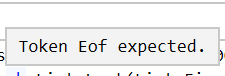
Sorry i am not that good in M
Helpful resources

FabCon & SQLCon – Barcelona 2026
Join us in Barcelona for FabCon and SQLCon, the Fabric, Power BI, SQL, and AI community event. Save €200 with code FABCMTY200.

Fabric Community Sticker Challenge - Barcelona 2026
If you love stickers, then you will definitely want to check out our community sticker challenge, Barcelona edition!

Power BI Monthly Update - July 2026
Check out the July 2026 Power BI update to learn about new features.

Power BI DataViz World Championships - June 2026
A new Power BI DataViz World Championship is coming this June! Don't miss out on submitting your entry.


