Don't miss your chance to take the Fabric Data Engineer (DP-600) exam for FREE! Find out how by watching the DP-600 session on-demand now through April 28th.
Learn moreJoin the FabCon + SQLCon recap series. Up next: Power BI, Real-Time Intelligence, IQ and AI, and Data Factory take center stage. All sessions are available on-demand after the live show. Register now
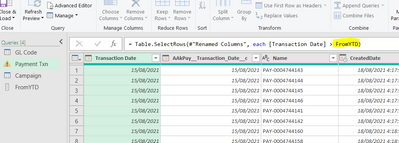
Hello, I am very new to PQ. I have imported huge data from SalesForce. I want to apply 'from and to' date filters on 'transactions date' column but I want users to input the 'from' (and 'to') dates in two separate cells in Excel to refresh my query. I imported the start date as a named range 'FromYTD' and saved as connection only. Then applied to the column as below.
Both the transactions column and From YTD is formatted as Date.
The error message I am getting is below. Please help. Thanks
Solved! Go to Solution.
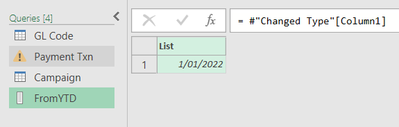
In your formula, make it FromYTD{0} in place pf FromYTD. This will make it refer to first value of FromYTD list.
OR
Don't change formula, in your FromYTD list, right click on List column and drill down. This will make it a single value and you query will work correctly.
Brilliant! It worked. Thanks
In your formula, make it FromYTD{0} in place pf FromYTD. This will make it refer to first value of FromYTD list.
OR
Don't change formula, in your FromYTD list, right click on List column and drill down. This will make it a single value and you query will work correctly.
Check out the April 2026 Power BI update to learn about new features.
If you have recently started exploring Fabric, we'd love to hear how it's going. Your feedback can help with product improvements.
A new Power BI DataViz World Championship is coming this June! Don't miss out on submitting your entry.
| User | Count |
|---|---|
| 5 | |
| 5 | |
| 4 | |
| 4 | |
| 4 |