cancel
Showing results for 
Search instead for 
Did you mean: 

Did you hear? There's a new SQL AI Developer certification (DP-800). Start preparing now and be one of the first to get certified. Register now

Reply
Anonymous
Not applicable

Power Query Date Filtering M Language

The spreadsheet I am working on is to transform data about products and prices based on dates in the next 10 years give or take.


The highlighted text in the M language is the part that is wrong. Specifically, "dLimit". In the leftmost column of my spreadsheet dates are listed (Y-Axis) with products on the X-Axis, and prices listed based on the date and product.


I want a code to return values from the EARLIEST DATE LISTED until 5 years from then. The start date could be June 2021, March 2021, or any date, so in each case, the dates should go until June 2026, March 2026, or other. I have tried using the date filter "InTheNextNDays" but that skips the current day or any ones before it, so this won't work if the data being used is old.


Is there a correction to this formula, or a different formula that would return dates for 5 years after the starting date in the spreadsheet?


The spreadsheet's format is:

Y-Axis: Dates

X-Axis: Products

Values: Prices and Net Change from the last price


https://imgur.com/gallery/VgJG5J5

Error message "Token Then expected" is appearing under "dLimit". Code may be wrong otherwise too, and any suggestions are appreciated.

1 ACCEPTED SOLUTION
v-kelly-msft
Community Support
Community Support

Hi  @Anonymous ,


First create a query parameter as start date;

Then create a funtion as below:

let
    Source = (number as number) => let
    
        #"End date"=Date.AddYears(startdate,number)
    in
        #"End date"
in
    Source
in
    Source

Then use below M code:

let
    Source = Table.FromRows(Json.Document(Binary.Decompress(Binary.FromText("Vc67DYNQFATRXogtwd4PcGtB9N+GHTxLs+FokvM8m3btceje3s+zBSMZxWjGybgYN2MYOqzMIEOsNeQNeUPekDfkDXlD3pA3xhvjjfEGvDjAW5GMYjTjZFyMmzGMxfuXGWSItUSeyBN5Ik/kiTyRJ/JkPBlPxhN5QV6QF+QFeUFekBfkBXlhvDBeGC/IS/KSvCQvyUvykrwkL8lL46Xx0nhJXpFX5BV5RV6RV+QVeUVeGa+MV8Yr8pq8Jq/Ja/KavCavyWvy2nhtvDber94v", BinaryEncoding.Base64), Compression.Deflate)), let _t = ((type nullable text) meta [Serialized.Text = true]) in type table [Date = _t]),
    #"Changed Type" = Table.TransformColumnTypes(Source,{{"Date", type date}}),
    #"Added Custom" = Table.AddColumn(#"Changed Type", "Custom", each if [Date]<=dateadd(5) and [Date]>=startdate then 1 else null),
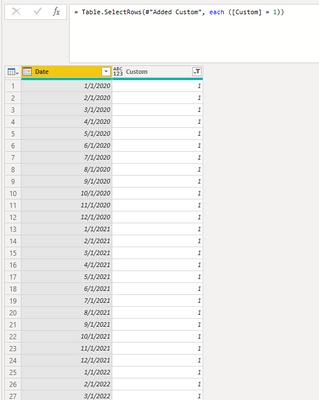
    #"Filtered Rows" = Table.SelectRows(#"Added Custom", each ([Custom] = 1))
in
    #"Filtered Rows"

Filter out the results which are null and you will see:

v-kelly-msft_0-1623128962804.png


For the related .pbix file,pls see attached.


Best Regards,
Kelly

Did I answer your question? Mark my post as a solution!


View solution in original post

2 REPLIES 2
v-kelly-msft
Community Support
Community Support

Hi  @Anonymous ,


First create a query parameter as start date;

Then create a funtion as below:

let
    Source = (number as number) => let
    
        #"End date"=Date.AddYears(startdate,number)
    in
        #"End date"
in
    Source
in
    Source

Then use below M code:

let
    Source = Table.FromRows(Json.Document(Binary.Decompress(Binary.FromText("Vc67DYNQFATRXogtwd4PcGtB9N+GHTxLs+FokvM8m3btceje3s+zBSMZxWjGybgYN2MYOqzMIEOsNeQNeUPekDfkDXlD3pA3xhvjjfEGvDjAW5GMYjTjZFyMmzGMxfuXGWSItUSeyBN5Ik/kiTyRJ/JkPBlPxhN5QV6QF+QFeUFekBfkBXlhvDBeGC/IS/KSvCQvyUvykrwkL8lL46Xx0nhJXpFX5BV5RV6RV+QVeUVeGa+MV8Yr8pq8Jq/Ja/KavCavyWvy2nhtvDber94v", BinaryEncoding.Base64), Compression.Deflate)), let _t = ((type nullable text) meta [Serialized.Text = true]) in type table [Date = _t]),
    #"Changed Type" = Table.TransformColumnTypes(Source,{{"Date", type date}}),
    #"Added Custom" = Table.AddColumn(#"Changed Type", "Custom", each if [Date]<=dateadd(5) and [Date]>=startdate then 1 else null),
    #"Filtered Rows" = Table.SelectRows(#"Added Custom", each ([Custom] = 1))
in
    #"Filtered Rows"

Filter out the results which are null and you will see:

v-kelly-msft_0-1623128962804.png


For the related .pbix file,pls see attached.


Best Regards,
Kelly

Did I answer your question? Mark my post as a solution!


Nathaniel_C
Community Champion
Community Champion

Hi @Anonymous just glancing at the m language code, I see you have an If(  - so you must include a then before the end.  That would be the value if the if evaluates to true.  Having a result for false is optional.
Let me know if you have any questions.

If this solves your issues, please mark it as the solution, so that others can find it easily. Kudos 👍are nice too.
Nathaniel


Did I answer your question? Mark my post as a solution!

Proud to be a Super User!


Helpful resources

Announcements
April Power BI Update Carousel

Power BI Monthly Update - April 2026

Check out the April 2026 Power BI update to learn about new features.

Fabric SQL PBI Data Days

Data Days 2026 coming soon!

Sign up to receive a private message when registration opens and key events begin.

New to Fabric survey Carousel

New to Fabric Survey

If you have recently started exploring Fabric, we'd love to hear how it's going. Your feedback can help with product improvements.

Power BI DataViz World Championships carousel

Power BI DataViz World Championships - June 2026

A new Power BI DataViz World Championship is coming this June! Don't miss out on submitting your entry.