cancel
Showing results for 
Search instead for 
Did you mean: 

July 7 - July 17 | Round 2 of the Power BI Dataviz World Championships. Don't miss your chance! Learn more

Reply
Anonymous
Not applicable

Power Query - Convert the data from XML column into the same column with line break

Hi,


I have a file mixed with normal data and with a column of data in XML format.

How can I convert the column from XML format to normal text format with line break?


Here is an example.

Original XML format in 1 column mixed with normal data:


                <CustomField>
                  <Key>Artwork</Key>
                  <Value>Adhesive Label - Paper MD PACKAGING</Value>
                </CustomField>
                <CustomField>
                  <Key>Comments</Key>
                  <Value>PACKAGED COMPLETE FOR FINISHED GOODS</Value>
                </CustomField>
                <CustomField>
                  <Key>Material</Key>
                  <Value>Lid, Top, body; ABS Weight; Steel</Value>
                </CustomField>


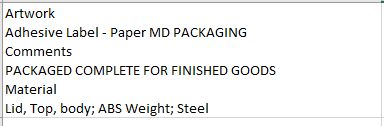
Desired result that I want to display in PowerBI:

image.png


Best regards,

Emily


1 ACCEPTED SOLUTION
AlB
Community Champion
Community Champion

@Anonymous 

What is it that you are trying to do ultimately? Have you tried the XML parser functionality Power Query has? Perhaps it would be handy in this case? Try the following. Probably not the most elegant solution but i think it will do. You might want to make it into a function if you have multiple rows with XML content. The last step shows the content in the same row separated by a line break. The step before the last one shows each item from the XML in a different row of the table. It wasn't clear to me which one of the two options you meant

let
    Source = Table.FromRows(Json.Document(Binary.Decompress(Binary.FromText("xY9LC4JAFIX/ysW1odDSlflKfJJSC3Mx5iWHxkZ0LPz3RUoEFYGb7vLjnMP9skza96q6PBh9J3htU2TlAyC83Rj0cBgDeiuuvD2NVHnib70tYT1OzbLCjl4QfFIggwXEpMEWAhNi3fB0xw2dafWl9HlV+fn3XD2D1zWeRTfDb7SwTDCiIPat1AI72oDthm6yvlMniszk/4IBEdhSwmYI+rSUIeWNDAUvBw30VQI7pMdKaJAIRDbHTsrzGw==", BinaryEncoding.Base64), Compression.Deflate)), let _t = ((type nullable text) meta [Serialized.Text = true]) in type table [Column1 = _t]),
    #"Changed Type" = Table.TransformColumnTypes(Source,{{"Column1", type text}}),
    #"Added Custom" = Table.AddColumn(#"Changed Type", "Custom", each Text.SplitAny([Column1],"<>")),
    #"Expanded Custom" = Table.ExpandListColumn(#"Added Custom", "Custom"),
    #"Filtered Rows" = Table.SelectRows(#"Expanded Custom", each ([Custom] <> "" and [Custom] <> "                " and [Custom] <> "                  ")),
    #"Added Custom1" = Table.AddColumn(#"Filtered Rows", "Custom.1", each if Text.Contains([Column1],"<" & [Custom] & ">") then 1 else 0),
    #"Filtered Rows1" = Table.SelectRows(#"Added Custom1", each ([Custom.1] = 0)),
    #"Removed Columns" = Table.RemoveColumns(#"Filtered Rows1",{"Custom.1"}),
    #"Grouped Rows" = Table.Group(#"Removed Columns", {"Column1"}, {{"Custom", each Text.Combine([Custom], Character.FromNumber(10
)), type text}})
in
    #"Grouped Rows"


Please mark the question solved when done and consider giving kudos if posts are helpful.

Contact me privately for support with any larger-scale BI needs, tutoring, etc.

Cheers 

SU18_powerbi_badge

View solution in original post

4 REPLIES 4
AlB
Community Champion
Community Champion

Hi @Anonymous 

Is what you show in one cell or spread across one column? If the latter, is each line of what you show in a row in the table? CAn you show a screen pic and copy the table here in text?

Please mark the question solved when done and consider giving kudos if posts are helpful.

Contact me privately for support with any larger-scale BI needs, tutoring, etc.

Cheers 

SU18_powerbi_badge

Anonymous
Not applicable

@AlB 

Here is how it looks like in Power Query in XML format for the CustomData column.

I want to split the same row of XML format data into line break.

Any idea how to make this magic?

Thanks.

image.png


Text code for XML:

<root><Artwork>Adhesive Label - Paper MD PACKAGING</Artwork><Comments>PACKAGED COMPLETE FOR FINISHED GOODS</Comments><Material>Lid, Top, body; ABS Weight; Steel</Material><Finish>Lid, Top, body; Cool Gray 11C; IDI-OPQ-028 Weight; Chrome; IDI-MPL-001</Finish><PackSpecs>4 PCS PER BROWN CARTON W/LABEL</PackSpecs><DrawingNumber>10750-SFT-SQCAN-ASSY</DrawingNumber><SecondaryLinePrice>1750.7</SecondaryLinePrice><SecondaryUnitPrice>1.7507</SecondaryUnitPrice></root>


Best regards,

Emily


AlB
Community Champion
Community Champion

@Anonymous 

What is it that you are trying to do ultimately? Have you tried the XML parser functionality Power Query has? Perhaps it would be handy in this case? Try the following. Probably not the most elegant solution but i think it will do. You might want to make it into a function if you have multiple rows with XML content. The last step shows the content in the same row separated by a line break. The step before the last one shows each item from the XML in a different row of the table. It wasn't clear to me which one of the two options you meant

let
    Source = Table.FromRows(Json.Document(Binary.Decompress(Binary.FromText("xY9LC4JAFIX/ysW1odDSlflKfJJSC3Mx5iWHxkZ0LPz3RUoEFYGb7vLjnMP9skza96q6PBh9J3htU2TlAyC83Rj0cBgDeiuuvD2NVHnib70tYT1OzbLCjl4QfFIggwXEpMEWAhNi3fB0xw2dafWl9HlV+fn3XD2D1zWeRTfDb7SwTDCiIPat1AI72oDthm6yvlMniszk/4IBEdhSwmYI+rSUIeWNDAUvBw30VQI7pMdKaJAIRDbHTsrzGw==", BinaryEncoding.Base64), Compression.Deflate)), let _t = ((type nullable text) meta [Serialized.Text = true]) in type table [Column1 = _t]),
    #"Changed Type" = Table.TransformColumnTypes(Source,{{"Column1", type text}}),
    #"Added Custom" = Table.AddColumn(#"Changed Type", "Custom", each Text.SplitAny([Column1],"<>")),
    #"Expanded Custom" = Table.ExpandListColumn(#"Added Custom", "Custom"),
    #"Filtered Rows" = Table.SelectRows(#"Expanded Custom", each ([Custom] <> "" and [Custom] <> "                " and [Custom] <> "                  ")),
    #"Added Custom1" = Table.AddColumn(#"Filtered Rows", "Custom.1", each if Text.Contains([Column1],"<" & [Custom] & ">") then 1 else 0),
    #"Filtered Rows1" = Table.SelectRows(#"Added Custom1", each ([Custom.1] = 0)),
    #"Removed Columns" = Table.RemoveColumns(#"Filtered Rows1",{"Custom.1"}),
    #"Grouped Rows" = Table.Group(#"Removed Columns", {"Column1"}, {{"Custom", each Text.Combine([Custom], Character.FromNumber(10
)), type text}})
in
    #"Grouped Rows"


Please mark the question solved when done and consider giving kudos if posts are helpful.

Contact me privately for support with any larger-scale BI needs, tutoring, etc.

Cheers 
SU18_powerbi_badge

Anonymous
Not applicable

@AlB Thank you very much for your suggested solution.

I tried it in my file and modifed a bit on the M query and it's working well.

Have a great day!


Best regards,

Emily

Helpful resources

Announcements
FabCon and SQLCon Barcelona 2026

FabCon & SQLCon – Barcelona 2026

Join us in Barcelona for FabCon and SQLCon, the Fabric, Power BI, SQL, and AI community event. Save €200 with code FABCMTY200.

60 days of Data Days Carousel

Data Days 2026

Join Data Days 2026: 60 days of free live/on-demand sessions, challenges, study groups, and certification opportunities.

Power BI DataViz World Championships carousel

Power BI DataViz World Championships - June 2026

A new Power BI DataViz World Championship is coming this June! Don't miss out on submitting your entry.

Top Solution Authors
Top Kudoed Authors
