Get certified for free when you join Fabric Data Days 2026 and dive into Fabric, Power BI, SQL, AI, and other essential data skills.
Join nowJuly 7 - July 17 | Round 2 of the Power BI Dataviz World Championships. Don't miss your chance! Learn more
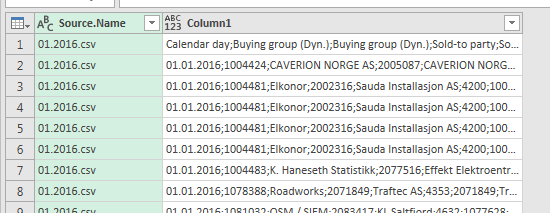
Hi guys. So ran into an issue lately, I am guessing after recent O365 updates. I have created several models based on the same csv data in single folder, and they work perfectly. Now, creating new models based on the same data, returns all the columns in one single column, meaning its concatenated. Adding new data data to the older models works perfectly, also PBID works fine.
I also just created a few csv files in a small 30x4 grid, in order to test the combine binaries function on completely new data. Again it returs it all in one single column.
This is very frustrating, any ideas are much appreciated. I attached a prt.scr. of what I am facing, will also attach the codes from editor mode if required.
Solved! Go to Solution.
Since the November 2016 update of Power BI Desktop, multiple object are created.
I provided an explanation in this topic.
My suggestion would be to verify your Transform Sample Binary from Data query:
by default, for csv-files the first step Source contains the function Csv.Document, including specifications for splitting values.
The next step is Promote Headers and the 3rd and last step is Change Type.
Since the November 2016 update of Power BI Desktop, multiple object are created.
I provided an explanation in this topic.
My suggestion would be to verify your Transform Sample Binary from Data query:
by default, for csv-files the first step Source contains the function Csv.Document, including specifications for splitting values.
The next step is Promote Headers and the 3rd and last step is Change Type.
I'm not a fan of the combine.binaries-way at all. You can still to the "old-fashioned-way" via an added column like described in here for example: http://community.powerbi.com/t5/Desktop/Retain-file-name-column-when-using-Folder-as-a-data-source-P...
Imke Feldmann (The BIccountant)
If you liked my solution, please give it a thumbs up. And if I did answer your question, please mark this post as a solution. Thanks!
How to integrate M-code into your solution -- How to get your questions answered quickly -- How to provide sample data -- Check out more PBI- learning resources here -- Performance Tipps for M-queries
Well, it turns out latest build 7766.2047 prompts for data type detection. Just like in desktop version. No worries then.
Join us in Barcelona for FabCon and SQLCon, the Fabric, Power BI, SQL, and AI community event. Save €200 with code FABCMTY200.
Join Fabric Data Days 2026: 60 days of free live/on-demand sessions, challenges, study groups, and certification opportunities.