cancel
Showing results for 
Search instead for 
Did you mean: 

July 7 - July 17 | Round 2 of the Power BI Dataviz World Championships. Don't miss your chance! Learn more

Reply
Anonymous
Not applicable

Power Query AI Text Analtyics

Hi


I need assistance please. I used text analytics for a comments field and instead of extracting just one key word it extracts multiple key words and increases in rows. How can I configure this to be one key per row and not multiple and increase row size

3 REPLIES 3
jesor
Microsoft Employee
Microsoft Employee

I'm doing the same, you can split that row by deliminator, may it be a space or however you see fit into more rows.  Unfortunately, to extract you would have to create more rows to get each word by itself.  In your visualizations just make sure you are using your key identifiers to ensure you are reporting on the parent rows before you did the expansion to multiple rows, so you would have 1 row, with lots of keywords.

Anonymous
Not applicable

Hi


Thank you make sense. The parent row would be the first word extracted in the comments? if I apply row delimiter I can extract first word to ensure visualization as "one word" per record?


Thanks

jesor
Microsoft Employee
Microsoft Employee

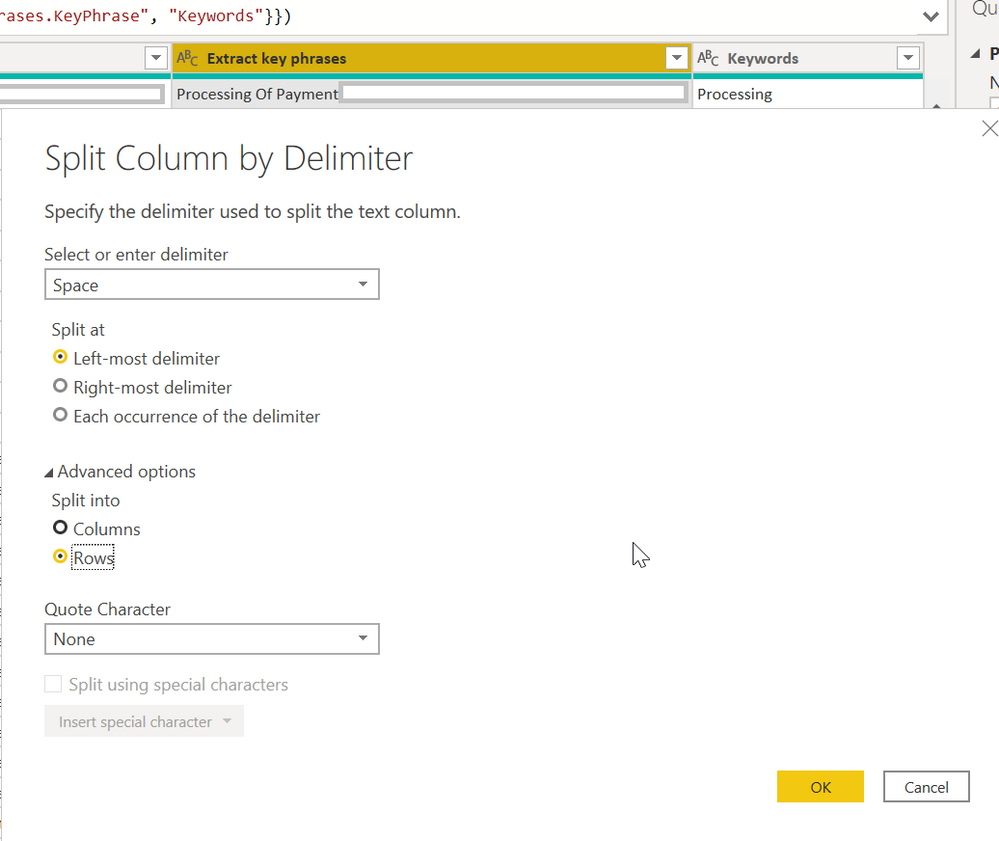
If you wanted only the first word per each row, you can do the row delimination based on what deliminator you have, to get only the first word of the comments field you would need to just do at the left most occurance of the deliminator.  If you are only extracting 1 word, then it is ok to just use the column versus row.  If you are trying to get all of the words, you would split by each occurance of the deliminator.  All you need to do is right click the column where you want to extract the data, then the extract choice.


If you are attempting the extraction of all of the words, I would go with rows, if it's just the first word, I would go column, because you would only get 1 column.  The reason for going with rows for the full text extraction, is that you would only get 1 column with all of the words, so you can use that for visualizations and counting, if you split into columns and your comment field in one row had 10 words, and another row had 5, you would still expand your table to the highest number which is 10, where the rest would be blank.  It's also hard to do analysis on frequency and such if you split into columns because now your data is scattered and contains blanks.


2020_05_04_09_31_12_.png

Helpful resources

Announcements
FabCon and SQLCon Barcelona 2026

FabCon & SQLCon – Barcelona 2026

Join us in Barcelona for FabCon and SQLCon, the Fabric, Power BI, SQL, and AI community event. Save €200 with code FABCMTY200.

60 days of Data Days Carousel

Data Days 2026

Join Fabric Data Days 2026: 60 days of free live/on-demand sessions, challenges, study groups, and certification opportunities.

Power BI DataViz World Championships carousel

Power BI DataViz World Championships - June 2026

A new Power BI DataViz World Championship is coming this June! Don't miss out on submitting your entry.