cancel
Showing results for 
Search instead for 
Did you mean: 

Vote for your favorite vizzies from the Power BI Dataviz World Championship submissions. Vote now!

Reply
M_farheen
New Member

Power BI query changes taking longer

I have around 1 million rows , I have reduced it's size even less than 800mb, 

Each and every query changes that I am applying are taking around 15-30 min and it's frustrating, can you please help me with it how to solve it and make it faster

.TIA. 

1 REPLY 1
edhans
Community Champion
Community Champion

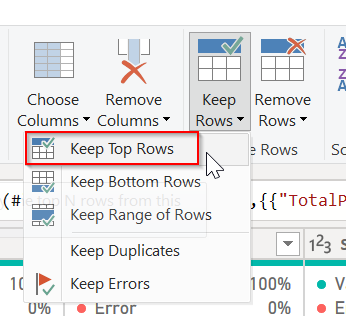
If you are making changes, go to the first step of the query and only pull in the top 1,000 lines or so.

edhans_0-1704817020250.png


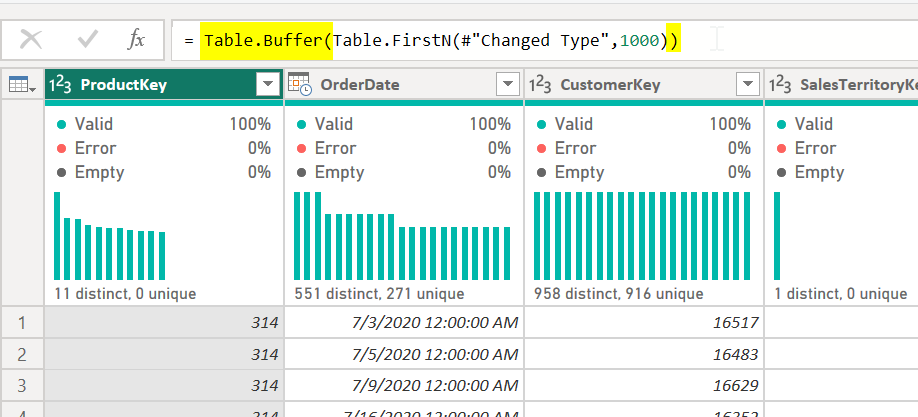
You can further speed it up by wrapping that line with Table.Buffer(). That should help development.

edhans_1-1704817075925.png


Once done, delete that line and all of your data will come back.


Did I answer your question? Mark my post as a solution!
Did my answers help arrive at a solution? Give it a kudos by clicking the Thumbs Up!

DAX is for Analysis. Power Query is for Data Modeling


Proud to be a Super User!

MCSA: BI Reporting

Helpful resources

Announcements
Power BI DataViz World Championships

Power BI Dataviz World Championships

Vote for your favorite vizzies from the Power BI World Championship submissions!

Sticker Challenge 2026 Carousel

Join our Community Sticker Challenge 2026

If you love stickers, then you will definitely want to check out our Community Sticker Challenge!

January Power BI Update Carousel

Power BI Monthly Update - January 2026

Check out the January 2026 Power BI update to learn about new features.

FabCon Atlanta 2026 carousel

FabCon Atlanta 2026

Join us at FabCon Atlanta, March 16-20, for the ultimate Fabric, Power BI, AI and SQL community-led event. Save $200 with code FABCOMM.