
cancel
Showing results for 
Search instead for 
Did you mean: 

View all the Fabric Data Days sessions on demand. View schedule

Reply
darogael
Frequent Visitor

Power BI integration with Cognitive Services

Hi Power BI community!

I've been working on building my own Power BI report with Sentiment Analysis. I have been following the steps described in this article and am currently stuck at building the Power BI connection with Cognitive Services.

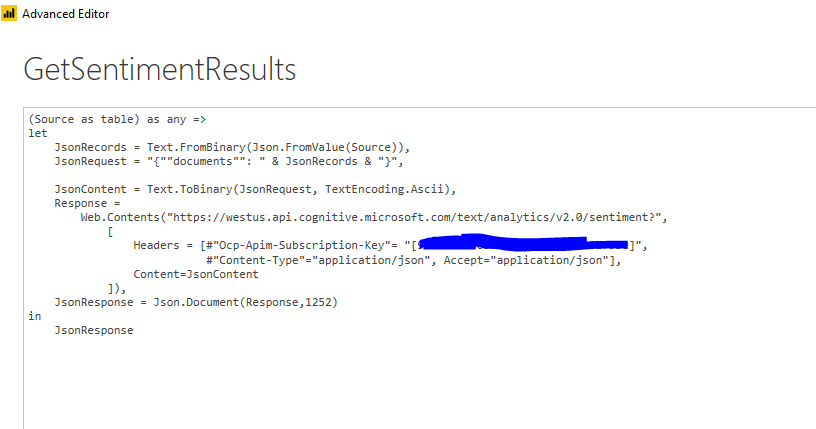
So far I have made a connection to my Azure SQL database table successfully. Then I made a data connection using Blank Query and adding the code described in the article, however, I changed the API key.


Capture.PNG


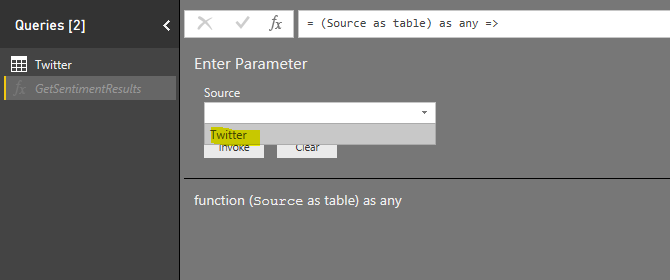
However, now I'm getting asked to add a parameter. This wasn't described in the article. As you can see below, the only parameter option I have is Twitter.


Capture2.PNG


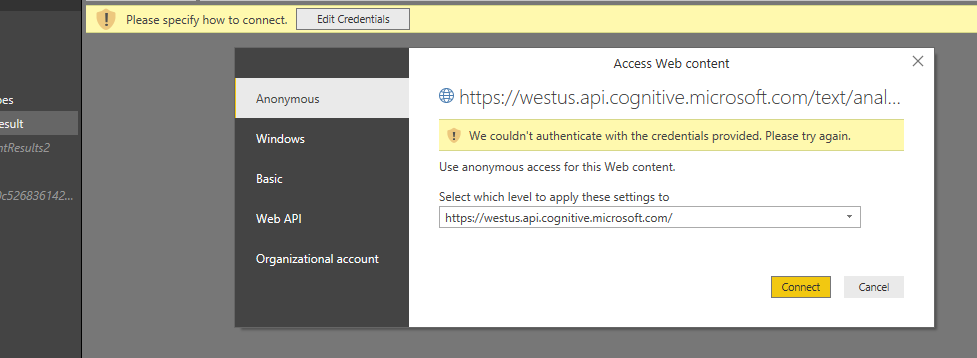
However, after selecting Twitter below is what I get


Capture3.PNG


Has anyone seen this before? Thanks in advance.

1 ACCEPTED SOLUTION
Anonymous
Not applicable

@darogael,

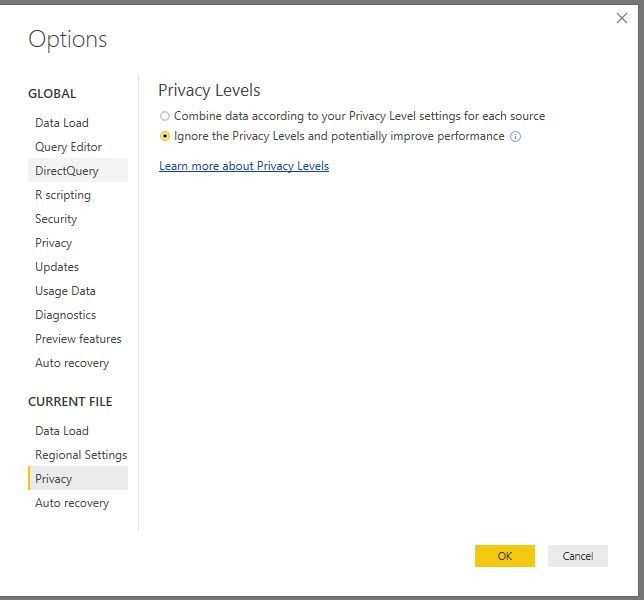
Go to File > Options and settings > Options and then Current File > Privacy , select the ignore privacy levels option as shown in the following screenshot, then check if the issue is solved.
1.JPG

Regards,


View solution in original post

6 REPLIES 6
Greg_Deckler
Community Champion
Community Champion

I believe there is a security setting that you need to disable to make this happen. 


Follow on LinkedIn
@ me in replies or I'll lose your thread!!!
Instead of a Kudo, please vote for this idea
Become an expert!: Enterprise DNA
External Tools: MSHGQM
YouTube Channel!: Microsoft Hates Greg
Latest book!:
DAX For Humans

DAX is easy, CALCULATE makes DAX hard...

Thanks for responding back so quickly. I did try that for both my data connections. I tried Public, Organizational and None but still the same problem.


Capture4.PNG

Anonymous
Not applicable

@darogael,

Go to File > Options and settings > Options and then Current File > Privacy , select the ignore privacy levels option as shown in the following screenshot, then check if the issue is solved.
1.JPG

Regards,


Thanks guys. This resolved the problem. I should have read through the Q/A in the blog 🙂

please guys does it always work for you ? 

I really followed all these steps before but  I am facing this error 😕 I copy carefully the api key but also the same thing 😕 does you fixe this  before?

Capture2.PNG

@TaherBouzid did you got a solution? I tried also everything, following exactly all steps, and I always get the same credentials error

Helpful resources

Announcements
November Power BI Update Carousel

Power BI Monthly Update - November 2025

Check out the November 2025 Power BI update to learn about new features.

Fabric Data Days Carousel

Fabric Data Days

Advance your Data & AI career with 50 days of live learning, contests, hands-on challenges, study groups & certifications and more!

FabCon Atlanta 2026 carousel

FabCon Atlanta 2026

Join us at FabCon Atlanta, March 16-20, for the ultimate Fabric, Power BI, AI and SQL community-led event. Save $200 with code FABCOMM.