Morning together,
we have a project together with our customer and wan to show our progress of testing via power bi. So we got already our database importat (splittet into 4 queries).
Now we want to do the following steps:
1.) Refresh queries (ok thats easy klick the button "Refresh"
2.) Calculate the results with an python script
- This is not so easy because we have to follow some links use a seperate Matrix and create one final verdict
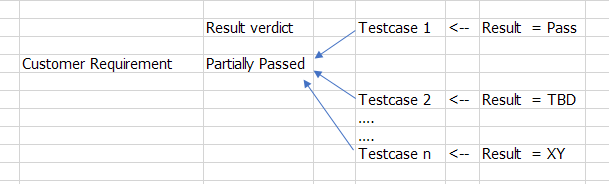
e.g. 1 customer requirements has 2 testcases and each of them has an result - We have to collect this results and create one final result for this 1 requriement
for understanding: 1st result = pass ; 2nd results = TBD --> Final result = Partially Passed
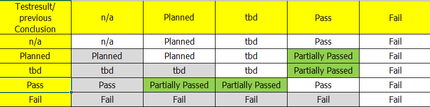
Result matrix:
I have 2 questions right now:
1.) How can i connect my collected results with the matrix ?
2.) How can i create a button to execute the python script after refreshing the datas ?
It would be create to hear your answers or questions 🙂


