
cancel
Showing results for 
Search instead for 
Did you mean: 

We've captured the moments from FabCon & SQLCon that everyone is talking about, and we are bringing them to the community, live and on-demand. Starts on April 14th. Register now

Reply
Anonymous
Not applicable

Power BI - Power Query map to Entity

Hi,


Id' like to write te results of my Power Query in Power BI to a new entity in CDS (map to entity)

remconicolai_0-1600417844955.png

What I see is a list of standard entities in a CDM environment but these entities doesn't match te results of my Power query so I want to cerate a new entity in this enviroment. It seems possible because when I open a workspace I can select the option 'Add entities'

remconicolai_1-1600418082200.png


If i continue to add a new entity in the Common Data Service, I have to select a server URL. 

My question is, what is the server URL for the CDM model I see in Power BI? Or do I have to choose another way to resolve this?


remconicolai_2-1600418203270.png


1 ACCEPTED SOLUTION
Icey
Community Support
Community Support

Hi @Anonymous ,


Please refer to this document: Finding your Common Data Service Environment URL.


  1. Open Power Apps, select the environment you're going to connect to, select Settings in the top-right corner, and then select Advanced settings.

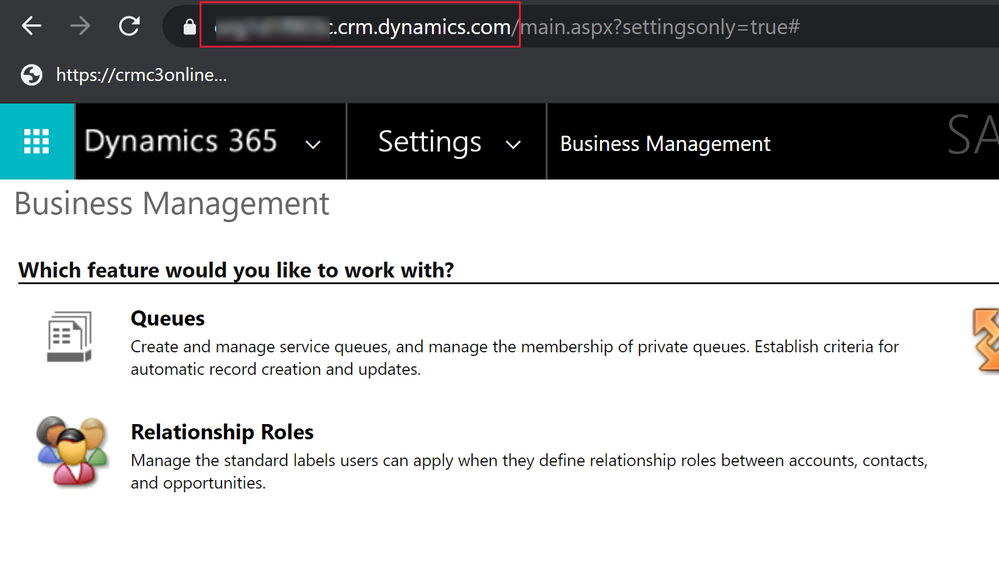
  2. In the new browser tab that opens, copy the root of the URL. This is the unique URL for your environment. The URL will be in the format of https://yourenvironmentid.crm.dynamics.com/. Make sure not to copy the rest of the URL. Keep this somewhere handy so you can use it when creating your Power BI reports.

cdsenv3.png


Best Regards,

Icey


If this post helps, then please consider Accept it as the solution to help the other members find it more quickly.

View solution in original post

1 REPLY 1
Icey
Community Support
Community Support

Hi @Anonymous ,


Please refer to this document: Finding your Common Data Service Environment URL.


  1. Open Power Apps, select the environment you're going to connect to, select Settings in the top-right corner, and then select Advanced settings.

  2. In the new browser tab that opens, copy the root of the URL. This is the unique URL for your environment. The URL will be in the format of https://yourenvironmentid.crm.dynamics.com/. Make sure not to copy the rest of the URL. Keep this somewhere handy so you can use it when creating your Power BI reports.

cdsenv3.png


Best Regards,

Icey


If this post helps, then please consider Accept it as the solution to help the other members find it more quickly.

Helpful resources

Announcements
New to Fabric survey Carousel

New to Fabric Survey

If you have recently started exploring Fabric, we'd love to hear how it's going. Your feedback can help with product improvements.

Power BI DataViz World Championships carousel

Power BI DataViz World Championships - June 2026

A new Power BI DataViz World Championship is coming this June! Don't miss out on submitting your entry.

Join our Fabric User Panel

Join our Fabric User Panel

Share feedback directly with Fabric product managers, participate in targeted research studies and influence the Fabric roadmap.

March Power BI Update Carousel

Power BI Community Update - March 2026

Check out the March 2026 Power BI update to learn about new features.