cancel
Showing results for 
Search instead for 
Did you mean: 

The Power BI Data Visualization World Championships is back! Get ahead of the game and start preparing now! Learn more

Reply
sks2701
Helper III
Helper III

Please help

Hello - I have a column with the age of the company , ranging from age 1 to 100 , I'm trying to create a new custom column (Company Age Range) in power query that will give the value something like below this from the age column - how can i do this ? thank you!

Company Age Range
0 - 2
3 - 5
6 - 10
11 - 20
21 - 30
31 - 40
41 - 50
51 - 100
Over 100
N/A
1 ACCEPTED SOLUTION
edhans
Super User
Super User

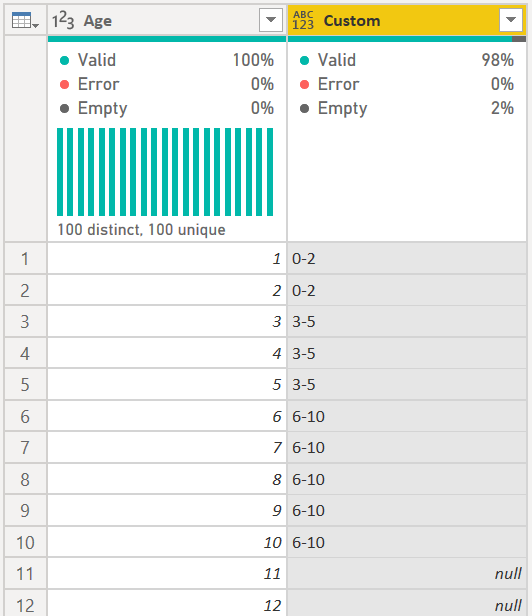
The easiest way is to use a custom column. The Conditional Column feature won't work as it will try to interpret 6-10 as a date. 


The formula would look like this:


if [Age] <= 2 then "0-2" 
else if [Age] <= 5 then "3-5" 
else if [Age] <= 10 then "6-10" 
else null


Just continue adding more 'else if' clauses until you have it like you want. You must include the final "else" statement, so it could be else null, or your final result, else "N/A"

edhans_0-1603808951503.png


Did I answer your question? Mark my post as a solution!
Did my answers help arrive at a solution? Give it a kudos by clicking the Thumbs Up!

DAX is for Analysis. Power Query is for Data Modeling


Proud to be a Super User!

MCSA: BI Reporting

View solution in original post

3 REPLIES 3
edhans
Super User
Super User

The easiest way is to use a custom column. The Conditional Column feature won't work as it will try to interpret 6-10 as a date. 


The formula would look like this:


if [Age] <= 2 then "0-2" 
else if [Age] <= 5 then "3-5" 
else if [Age] <= 10 then "6-10" 
else null


Just continue adding more 'else if' clauses until you have it like you want. You must include the final "else" statement, so it could be else null, or your final result, else "N/A"

edhans_0-1603808951503.png


Did I answer your question? Mark my post as a solution!
Did my answers help arrive at a solution? Give it a kudos by clicking the Thumbs Up!

DAX is for Analysis. Power Query is for Data Modeling


Proud to be a Super User!

MCSA: BI Reporting

thank you so much for this solution- It really worked 🙂

Excellent @sks2701 - glad to be of service!


Did I answer your question? Mark my post as a solution!
Did my answers help arrive at a solution? Give it a kudos by clicking the Thumbs Up!

DAX is for Analysis. Power Query is for Data Modeling


Proud to be a Super User!

MCSA: BI Reporting

Helpful resources

Announcements
Power BI DataViz World Championships

Power BI Dataviz World Championships

The Power BI Data Visualization World Championships is back! Get ahead of the game and start preparing now!

December 2025 Power BI Update Carousel

Power BI Monthly Update - December 2025

Check out the December 2025 Power BI Holiday Recap!

FabCon Atlanta 2026 carousel

FabCon Atlanta 2026

Join us at FabCon Atlanta, March 16-20, for the ultimate Fabric, Power BI, AI and SQL community-led event. Save $200 with code FABCOMM.