cancel
Showing results for 
Search instead for 
Did you mean: 

We've captured the moments from FabCon & SQLCon that everyone is talking about, and we are bringing them to the community, live and on-demand. Starts on April 14th. Register now

Reply
sks2701
Helper III
Helper III

Please help

Hello - I have a column with the age of the company , ranging from age 1 to 100 , I'm trying to create a new custom column (Company Age Range) in power query that will give the value something like below this from the age column - how can i do this ? thank you!

Company Age Range
0 - 2
3 - 5
6 - 10
11 - 20
21 - 30
31 - 40
41 - 50
51 - 100
Over 100
N/A
1 ACCEPTED SOLUTION
edhans
Community Champion
Community Champion

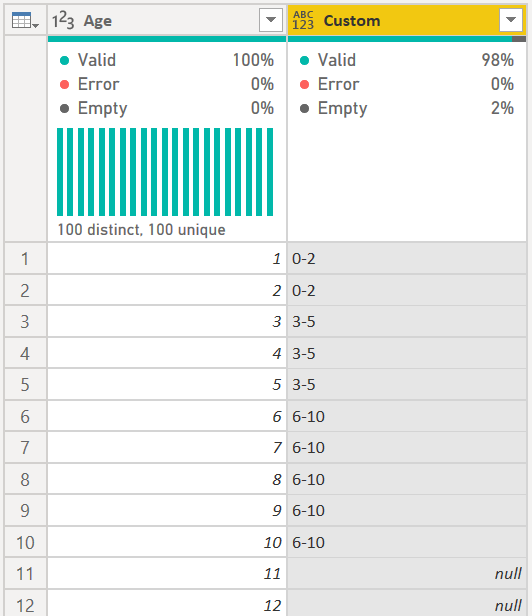
The easiest way is to use a custom column. The Conditional Column feature won't work as it will try to interpret 6-10 as a date. 


The formula would look like this:


if [Age] <= 2 then "0-2" 
else if [Age] <= 5 then "3-5" 
else if [Age] <= 10 then "6-10" 
else null


Just continue adding more 'else if' clauses until you have it like you want. You must include the final "else" statement, so it could be else null, or your final result, else "N/A"

edhans_0-1603808951503.png


Did I answer your question? Mark my post as a solution!
Did my answers help arrive at a solution? Give it a kudos by clicking the Thumbs Up!

DAX is for Analysis. Power Query is for Data Modeling


Proud to be a Super User!

MCSA: BI Reporting

View solution in original post

3 REPLIES 3
edhans
Community Champion
Community Champion

The easiest way is to use a custom column. The Conditional Column feature won't work as it will try to interpret 6-10 as a date. 


The formula would look like this:


if [Age] <= 2 then "0-2" 
else if [Age] <= 5 then "3-5" 
else if [Age] <= 10 then "6-10" 
else null


Just continue adding more 'else if' clauses until you have it like you want. You must include the final "else" statement, so it could be else null, or your final result, else "N/A"

edhans_0-1603808951503.png


Did I answer your question? Mark my post as a solution!
Did my answers help arrive at a solution? Give it a kudos by clicking the Thumbs Up!

DAX is for Analysis. Power Query is for Data Modeling


Proud to be a Super User!

MCSA: BI Reporting

thank you so much for this solution- It really worked 🙂

edhans
Community Champion
Community Champion

Excellent @sks2701 - glad to be of service!


Did I answer your question? Mark my post as a solution!
Did my answers help arrive at a solution? Give it a kudos by clicking the Thumbs Up!

DAX is for Analysis. Power Query is for Data Modeling


Proud to be a Super User!

MCSA: BI Reporting

Helpful resources

Announcements
New to Fabric survey Carousel

New to Fabric Survey

If you have recently started exploring Fabric, we'd love to hear how it's going. Your feedback can help with product improvements.

Power BI DataViz World Championships carousel

Power BI DataViz World Championships - June 2026

A new Power BI DataViz World Championship is coming this June! Don't miss out on submitting your entry.

Join our Fabric User Panel

Join our Fabric User Panel

Share feedback directly with Fabric product managers, participate in targeted research studies and influence the Fabric roadmap.

March Power BI Update Carousel

Power BI Community Update - March 2026

Check out the March 2026 Power BI update to learn about new features.