cancel
Showing results for 
Search instead for 
Did you mean: 

Learn from the best! Meet the four finalists headed to the FINALS of the Power BI Dataviz World Championships! Register now

Reply

Please help.

Emmanuel Kamara
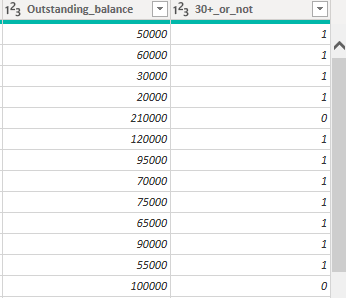
I have a dax function that returns the total outstanding amount for values =1...and also a dax function that returns the sum of all the outstanding balance (0, and 1). What I want to do is to divide those two functions to get what I want (PAR= sum of outstanding balance for values=1/ sum of total outstanding balance. Or is there a way I could just get a column that contains only outstanding balance for values =1?
see screenshot below. 
QUESTION.PNG
1 ACCEPTED SOLUTION
Anonymous
Not applicable

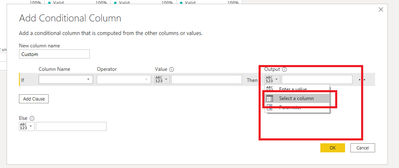
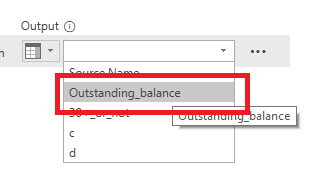
Sorry, you're not to type "outstanding balance", you need to change the output to "select a column", then select outstanding balance. 

Karlos_0-1597425317061.png

Karlos_0-1597425436398.png


@emmanuelkamara1 did that work for you? 

View solution in original post

3 REPLIES 3
Anonymous
Not applicable

yeah, just create and conditional column with the following criteria 

Karlos_0-1597424276710.png


Hi thanks! it only returns the name "outstanding_baance" and not the actual figure 

Anonymous
Not applicable

Sorry, you're not to type "outstanding balance", you need to change the output to "select a column", then select outstanding balance. 

Karlos_0-1597425317061.png

Karlos_0-1597425436398.png


@emmanuelkamara1 did that work for you? 

Helpful resources

Announcements
Join our Fabric User Panel

Join our Fabric User Panel

Share feedback directly with Fabric product managers, participate in targeted research studies and influence the Fabric roadmap.

February Power BI Update Carousel

Power BI Monthly Update - February 2026

Check out the February 2026 Power BI update to learn about new features.

FabCon Atlanta 2026 carousel

FabCon Atlanta 2026

Join us at FabCon Atlanta, March 16-20, for the ultimate Fabric, Power BI, AI and SQL community-led event. Save $200 with code FABCOMM.

Top Solution Authors